Electronic DVIR Software for Bus Driver Vehicle Inspection Reports
Replace paper DVIRs with guided pre-trip and post-trip reports — Pass/Fail checklists, driver e-signatures, and automatic work orders from every defect. Keep your bus fleet DOT and FMCSA compliant.
A Signed, Compliant DVIR in Minutes
Drivers run a Pass/Fail inspection, sign on screen, and any failed item turns into a maintenance work order automatically.
Start the DVIR
Select bus, driver, inspection type, odometer and location.
Run the Checklist
Mark each item Pass or Fail, add notes and photos.
Sign & Submit
Driver signs on screen and submits the report.
Fix & Close
Failed items auto-create maintenance work orders.
Complete a Full Inspection Report in One Form
Pick the bus, driver and inspection type, log the odometer and location, run the Pass/Fail checklist, add notes, and capture the driver's e-signature. Required fields keep every DVIR complete and compliant.
Pre & Post-Trip
Both inspection types supported.
Location Capture
City & state logged per report.
Driver E-Signature
Certify the inspection on screen.
Notes & Comments
Record extra observations.
Build DVIR Checklists That Fit Your Buses
Use the standard checklist or create your own — name it, add Pass/Fail inspection items by category, and reuse it across the fleet. One-tap Pass All speeds up clean inspections, while any Fail flags a defect.
Templates
Standard or custom checklists.
Custom Items
Add Pass/Fail items by category.
One-Tap Pass All
Clear clean inspections fast.
Photos on Fail
Attach evidence to defects.
Turn Every Defect Into a Work Order Automatically
When a driver fails an item, Bus CMMS flags the defect and creates the maintenance work order for you — critical defects become work orders, minor ones become PM schedules. Nothing slips between inspection and repair.
Defect Tracking
Every failed item logged.
Auto Work Orders
Critical defects → work orders.
PM Schedules
Minor defects → PM schedules.
Full Lifecycle
Inspection to repair in one place.
| DVIR # | Driver | Bus | Type | Status |
|---|---|---|---|---|
| DVIR-142 | Michael Carter | BUS-4521 | Pre-Trip | Defects |
| DVIR-141 | Sarah Collins | BUS-4487 | Post-Trip | Safe |
| DVIR-140 | David Reyes | BUS-4490 | Pre-Trip | Safe |
| DVIR-139 | Sarah Collins | BUS-4521 | Post-Trip | Safe |
Audit-Ready DVIR Records at Your Fingertips
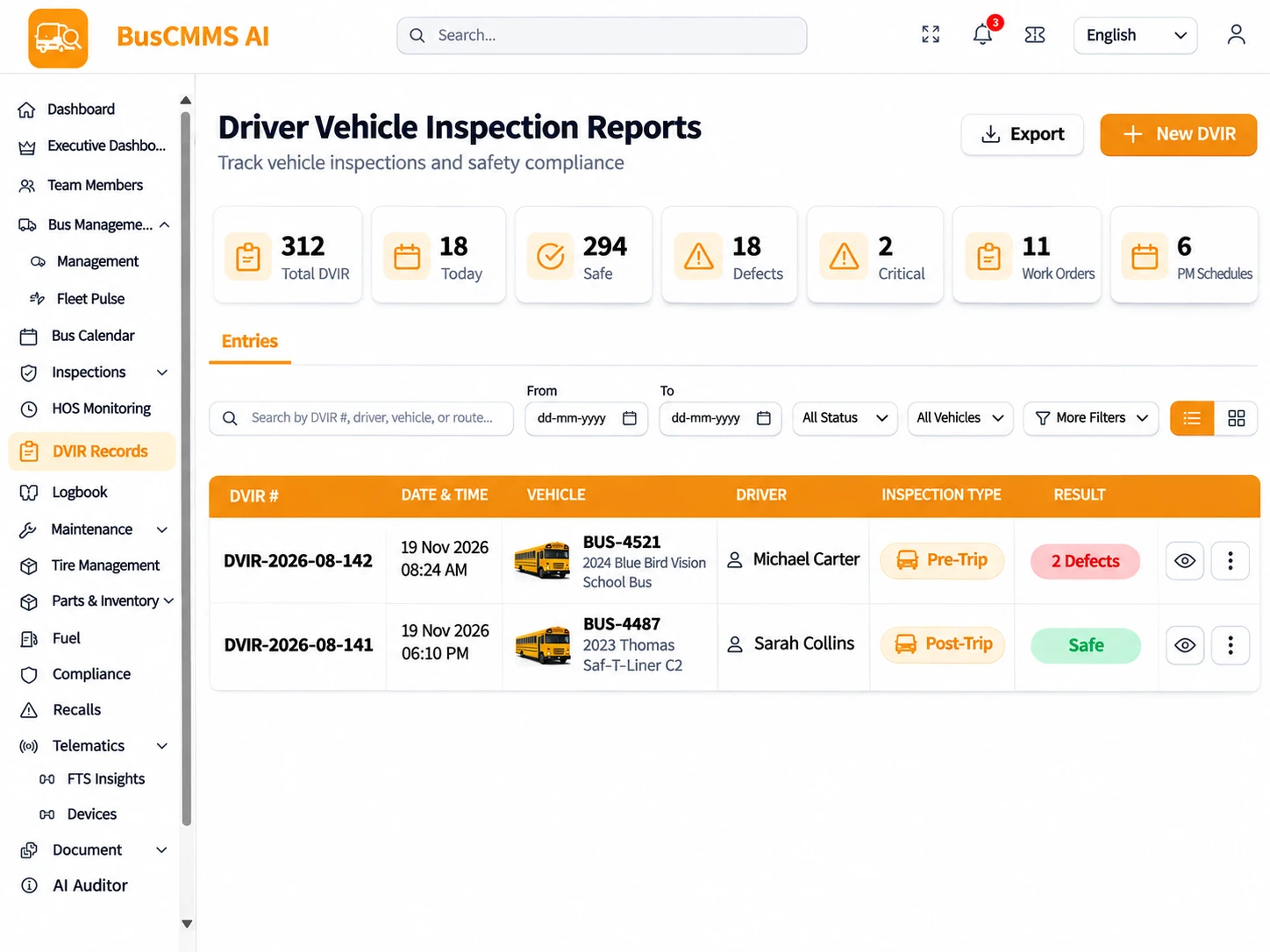
Every DVIR is stored, searchable and exportable. Monitor totals, safe reports, defects and critical items from the dashboard, filter by driver, vehicle, date or status, and export audit-ready records for DOT and FMCSA reviews.
Compliance Dashboard
Totals, safe, defects, critical.
Search & Filter
By driver, vehicle, date, status.
Audit Export
DOT & FMCSA-ready records.
Full History
Retained for every bus.
A Complete Electronic DVIR Platform for Buses
Everything your drivers and office need to run paperless, compliant inspection reports.
Electronic DVIR
Paperless inspection reports.
Pre & Post-Trip
Both inspection types.
Pass / Fail Items
Clear, guided checklists.
Custom Checklists
Templates & custom items.
Driver E-Signature
Certify every inspection.
Auto Work Orders
Defects become repairs.
Location & Odometer
Captured per report.
Photo Evidence
Attach images to defects.
Compliance Dashboard
Safe, defects & critical.
Audit Export
DOT & FMCSA records.
Dispatch Linking
Tie a DVIR to a dispatch.
Mobile Inspections
Inspect from any phone.
DVIR Software for Every Bus Fleet
School districts, transit agencies, charter lines and motorcoach operators stay inspection-compliant with Bus CMMS.
School Bus Fleets
Daily pre-trip safety DVIRs.
Public Transit & Coach
Pre & post-trip compliance.
Charter & Shuttle
Inspection records per run.
Motorcoach & Tour
DOT-ready long-haul DVIRs.
Electronic DVIR Software — Frequently Asked Questions
Everything you need to know about paperless driver vehicle inspection reports.
Go Paperless With Electronic DVIRs
Give drivers a fast Pass/Fail inspection, give your office audit-ready records, and let every defect flow straight into a work order — all DOT and FMCSA ready.
Go Paperless With Electronic DVIRs
Give drivers a fast Pass/Fail inspection, give your office audit-ready records, and let every defect flow straight into a work order — all DOT and FMCSA ready.