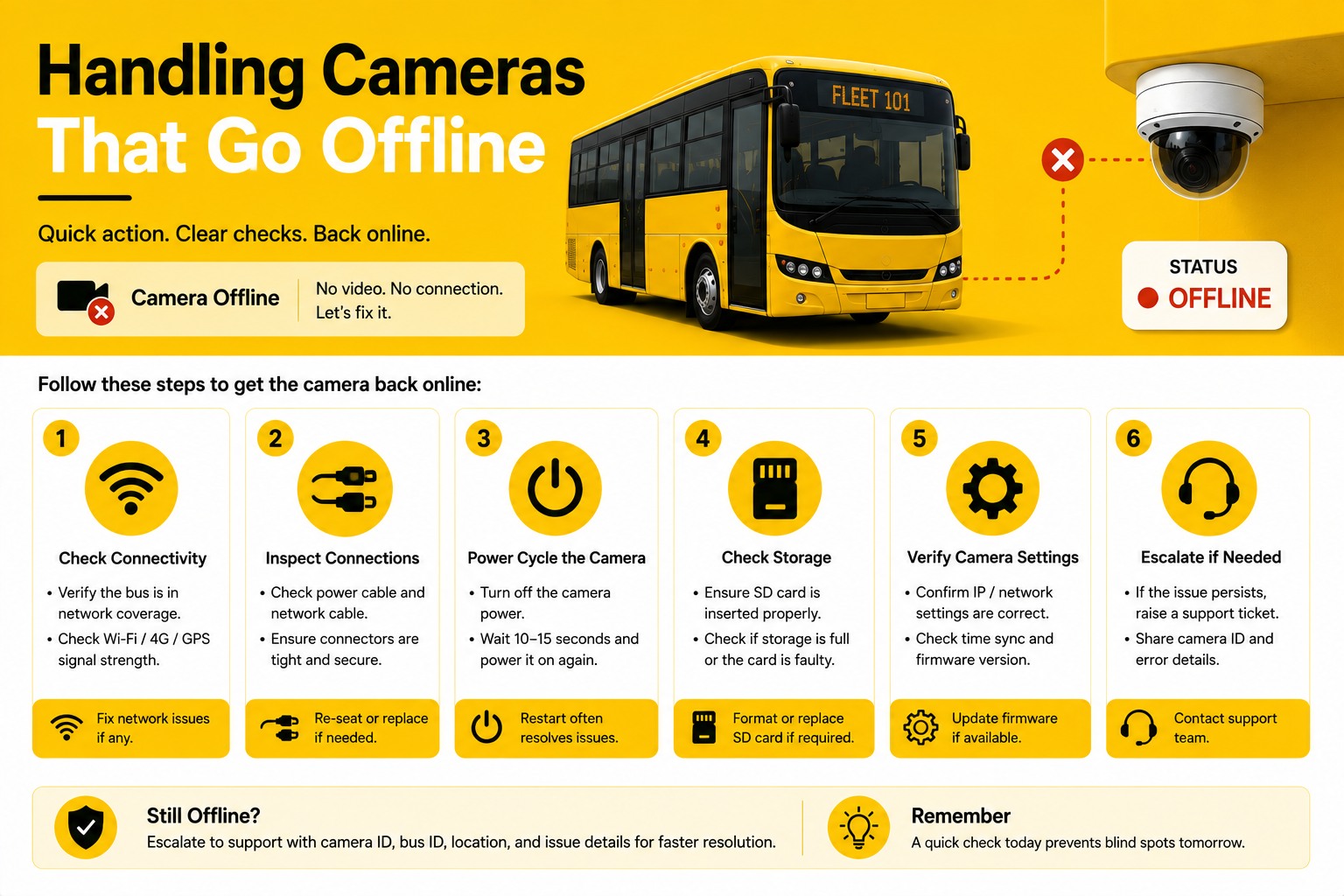
An offline camera alert doesn't tell you whether the problem is a $0 fix — a bus that drove out of cellular range overnight — or a $200 truck roll to swap a failed unit. Triage order is what separates the two: check connectivity first, hardware second, and only escalate to a vendor replacement once both are ruled out. See BusCMMS in actions.
Handling Cameras That Go Offline
The triage order that separates a connectivity blip from a real hardware failure, sizing a spare-unit pool, and the replacement SLA worth holding a vendor to in writing.
Connectivity check
Did the bus lose cellular or Wi-Fi signal, or return to a dead zone? This resolves on its own once the bus reconnects — no action needed.
Power and connection check
Loose harness connector, tripped breaker, or a power cycle needed. A quick physical check often resolves this without a parts order.
Hardware failure
If connectivity and power both check out, the unit itself has likely failed — this is where a spare-unit swap and vendor SLA come into play.
Distinguishing Connectivity From Hardware Failure
The same "offline" alert can mean two completely different problems.
No single federal mandate governs how a fleet responds to a camera offline alert; the compliance bar here is 49 CFR 396 maintenance record requirements and district policy, leaving triage process entirely up to each fleet's own practices. A connectivity gap shows a camera going offline and back online in a pattern that correlates with the bus's route — dropping signal in a known dead zone, reconnecting once it returns to coverage. A genuine hardware failure shows a camera staying offline persistently, regardless of the bus's location or connectivity conditions, and often coincides with the unit failing to respond to a remote reset command. Checking the offline pattern against the bus's route history before assuming a hardware fault saves a wasted technician visit for what's actually a normal, temporary connectivity gap.
Sizing a Spare-Unit Pool
Enough spares to swap immediately, not so many that inventory sits unused.
A spare-unit pool exists so a confirmed hardware failure can be swapped the same day rather than waiting on a vendor shipment while a bus runs with a coverage gap. Sizing this pool depends on fleet size and historical failure rate — a reasonable starting point for many fleets is holding spares equal to roughly 2-3% of total installed units, adjusted upward if a specific camera model has shown a higher failure rate in practice. Too few spares means a bus sits with a known gap while waiting on a shipment; too many ties up budget in inventory that mostly sits on a shelf. Tracking actual swap frequency over a full year gives a fleet a much better basis for right-sizing this number than a generic industry guess.
The Install Mistake That Makes an Offline Alert Worse
A camera that was already miscovering its zone makes a hardware failure a bigger loss than it needed to be.
Here's the objection worth naming directly: install positions chosen for convenience rather than field of view, leaving the loading door uncovered, compounds the impact of an offline failure specifically because the redundancy a fleet might assume exists often doesn't. If the side camera is the only unit covering the loading door and it goes offline, there's no backup angle catching that zone in the meantime — unlike a forward-facing failure, where a following vehicle or dispatch record might partially compensate. Confirming which failed channel carries unique, non-redundant coverage should factor into how urgently a specific offline alert gets triaged, not just how long the unit has been down.
A Scenario From a Real Bus Operation
A false alarm and a real failure, triaged correctly on the same morning.
A district running 55 buses received two offline alerts on the same morning. Checking the first against route history showed the camera had gone offline exactly when that bus entered a known rural dead zone and came back online nine minutes later once it exited — a non-issue requiring no action. The second alert showed a camera that had been offline for over six hours, with no correlation to the bus's route or location, and a failed remote reset attempt. That unit was confirmed as a hardware failure, a spare was swapped from the district's on-hand pool that same afternoon, and the failed unit was shipped to the vendor under a documented replacement SLA rather than sitting in an unresolved queue.
We used to treat every offline alert the same, which meant sending a technician out for what turned out to be a bus that just drove through our one dead zone. Now we check route history first — takes thirty seconds — and it cuts our actual truck rolls by more than half. The real failures still get swapped same day from our spare pool, but we're not wasting a visit on something that fixes itself in ten minutes.
Not sure how many offline alerts your fleet gets in a typical week, or how many turn out to be real failures? That ratio is worth tracking. Talk to the team about offline alert triage →
Quick Spec Reference
Scannable on a phone during a triage call.
| Step | What confirms it |
|---|---|
| Connectivity issue | Offline period correlates with a known route dead zone, resolves on reconnect |
| Power/connection issue | Loose harness, tripped breaker; often fixed with a physical check, no parts needed |
| Hardware failure | Persistent offline status unrelated to location, failed remote reset |
| Spare pool size | ~2-3% of installed units as a starting benchmark, adjusted by actual swap rate |
| Vendor SLA | Diagnosis within 1 business day, replacement shipped within 3-5 |
| Coverage redundancy check | Confirm if the failed channel has unique, non-redundant coverage |
Frequently Asked Questions
What's the right order to triage a camera offline alert?
Check connectivity first — whether the offline period correlates with a known dead zone in the bus's route, which resolves on its own once the bus reconnects. Next check power and physical connections, since a loose harness or tripped breaker can often be fixed on-site without parts. Only after ruling out both should a persistent offline status be treated as a genuine hardware failure.
How can you tell a connectivity gap apart from a real hardware failure?
A connectivity gap typically shows a camera going offline and back online in a pattern that correlates with the bus's route, such as a known rural dead zone. A genuine hardware failure shows persistent offline status regardless of the bus's location, often combined with a failed response to a remote reset command.
How large should a spare camera unit pool be?
A reasonable starting benchmark is roughly 2-3% of total installed units, adjusted upward if a specific camera model shows a higher failure rate in practice. Tracking actual swap frequency over a full year gives a fleet a more accurate basis for sizing this pool than relying on a generic industry estimate.
What should a camera replacement SLA include?
A solid SLA specifies diagnosis response within one business day of a confirmed hardware fault, replacement shipment within three to five business days rather than "as available," an explicitly stated warranty coverage window, and ideally an advance replacement option where a new unit ships before the failed one is returned, minimizing downtime.
Why does it matter which specific channel is offline, not just how long?
If the offline channel carries unique, non-redundant coverage — such as the only camera aimed at the loading door — there's no backup angle catching that zone in the meantime, unlike a forward-facing failure where other data might partially compensate. This should factor into how urgently a specific offline alert gets triaged, not just its duration.







