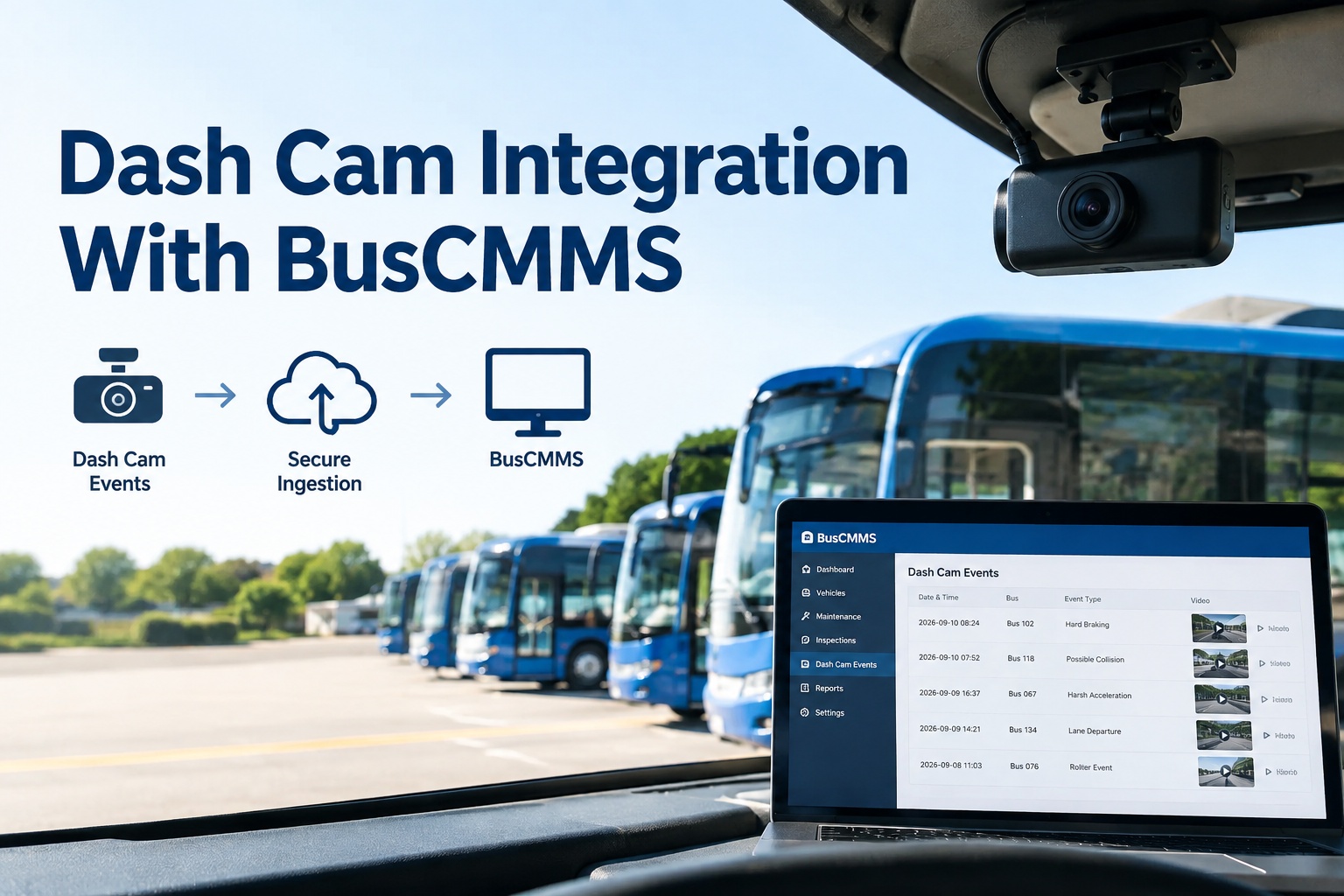
Dash cam integration for a bus fleet means connecting the dash cams or AI cameras you already run to BusCMMS, so the events they capture — a harsh brake, a following-too-close alert, a collision — automatically land on the right bus record and can trigger an inspection or a work order, with the video clip preserved as evidence. You don't rip out cameras. BusCMMS ingests their events, maps each device to the correct bus without creating duplicate assets, and turns a clip that used to sit in a separate portal into a follow-up someone actually acts on. That's the whole idea: your cameras stop being a silo and start driving your maintenance and safety workflows.
Dash Cam Integration With BusCMMS
Ingest events from your existing dash cams and AI cameras, map them to the right bus, and turn clips into inspections, work orders, and safety records
- Any camHardware-agnostic
- EventTriggers a workflow
- No dupesDevice → correct bus
What Dash Cam Integration With BusCMMS Does
Most bus fleets already have cameras — a road-facing dash cam, maybe an AI camera flagging driver events, sometimes a full MDVR estate. The problem is almost never the cameras. It's that their events live in a vendor portal that has no idea what a work order, a DVIR, or a PM schedule is. Someone has to notice the event, log into a separate system, find the clip, and manually start whatever should happen next. Most of the time, nothing happens next.
Dash cam integration closes that gap. BusCMMS ingests the events your cameras already produce, attaches them to the correct bus, and lets a camera event become an inspection or a work order with the video preserved as supporting evidence. Because BusCMMS is hardware-agnostic, it doesn't care whose dash cam you bought — it works with your existing camera and MDVR infrastructure rather than requiring a specific brand. For a school district, transit agency, or charter operator, that means the safety data you're already collecting finally does something. You can book a walkthrough to see dash-cam events connect to inspections, safety records, and work orders.
Four Ways BusCMMS Connects to Your Cameras
There's no single required method — BusCMMS meets your camera system where it is, using whatever interface it exposes. More modern AI cameras offer more options, but even basic dash cams usually support at least one path.
BusCMMS pulls events, device data, and clip references from the camera platform's REST API on request — the most flexible path for lookups and backfills.
The camera platform pushes an event to BusCMMS the instant it fires, so an inspection or work order can trigger in real time — no polling delay.
A continuous or scheduled feed of event records flows in, ideal for AI cameras that batch their detections rather than pushing each one live.
The actual video is fetched on request via the clip reference in the event — you pull the footage that matters instead of streaming everything.
The typical pattern for a bus fleet: a webhook or event feed for real-time detections, the API for lookups and to backfill anything a feed missed, and clip retrieval when a reviewer actually needs to watch the footage. You don't have to choose one and live with its limits — the methods work together. If you'd rather not architect any of this yourself, you can start free and connect your cameras without building the plumbing.
The Data Fields That Flow In
When a dash cam event reaches BusCMMS, it carries a consistent set of fields — enough to place the event on the right bus and turn it into an action. Field names vary by camera vendor, but the shape is the same.
| Bus ID | Your fleet's identifier for the vehicle — the record the event attaches to |
|---|---|
| Device ID | The camera or MDVR's own identifier — mapped to the bus, not treated as one |
| Timestamp | When the event occurred, in UTC — normalized to your timezone on ingest |
| GPS location | Latitude/longitude for route and stop context |
| Event type | What fired: harsh braking, following distance, collision, distraction, etc. |
| Clip reference | Pointer to the video; retrieved on request and preserved as evidence |
Read those together and you have everything a workflow needs: which bus, what happened, when and where, and how to get the footage. The device ID versus bus ID distinction in the first two rows is the one that quietly matters most — and it's the subject of the next section, because getting it wrong is the fastest way to corrupt your fleet records.
Bus-to-Device Mapping: No Duplicate Assets, Ever
This is where camera integrations quietly go wrong, so it's worth being precise. A dash cam has its own device ID. Your bus has a fleet number. They are not the same thing. If an integration treats every device ID it sees as a new asset, your fleet record fills up with phantom "buses" that are really just cameras — and events land on the wrong record, making every report unreliable. BusCMMS is built to prevent that with a deliberate mapping layer.
- 1
Each device maps to one bus
A camera's device ID links to a single bus asset record. That link is the source of truth for where its events belong.
- 2
Events resolve on ingest
Every incoming event looks up its device ID and attaches to the real bus — never spawning a new asset because the ID is unfamiliar.
- 3
Swaps are one edit
When a camera moves to another bus — common when cameras cover problem routes — you update one mapping, and history stays intact.
- 4
Unknown devices get flagged
An unmapped device ID is quarantined for review, not auto-created as a bus. A mislabeled camera can't silently spawn a duplicate.
The result is one bus record with its cameras attached underneath as devices — never separate assets of their own. Events always resolve to the correct bus, your reports stay honest, and duplicates simply don't appear. Because BusCMMS owns the bus asset record and treats cameras as devices on it, this is handled by design rather than something you have to engineer. That's worth a demo to see mapping done cleanly on your fleet.
From Camera Event to Work Order — With the Clip Attached
The point of ingesting events isn't to collect them — it's to act on them. Here's what BusCMMS actually does once a dash-cam event lands, on a real school or transit fleet.
Trigger an inspection
A repeated harsh-braking pattern on one bus can auto-open an inspection to check brakes — the event becomes a prompt, not a buried clip.
Open a work order
An event with a probable mechanical cause spins up a maintenance work order on the right bus, with the clip linked as supporting evidence.
Create a safety record
A distraction or collision event routes into a safety-review record with the video attached, ready for coaching or documentation.
Preserve the evidence
The clip is retrieved and preserved against the record before its source URL expires — so the footage is there when you need it later.
That last point matters more than it looks: dash-cam clip links are usually time-limited, so an event you "saw" last month is worthless if the footage wasn't preserved. BusCMMS attaches the clip to the record as evidence, so the video lives with the work order or safety case it supports. Every one of these ends in an action on a specific bus — an inspection, a work order, a documented safety record — which is the entire reason to integrate cameras in the first place.
The Operational Details That Keep It Running
A camera integration that works on day one but breaks quietly by month three isn't worth much. These are the details that keep it reliable in production.
Authentication & permissions
Secure, scoped API access and clear rules on who can pull footage — especially important with students aboard a school bus.
Connectivity
Event metadata is light and flows over cellular; heavy clips are retrieved when the bus hits depot Wi-Fi or on demand for urgent cases.
Storage & retention
Decide how long clips are preserved against records, and pull anything you need to keep before a source clip ages out.
Integration monitoring
Alerts fire when event volume drops to zero or a sync fails, so a broken camera feed is caught early — not during an audit weeks later.
The thread through all of these is that an integration is a living system, not a one-time hookup — and because BusCMMS maintains these connections, a camera-vendor API change is the platform's problem to absorb rather than a silent gap in your safety records. That's the difference between a demo that works once and a production integration your team can rely on.
"Isn't Integrating Harder Than Just Replacing the Cameras?"
It's the reflex every vendor with new hardware to sell will encourage — and it usually overstates how hard integration is while ignoring the cost and disruption of a fleet-wide swap. Here's the honest comparison.
Integrate with BusCMMS when…
- Your dash cams or AI cameras work fine
- They expose an API, webhook, or event feed
- Budget is better spent on software than new hardware
- You can't pull buses out of service for installs
- Coverage is adequate; you just want events connected
Replace hardware when…
- Cameras are failing or genuinely obsolete
- The system exposes no data interface at all
- Camera coverage itself is inadequate
- Data is locked and the vendor won't release it
- You have no cameras yet and are starting fresh
The deciding question isn't "old vs. new" — it's "can these cameras hand over their events, and do they still cover what I need?" If yes, integration gets you modern workflows for a fraction of the cost and none of the install downtime. Because BusCMMS is hardware-agnostic, it doesn't push you toward a replacement it happens to sell — it connects what you have and tells you honestly if a specific camera genuinely can't participate.
A Real Scenario: Existing Dash Cams, Connected in Days
Here's what integrating an existing dash-cam estate actually looks like for a transit agency that doesn't want to touch a camera.
The dash cams stay on every bus. BusCMMS connects to the camera platform's event feed, and each device ID is mapped to its bus — no duplicate assets created.
Events start flowing. A following-distance alert on Bus #22 now appears on #22's record automatically, alongside its inspections and open work orders.
Clip retrieval goes live. When a safety lead reviews the #22 event, the specific clip is pulled and preserved against a safety record as evidence.
Triggers close the loop: a repeated harsh-braking pattern on #22 auto-opens a brake inspection, with the clips attached. Same cameras, new capability.
That's dash cam integration made concrete: the cameras never came off the buses, nobody lost a route to an install crew, and yet the fleet went from isolated footage to camera events wired into inspections, safety records, and maintenance. The hardware you already own did the job — it just needed to connect to something that knows what a work order is. That's exactly what fleets see when they book a walkthrough of dash-cam events connected to bus records.
Dash Cam Integration at a Glance
A quick side-by-side of what changes when your dash cams connect to BusCMMS.
| Where events live | Separate vendor portal → on the correct bus record in BusCMMS |
|---|---|
| Follow-up | Manual, often skipped → auto-triggers inspection or work order |
| Video clips | Expire in the portal → preserved against the record as evidence |
| Asset records | Risk of duplicate "buses" → device mapped to one bus, no dupes |
| Hardware | Vendor lock-in pressure → hardware-agnostic, keep what you own |
| Maintenance link | None → events sit beside DVIRs, PMs, and work orders |
Where BusCMMS Fits
The reason to integrate rather than replace is straightforward: you want your camera data to drive real workflows without re-spending your hardware budget or pulling buses off routes. That's exactly what BusCMMS is built to do.
That's the role BusCMMS plays. BusCMMS is the AI-native, hardware-agnostic bus fleet operations platform that works with your existing dash cam, AI camera, and MDVR infrastructure — connecting video events with inspections, safety records, and maintenance workflows on the same bus asset record. Cameras stay on the buses. Events map to the correct bus with no duplicate assets, clips are preserved against records instead of expiring in a portal, and the integration is maintained on the platform side so a vendor change doesn't silently break your safety records. A camera event becomes a work order; a distraction event becomes a documented safety record; an inspection sits beside both — all on one timeline per bus. No federal regulation requires any particular dash-cam integration; this is about running your fleet well with the hardware you already own.
The Bottom Line on Dash Cam Integration
So, what is dash cam integration with BusCMMS? It's connecting the dash cams and AI cameras you already run so their events flow into BusCMMS — via API, webhook, event feed, or clip retrieval — map cleanly to the right bus with no duplicate assets, and turn into inspections, work orders, and safety records with the video preserved as evidence. It's how you make an existing camera estate useful without replacing a thing.
Replacement makes sense only when cameras are obsolete, closed off, or don't cover what you need. For everyone else, integration delivers modern, connected workflows for a fraction of the cost and none of the install downtime — and because BusCMMS is hardware-agnostic, it works with the cameras you already trust rather than pushing new ones. If you'd like to see it on your own fleet, book a BusCMMS walkthrough to see how dash-cam events connect directly to bus inspections, safety records, and work orders.
What is dash cam integration with BusCMMS?
Dash cam integration means connecting the dash cams or AI cameras you already run to BusCMMS, so the events they capture, like a harsh brake or a collision, automatically land on the correct bus record and can trigger an inspection or work order with the video preserved as evidence. BusCMMS ingests the events through an API, webhook, event feed, or clip retrieval, maps each camera to the right bus without creating duplicate assets, and links clips to safety, inspection, and maintenance records. You don't replace hardware; you make the cameras you own drive real workflows.
Does BusCMMS work with any brand of camera?
BusCMMS is hardware-agnostic, so it's designed to work with your existing dash cam, AI camera, and MDVR infrastructure rather than requiring a specific brand. It connects using whatever interface your camera platform exposes, such as an API, webhook, or event feed, and pulls in the standard event fields like bus ID, device ID, timestamp, GPS location, event type, and clip reference. The practical limit is whether a given camera can hand over its events at all; if it can, BusCMMS can generally ingest them, which is why integration usually beats replacing hardware.
How does BusCMMS avoid creating duplicate bus records?
A camera has its own device ID, which is not the same as your bus. BusCMMS uses a mapping layer where each device ID links to a single bus asset record, and every incoming event resolves its device ID to the correct bus rather than creating a new asset because the ID is unfamiliar. When a camera is swapped to another bus, you update one mapping instead of fracturing your event history, and any unmapped device ID is quarantined for review rather than auto-created as a bus. The result is one bus record with its cameras attached as devices, and no phantom duplicates.
Can a camera event automatically create a work order?
Yes. Once an event is ingested and mapped to the right bus, BusCMMS can turn it into a follow-up: a repeated harsh-braking pattern can auto-open a brake inspection, an event with a probable mechanical cause can open a maintenance work order, and a distraction or collision event can create a safety record. In each case the video clip is retrieved and preserved against the record as supporting evidence, so the footage lives with the work order or safety case it supports rather than expiring in a separate portal.
Isn't it easier to just replace the whole camera system?
Usually not. If your dash cams or AI cameras work, aren't obsolete, and expose an API, webhook, or event feed, integration connects them to modern workflows for a fraction of the cost of a fleet-wide replacement and with no install downtime. Replacement only makes sense when cameras are failing or obsolete, expose no data interface, have inadequate coverage, or have data locked by a vendor who won't release it, or when you have no cameras yet. Because BusCMMS is hardware-agnostic, it connects what you already own and gives you a straight read on whether a specific camera genuinely can't participate.