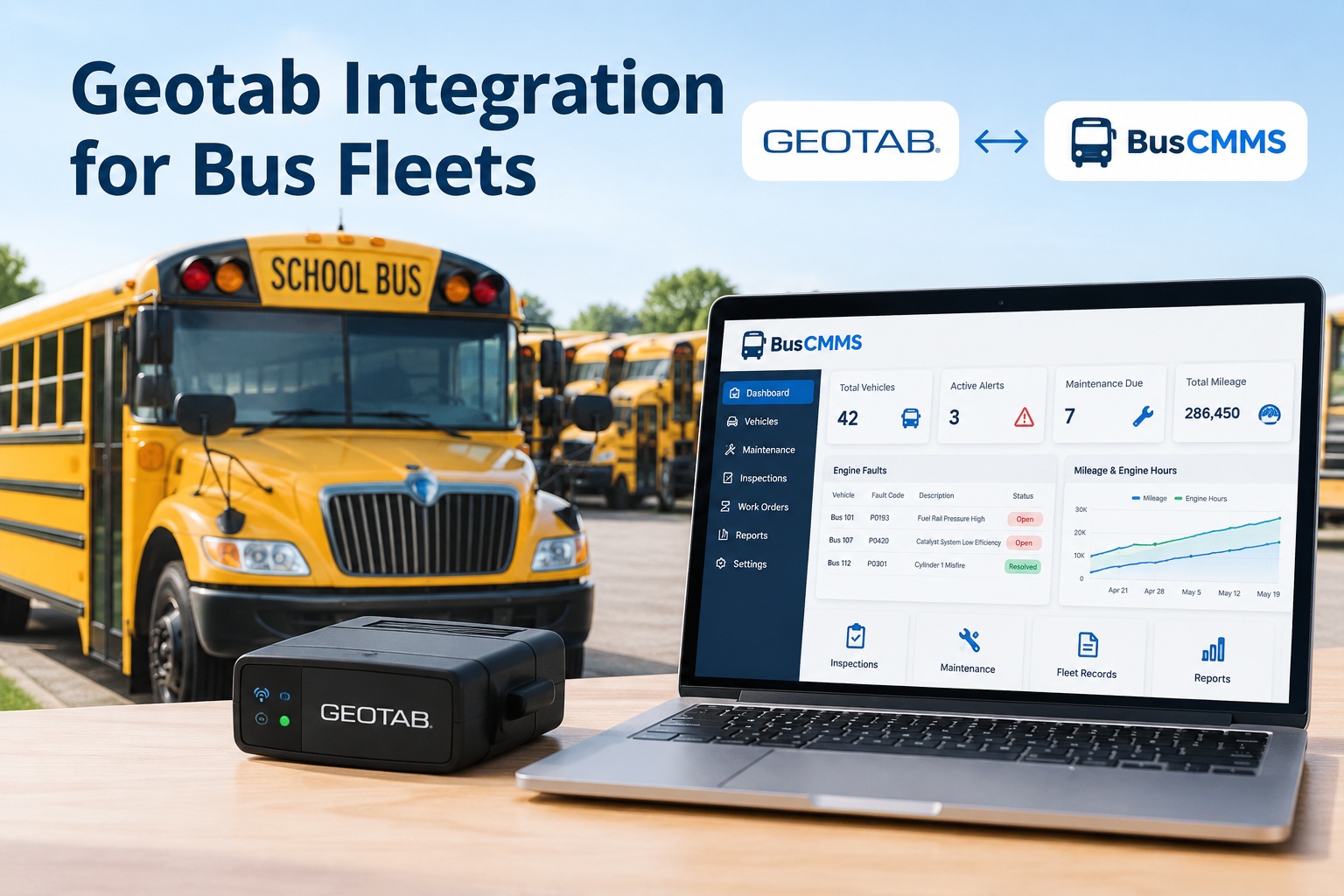
Every bus in a Geotab-equipped fleet is quietly narrating its own health. The GO device reads the engine control module, pulls fault codes, odometer, and engine hours straight off the vehicle, and streams it all into MyGeotab. The catch is that a fault code sitting in a telematics dashboard does not fix anything — someone still has to see it, decide it matters, and turn it into a repair before the bus is on the shoulder. A Geotab bus integration with BusCMMS closes that last step: the engine data Geotab already collects becomes maintenance triggers, work orders, and preventive schedules, so the signal from the engine reaches the shop automatically. See Geotab engine data drive maintenance in a demo
Updated September 2026 · Integration capabilities depend on your MyGeotab plan, API clearances, and data scope; specifics are confirmed at setup. Preventive-inspection requirements (49 CFR 396.3 and 396.17) apply by operation and are noted here for context.
Geotab Integration for Bus Fleets
Geotab already knows what your engines are saying. The integration turns that signal into action — a fault code becomes a work order, mileage becomes a service due, before a breakdown decides for you.
Geotab's strength is the depth of what it reads off the vehicle. MyGeotab exposes engine measurements, faults, odometer, engine hours, and trip data through its API, which means a maintenance system connected to it is not guessing at vehicle condition — it is reading it. Here are the signals worth acting on, and the preventive move each one enables once it reaches BusCMMS.
The engine is already talking. Here is what it says.
The ECM flags a diagnostic trouble code — a sensor, an emissions issue, a subsystem fault — and the GO device transmits it.
Preventive move: Raise an alert or open a work order so the fault is triaged and scheduled, not left blinking on a dash.
Actual accumulated mileage per vehicle, reported continuously rather than read off a dash once a month.
Preventive move: Trigger mileage-based PM automatically, so an oil change or brake check comes due on real distance driven.
Run-time from the engine, a better wear indicator than mileage for buses that idle a lot or run stop-and-go.
Preventive move: Drive hours-based service intervals, catching wear that a mileage-only schedule would miss.
How the bus was actually used — distance, idle time, patterns that stress the engine and driveline.
Preventive move: Add usage context to the vehicle record, so service reflects how hard a unit really works.
Every one of these already exists in your MyGeotab data today. The integration's job is simply to route it to the place where it changes a decision — the maintenance record — instead of leaving it as a number on a screen someone has to remember to check. Book a demo to see engine signals become scheduled service
From fix-on-failure to fix-before-failure
This is what the integration actually changes about how a fleet runs. Geotab gives you the early signal; connecting it to maintenance is what lets you act on that signal instead of waiting for the failure it predicted. The shift is from a reactive shop that responds to breakdowns to a preventive one that heads them off — and it is the difference between a scheduled repair and a tow.
The data is identical in both columns — the only variable is whether it reached a system that turns it into action. That is the whole value of the integration: it moves your fleet a step to the left on the failure timeline, from reacting to a breakdown to preventing it. Start free and shift from fix-on-failure to fix-before-failure
A use case: the code that never became a breakdown
Here is the shift made concrete. A transit fleet runs 30 buses on Geotab. One Tuesday, bus 18's engine control module flags a fault code — the kind that is a cheap fix now and a major failure in three weeks if ignored. Watch how the integration changes the ending.
The GO device pulls the DTC from the ECM and it lands in MyGeotab — as it would anyway.
The integration passes the fault to the maintenance layer, where it opens an alert tied to bus 18.
The alert becomes a work order the shop actually sees, prioritized by the fault's severity.
The repair is slotted into an off-peak window — the bus keeps its routes until then, watched.
The cheap early repair happens on schedule. The three-weeks-later breakdown, and its tow, never occur.
Without the integration, that same fault code sat in a dashboard until bus 18 quit on a route. With it, the code became a planned, inexpensive repair. Same data, same fault — a completely different Tuesday. Book a demo to see a fault code become a scheduled repair
Setup, and the Geotab-specific things to get right
Connecting the two systems is a read-only link through Geotab's official SDK, so nothing about your GO devices or MyGeotab setup changes. But Geotab's platform has a few particulars worth handling correctly the first time — get these right and the integration comes up clean and stays that way.
Geotab evolves its SDK and publishes updates that can affect integrations. Use a maintained connection that tracks those changes rather than a one-off script that silently breaks on a platform update.
A device that has never reported engine data needs an initial baseline set, or hours calculate from zero. Set the baseline at setup so hours-based PM is accurate from day one.
If a bus was created manually in BusCMMS and also imports from Geotab, you get two records. Match or merge on VIN during setup so each bus has one identity, not a duplicate.
What the integration can read depends on the API user's clearances and data scope in MyGeotab. Confirm the API user has access to faults and diagnostics before going live, or data simply will not appear.
One more Geotab nuance worth knowing: engine fault data can come from two sources — the GO device and the vehicle's own engine control unit — and the right response can differ between them. A good integration preserves that context so the shop knows what it is looking at. Start free and set up the Geotab connection the right way
One record for the whole bus, not just its engine
Geotab is excellent at telling you what the engine is doing, but engine data alone is not the whole story of a bus. The complete record also needs inspections, the repair history, driver records, and the outcomes of every work order — and that is the layer telematics does not provide. BusCMMS is an AI-native bus fleet platform that connects telematics, inspections, maintenance, driver records, and fleet history on one record per vehicle. Feeding it Geotab's fault codes, odometer, engine hours, and trip data means the engine's early-warning signal lands next to the inspection results and repair history, so a fault becomes a scheduled work order, mileage drives preventive service, and the full history of a bus — what it reported, what was inspected, what was fixed — lives in one place. It turns Geotab's rich data into preventive action and a single source of truth, without replacing the GO devices your fleet already runs.
Put your Geotab engine data to work in BusCMMS
Connect the fault codes, odometer, engine hours, and trip data Geotab already collects to BusCMMS, and get maintenance triggers, work orders, and one full history per bus — a read-only link through Geotab's official SDK, with your GO devices untouched. Start a free trial or book a demo and we will walk a Geotab-to-BusCMMS data flow on your own fleet.
Read-only SDK connection · GO devices unchanged · One vehicle record
Frequently asked questions
What does a Geotab integration with BusCMMS do?
It connects the engine and vehicle data Geotab already collects — fault codes (DTCs), odometer, engine hours, and trip data from the GO device and MyGeotab — to BusCMMS, so that data drives maintenance instead of sitting in a telematics dashboard. In practice a fault code can open a maintenance alert or work order, odometer readings can trigger mileage-based preventive maintenance, and engine hours can drive hours-based service intervals. The result is one maintenance record per vehicle where the engine's early-warning signal lands next to the inspection and repair history, letting a fleet shift from reacting to breakdowns to scheduling repairs before they happen.
Do I need to replace my Geotab GO devices?
No. The integration is a read-only connection through Geotab's official SDK and API. Your GO devices stay installed, your MyGeotab subscription continues unchanged, and your vehicles keep reporting telematics exactly as they do now. BusCMMS reads that data to populate maintenance records, triggers, and work orders. You are adding a maintenance destination for the data Geotab already produces, not swapping hardware or changing your telematics setup.
What Geotab data flows into BusCMMS?
The data most useful for maintenance: engine fault codes (diagnostic trouble codes read from the ECM), odometer, engine hours, and trip and usage data. MyGeotab exposes these through its API, and the integration routes them so fault codes become alerts or work orders, mileage and hours drive preventive-maintenance intervals, and usage data adds context to the vehicle record. Exactly which data is available depends on your MyGeotab plan and the API user's clearances and data scope, which is confirmed at setup, but engine faults, odometer, and engine hours are the core of a maintenance integration.
How is asset matching handled, and what about duplicates?
Each Geotab device is matched to its corresponding BusCMMS vehicle, best done by VIN as a one-time step during setup, so the two systems share a single identity for every bus. The common pitfall is a duplicate: a bus that was created manually in BusCMMS and also imports from Geotab ends up as two records. The fix is to match or merge on VIN as part of setup, before data starts flowing, rather than reconciling duplicates afterward. It also helps to set an engine-hours baseline for any device that has not reported engine data, so hours-based maintenance is accurate from the start.
What happens when Geotab updates its API?
Geotab actively develops its platform and publishes SDK and API updates, some of which can affect integrations. This is exactly why a maintained integration matters more than a one-off custom script: a script written once can silently break when the platform changes, whereas a maintained connection is kept current with Geotab's updates so data keeps flowing. When evaluating any Geotab integration, it is worth confirming that it tracks Geotab's platform changes rather than being a static build that will need re-engineering at the next update.