It is 5:47 AM. Route 47 is scheduled to depart the depot at 6:15. Your regular driver called out at 4:30, and the substitute you found has been driving for the district for two months and has never driven Route 47. What she has is a paper route sheet. If that sheet lists the wrong turn onto Maple, missing the railroad crossing at 7th Street, or the correct time to pull up at Stop 003 where a wheelchair student is waiting, the route runs late, kids miss class, parents call the superintendent, and the district writes an incident report. If it is complete, accurate, and readable in the pre-dawn light of a bus stop, none of that happens. This is a school bus route sheet template covering every field a driver actually needs -- turn-by-turn directions, stop schedule with student counts, railroad crossings, hazard notes, and emergency contacts -- built for the substitute driver scenario, printable today, digitizable when the district is ready.
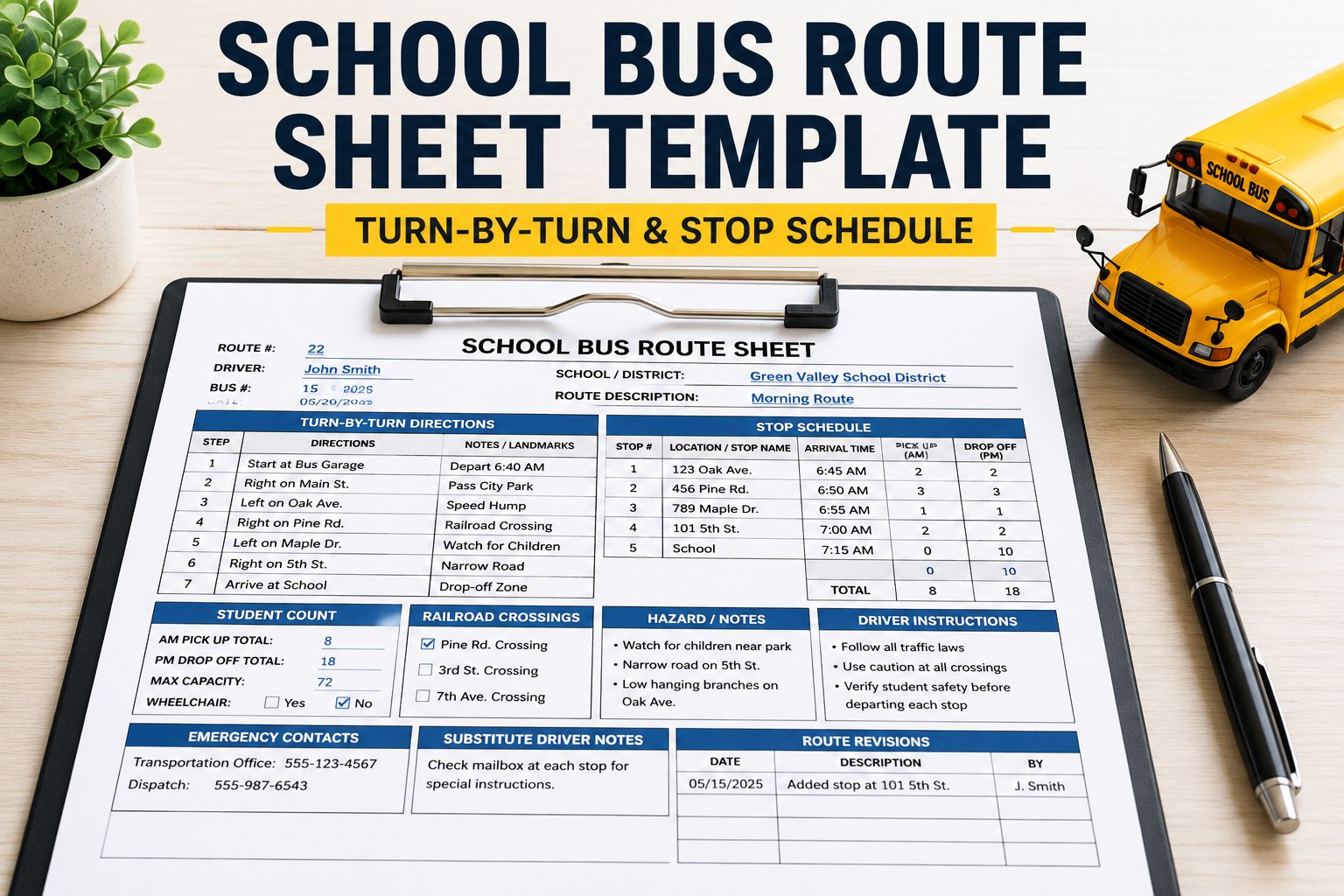
School Bus Route Sheet Template (Turn-by-Turn & Stop Schedule)
A complete route sheet template covering every field required to run a route safely and on time -- built for the substitute driver, the new hire, and the compliance auditor.
- Depart Lot 3 → right on 5th St
- Left on Maple St (Stop 001)
- Continue N → right on Oak Ave (Stop 002)
- Right on Elm Ct (Stop 003 · wheelchair lift)
- Left on Cedar Ln (Stop 004)
- Continue to Lincoln Elem via 7th St
- 6Core sections
- 18+Required fields
- Print+ digital ready
- DOTCompliance safe
The 6 Sections Every Route Sheet Needs
Skip any of these six sections and the substitute driver on your fleet will get a route wrong within the first week. This is the minimum set every route sheet template must include.
-
01
Route Metadata Header
Route #, bus #, driver name, date, tier (elementary/mid/high), depart + arrive times. The metadata that identifies which route this sheet describes.
-
02
Stop Schedule Table
Time, stop #, address, student count per stop. Optionally: student names or IDs, ADA/wheelchair flag, transfer info, minor waiting-adult required.
-
03
Turn-by-Turn Directions
Numbered directions from depot to school, with stop callouts inline. The section a substitute driver relies on when they have never driven the route.
-
04
Hazards & RR Crossings
Every railroad crossing, low bridge, sharp turn, school zone, one-way street, seasonal closures. Required for DOT compliance and insurance.
-
05
Emergency Contacts
Dispatch phone, supervisor mobile, mechanic on-call, local police non-emergency, hospital info, plus the "if bus breaks down here" contingency contacts.
-
06
Revision & Signature Block
Revision number, revision date, planner initials. Driver acknowledgment signature. Ensures anyone reading the sheet knows they have the latest version.
Book a demo to see how BusCMMS auto-generates these 6 sections for every route.
What to Put in Every Field
Field-by-field guidance for filling out the template. Use this as your route sheet standard operating procedure for the routing team.
Route Metadata Header
Stop Schedule
Turn-by-Turn Directions
Hazards, RR Crossings, and Restrictions
Emergency Contacts
Revision + Signature Block
8 Route Sheet Documentation Best Practices
The difference between a route sheet that works and one that causes incidents is the details below. Print these on a laminated card in your dispatch office.
-
01
Use 24-hour time throughout
"07:15" not "7:15 AM". Eliminates a category of driver errors at the tightest schedule margins.
-
02
One instruction per line for turns
Do not stack "Right on Oak then left on Maple" on one line. Substitutes miss the second half.
-
03
Include cardinal directions on turns
"Turn N on Oak" tells the driver something different than "Right on Oak" from a driver who has entered from the wrong direction.
-
04
Landmark every ambiguous turn
"Right on Elm Ct (at the fire station)" prevents drivers from missing an unmarked residential road.
-
05
List every RR crossing by name
FMCSA 392.10 requires school buses stop at every crossing. Sheet must call each one out so the driver knows to slow, stop, look, listen, proceed.
-
06
Revision-stamp every published version
Drivers with two sheets in the visor should know which one is current. Rev # + date solves it.
-
07
Flag ADA, custody, and adult-required stops
These are not "notes." They are must-know instructions that protect vulnerable students. Bold, highlighted, unmissable.
-
08
Print at 12pt minimum, high contrast
Read in the cab, in the pre-dawn dark, at 55 years old, through bifocals. If the sheet cannot be read at a glance, it will not be read.
Book a demo to see how BusCMMS digitizes route sheets with version control and driver acknowledgment.
Paper Route Sheets vs Digital Route Sheets
Paper still works. It has forever. But the 2026 fleet-management operating model expects driver-tablet delivery, version control, and driver acknowledgment tracking. Here is the honest comparison.
- Update cycle: Manual reprint + physical hand-off at shift change
- Version control: Depends on driver picking the right one from a stack
- Change communication: Radio, text, or "hope the driver got the memo"
- Acknowledgment: No trace of whether driver actually read the sheet
- DOT audit: Manual pull from filing cabinets, per revision
- Substitute rollout: Physical sheet handed at 5 AM as they climb into the cab
- Cost: Paper, printing, storage, but zero software cost
- Update cycle: Push change → every driver tablet updated within seconds
- Version control: Only current revision shown; old versions archived automatically
- Change communication: Driver notified in-app + acknowledgment required before departure
- Acknowledgment: Digital signature captured, timestamped, auditable
- DOT audit: Query any revision from any date in seconds
- Substitute rollout: Assign driver → correct route sheet appears on their tablet automatically
- Cost: BusCMMS subscription, but eliminates print + storage + version confusion
Paper route sheets are the fallback when tablets die or WiFi fails. Digital route sheets are the primary. Modern fleets run both. Book a demo to see the tablet interface + digital revision workflow in action.
5-Step Rollout: From Template to Every Route in the Fleet
Adopting a new template across an entire district takes about 4-6 weeks. Here is the sequence that works.
- Week 1
Standardize the fields
Copy the 6-section template into your existing format (Google Doc, Excel, PDF, or CMMS). Agree on field names, time format, and revision-numbering convention with the routing team.
- Week 2
Pilot on 3-5 routes
Pick a mix: one easy route, one complex urban route, one route with RR crossings and hazards. Have the assigned drivers review + give feedback before rolling wider.
- Week 3
Refine based on driver feedback
Where do drivers still get confused? Are landmarks too vague? Are turn directions clear? Update the template before the fleet rollout.
- Weeks 4-5
Roll fleet-wide + train
Push updated route sheets to every driver. Run a 30-min training on the new format at the driver meeting. Highlight what changed and why.
- Week 6+
Monitor + iterate
Watch on-time performance, incident reports, substitute-driver stress, parent complaints. Adjust the template every semester if needed.
Book a demo to see how BusCMMS accelerates rollout from 6 weeks to 2 weeks with pre-built templates.
Is there a DOT-required format for school bus route sheets?
No, FMCSA does not mandate a specific route sheet format. However, several elements are effectively required for compliance and insurance: railroad crossings must be documented (FMCSA 392.10), hazardous conditions must be communicated to drivers, and driver acknowledgment of route instructions is expected during audits. State DOTs may add their own requirements -- check your state pupil transportation director's guidance. The template above meets or exceeds every state requirement we have reviewed, but districts should verify against local rules.
How often should we update route sheets?
At minimum: at the start of each school year, when any stop is added or removed, when a hazard or RR crossing changes, when driver assignments shift, or when any construction detour affects the route. Best-practice districts publish an updated route sheet after every meaningful change with an incremented revision number. Districts on digital route sheets update near-instantly; paper districts typically batch changes weekly to reduce print volume, but urgent safety changes (new hazard, construction) go out same-day.
What is the difference between a route sheet and a run sheet?
Terminology varies by district. In most usage: a "route sheet" describes the fixed geographic path (turn-by-turn + stops) that a bus follows. A "run" is a single execution of a route on a specific date with a specific driver + bus (e.g. "Route 47 morning run, September 5, driver Rodriguez, bus B-217"). A "run sheet" typically combines the route path with the day-specific assignment (driver, bus, students, notes for the day). The template above is a route sheet with run-specific fields (date, driver, bus) so it works for both purposes -- the same document any given day.
Should substitute drivers get the same route sheet as the regular driver?
Yes, plus a substitute driver briefing sheet. The regular driver has weeks or years of route familiarity that no sheet fully captures -- which house has the loose dog, which family always brings their kid out late, which corner is icy first in winter. Substitutes need explicit callouts for these tribal knowledge items. A "substitute driver briefing" appended to the standard route sheet is best practice, with 5-10 specific notes about the route that are not in the standard sheet. This is one area where digital route sheets shine: the regular driver can add these notes in-app and they follow the route sheet automatically.
Can BusCMMS deliver this template to driver tablets?
Yes. BusCMMS's digital route sheet module delivers the exact 6-section template above (or your customized version) to driver tablets, updates them the instant a route changes, requires driver acknowledgment before departure, and archives every revision for DOT audits. Substitute drivers pick up the correct route sheet automatically when assigned. Version confusion, missed changes, and "which sheet is current" problems disappear. Book a 20-minute demo to see the tablet interface live, or start a 30-day free trial.