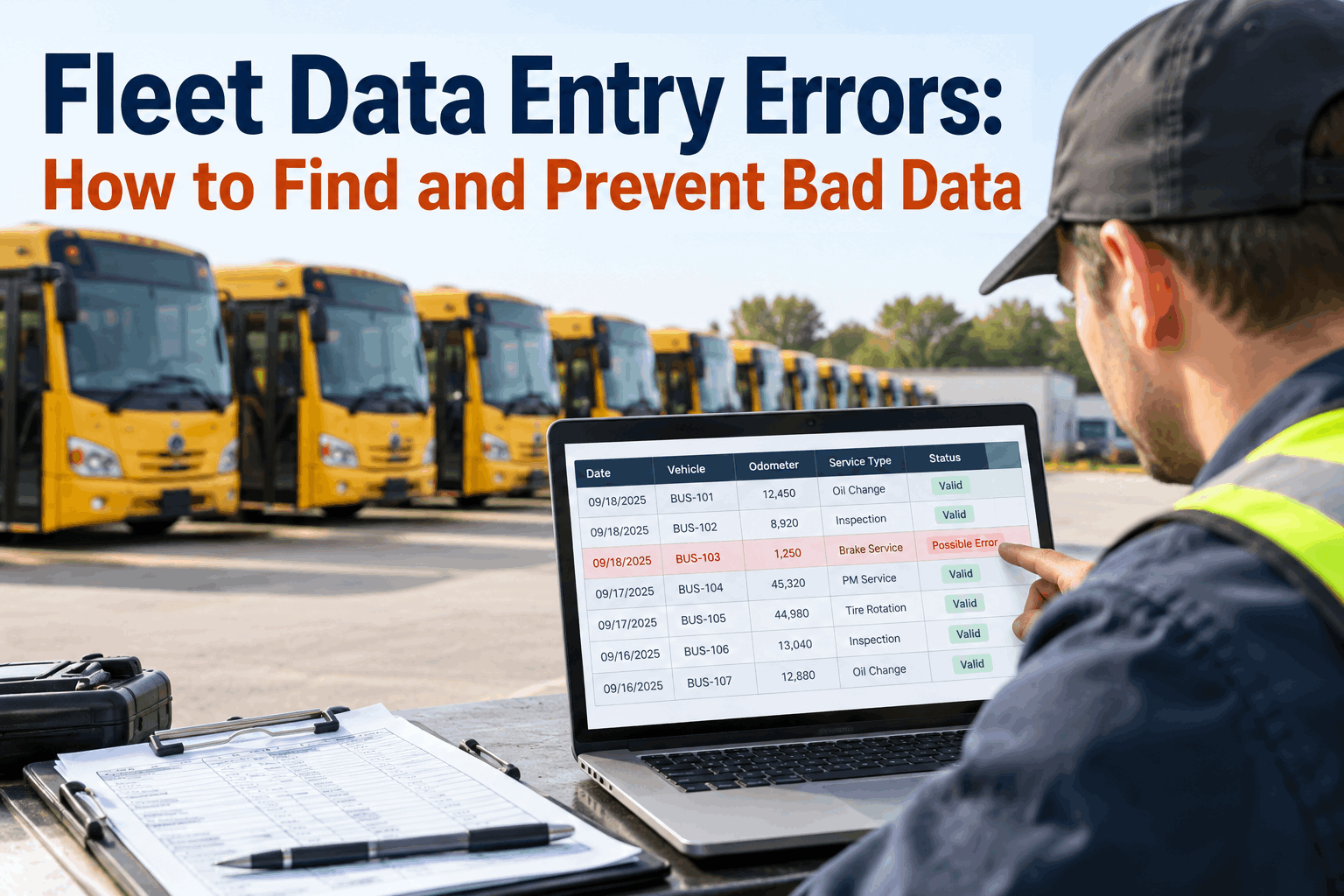
A maintenance report suddenly shows one bus traveling 92,000 miles in a week, another receiving the same repair twice on the same day, and a third with a fuel cost that is ten times its normal amount. The vehicles may be fine—the records are not. Fleet data entry errors can quietly distort maintenance schedules, cost reports, utilization trends, and management decisions unless the fleet has a practical way to detect and correct suspicious information.
Find Bad Data.
Verify the Record.
Protect the Report.
Reliable fleet reporting starts before the dashboard. Build validation into odometer readings, maintenance records, costs, dates, and vehicle data so questionable entries can be reviewed before they influence preventive maintenance or management reporting.
One Incorrect Entry Can Travel Through the Entire Fleet System
Fleet information is connected. An odometer reading may influence preventive maintenance. A labor entry can affect maintenance cost. A parts quantity can change inventory usage. A work order date can alter downtime reporting. When the original record is wrong, every report or decision that depends on it can inherit the same problem.
That is why fleet data quality should not be treated as an accounting cleanup exercise at the end of the month. Maintenance teams need to catch questionable records close to the point where they are entered, while the person, vehicle, work order, invoice, or physical meter used to verify the information is still easy to identify.
Correcting a report is useful. Correcting the source record—and understanding why it became wrong—is what prevents the same error from returning.
What Bad Fleet Data Usually Looks Like
Most data problems leave clues. The challenge is separating a genuinely unusual fleet event from an entry that is simply incorrect. Instead of assuming every outlier is an error, flag the record and compare it with the vehicle's recent history and the original source.
Digit or Decimal Error
A misplaced digit can turn 148,630 miles into 248,630, or a $480 invoice into $4,800.
Wrong Vehicle
The information itself may be valid but assigned to a different bus or asset.
Duplicate Record
A work order, fuel transaction, invoice, or inspection can accidentally be entered twice.
Incorrect Date
A wrong service or completion date can place maintenance activity in the wrong reporting period.
Unit Mismatch
Miles, kilometers, gallons, quantities, hours, or currency values may be interpreted incorrectly.
Missing Information
Blank mileage, labor, parts, reason codes, or completion fields can leave reports incomplete.
How to Spot Fleet Data Entry Errors Before They Become Reporting Problems
Good validation combines system checks with operational judgment. A rule can identify an unusual number, but a fleet manager or technician may still need to determine whether the number represents a mistake or a legitimate event.
Flag the Outlier
Identify unusual mileage, hours, cost, dates, quantities, or duplicate-looking transactions.
Check History
Compare the entry with previous readings, work orders, inspections, and normal vehicle patterns.
Verify the Source
Check the physical meter, invoice, technician record, receipt, inspection, or connected source.
Correct & Review
Fix the record with context, then check reports and maintenance decisions affected by the bad value.
A structured review queue makes questionable records visible without automatically declaring them wrong. See how BusCMMS can support cleaner fleet maintenance records.
Build Checks Around the Data That Matters Most
Not every field needs the same validation. Focus first on information that can materially change maintenance timing, cost reporting, vehicle history, compliance records, or management decisions.
Bad Data Can Make a Good Fleet Report Tell the Wrong Story
A dashboard can calculate perfectly and still be misleading when the underlying records are inaccurate. Before investigating a dramatic trend, fleet managers should ask whether the operational change is real or whether a small number of incorrect records are distorting the result.
This same principle applies to maintenance cost, labor hours, parts usage, downtime, fuel, inspections, and other operational reports. When a result looks surprising, review the records driving the result before assuming fleet performance has suddenly changed.
Prevent Data Entry Errors Without Slowing Down the Shop
The objective is not to make technicians and administrators complete unnecessary fields. Good controls reduce ambiguity, simplify common entries, and reserve manual review for information that genuinely looks unusual.
Use Required Fields Carefully
Require information that is operationally necessary, such as vehicle identity, reading type, service date, or completion status, without turning every form into a long checklist.
Use Controlled Choices
Dropdowns and standardized selections can reduce inconsistent spelling, duplicate categories, and unclear status values.
Compare Against History
Show recent mileage, hours, maintenance, or cost information so the person entering data has useful context before saving a questionable value.
Review Exceptions
Focus supervisor attention on unusual records instead of manually checking every routine transaction.
Preserve Corrections
When an important value changes, retain enough context to understand the original entry, corrected value, reason, and verification source.
Fix the Process Too
Repeated errors in the same field may indicate a confusing form, unclear procedure, training gap, or integration problem rather than individual carelessness.
Teams that want a more structured maintenance workflow can start using BusCMMS and organize fleet records around the vehicles and maintenance activity they support.
When You Find Bad Data, Correct More Than the Number
A corrected record can have downstream effects. If the bad value already influenced preventive maintenance, a monthly report, a cost calculation, or a management review, the team should determine whether those outputs also need to be refreshed or explained.
Turn Data Quality Into a Routine Fleet Process
Fleet data quality improves when it has an owner and a repeatable process. Daily entry controls can catch obvious problems, while periodic reviews can identify broader patterns such as recurring missing fields, unusual corrections, duplicate work orders, or vehicles with inconsistent meter histories.
Vehicle, date, mileage, hours, quantities, cost, and required maintenance fields.
Large jumps, missing values, duplicates, unusual costs, and inconsistent histories.
Investigate the records behind surprising trends before presenting the conclusion.
Improve the form, workflow, integration, or training when the same error keeps returning.
For fleets that want mileage, work orders, preventive maintenance, inspections, and reporting in a connected environment, book a BusCMMS demonstration to review the workflow with your team.
Five Rules for Better Fleet Data Quality
A sudden mileage, cost, date, or quantity change deserves verification before it drives a decision.
Previous records provide context that makes many data-entry mistakes easier to identify.
Use meters, invoices, inspections, work orders, receipts, or connected sources before changing important data.
A correction may also require a PM schedule, KPI, cost calculation, or report to be reviewed.
Repeated mistakes are a signal to improve the workflow, validation rule, training, or integration.
Accurate fleet reporting is built record by record. When teams validate important inputs, investigate anomalies, document corrections, and improve recurring problem areas, reports become more useful because managers understand the quality of the information behind them. Teams ready to strengthen that process can start with BusCMMS or book a demo.
Fleet Data Entry Errors: Frequently Asked Questions
Practical answers for bus fleet managers and maintenance teams working to improve data quality and reporting accuracy.