A fight breaks out on the back bench of Route 8 at 3:15 on a Friday, and by Monday morning three parents, a principal, and your director all want to know exactly what happened. Ten years ago that meant pulling a scratched hard drive off the bus, hoping it recorded, and squinting at grainy footage with no timestamp you trusted. Today you type in the bus, the time, and the route, and a clean clip is on your screen in minutes — interior camera, timestamp, GPS pin, all synced. The box that makes that possible is the MDVR.
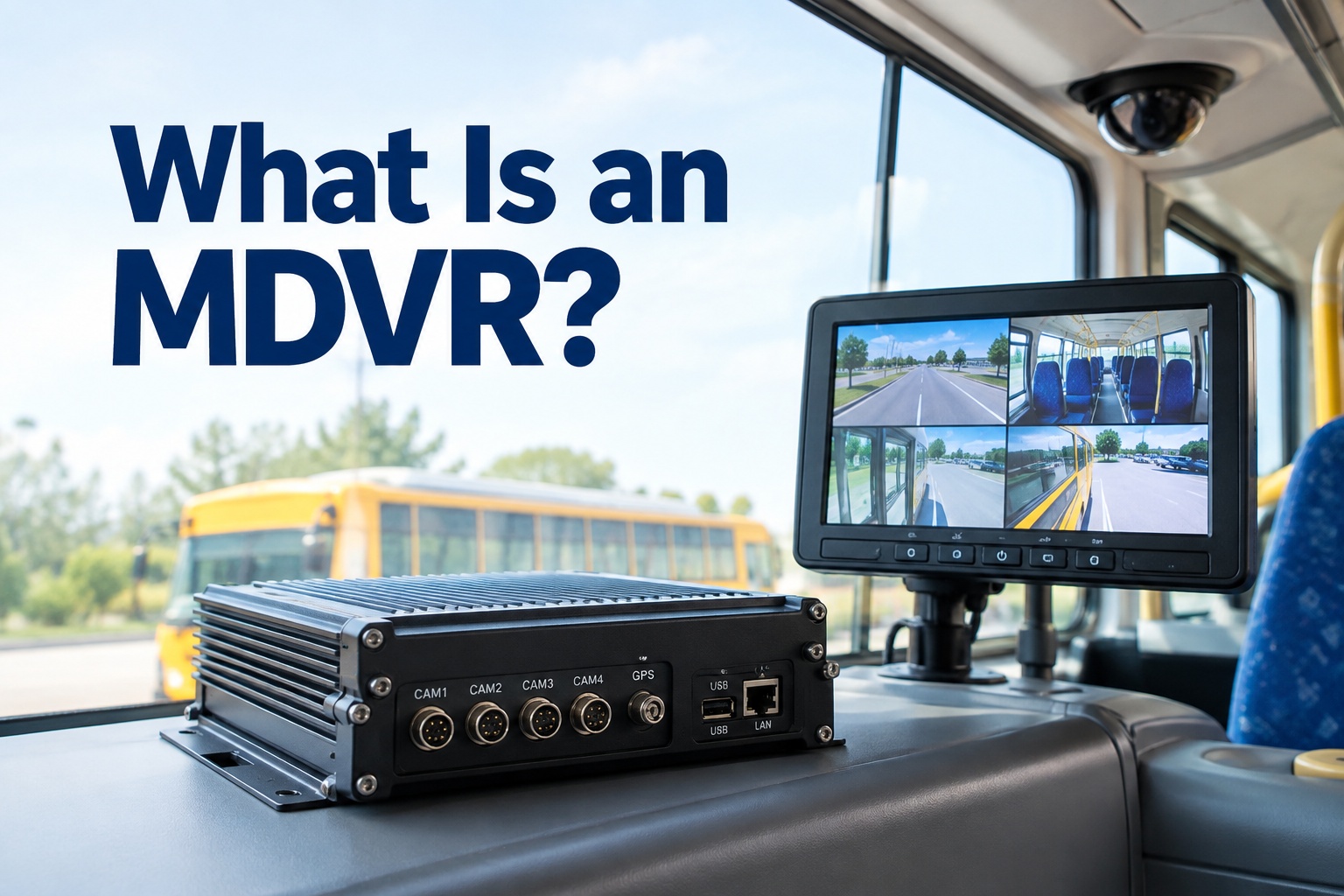
What Is an MDVR?
How a mobile digital video recorder captures, stores, and retrieves bus camera footage — channels, storage, GPS, and cloud, explained
- 2–13Camera channels
- 1–2TBTypical onboard storage
- GPS+4GLocation & connectivity
What Is an MDVR, in Plain Terms?
An MDVR — a mobile digital video recorder — is the in-vehicle device that records and stores footage from one or more onboard cameras. Think of it as the brain of a bus's camera system: the cameras are just eyes, and the MDVR is what captures what they see, tags it with the time and GPS location, and holds it until someone needs to pull it. It's built for a moving bus, which means it's ruggedized to survive constant vibration, wide temperature swings, and power interruptions that would kill an ordinary recorder.
In practice, that box is doing several jobs at once. It takes in multiple camera feeds, compresses them so they don't eat storage, writes them to an onboard hard drive or SD card, stamps every frame with location and time from GPS, and — on modern units — connects over 4G or Wi-Fi so you can pull a clip without ever walking out to the bus. A built-in G-sensor flags hard braking or an impact so the important moments are easy to find later.
For a school, transit, or charter fleet, that adds up to one thing: when something happens on a bus, you can prove what actually happened, tied to the exact vehicle, time, and route. The catch is that footage alone doesn't close a case or fix a problem — someone still has to connect that clip to a follow-up. That's where the recording stops being surveillance and becomes useful, and it's worth a walkthrough to see how video events connect to your bus records.
How an MDVR Works on a Bus
Behind that simple "it records the cameras" description is a specific chain of steps. Understanding it tells you what you're actually buying — and where a cheap unit will let you down.
- 1
Camera inputs come in
Interior, road-facing, door, and rear cameras feed the MDVR over its channels. Each camera is one channel, which is why channel count matters.
- 2
Video is encoded
The MDVR compresses feeds using H.264 or the newer H.265, packing more footage into less space and less bandwidth — essential when you're storing days of multi-camera video.
- 3
Footage is stored onboard
Video writes to a ruggedized hard drive or SD card — typically 1–2TB — usually looping oldest-over-newest once full, per your retention setting.
- 4
GPS and events get tagged
Every clip carries location, speed, and time. A G-sensor auto-flags hard braking or impacts as events, so critical moments surface without scrubbing hours of footage.
- 5
Retrieval and cloud upload
Pull footage on-site over USB, or over 4G/Wi-Fi remotely. Many units auto-upload flagged events to the cloud when the bus hits coverage.
That last step is the modern difference. An older DVR meant physically retrieving a drive; a current MDVR can send you the clip you need before the bus is back in the yard. If you're offloading large volumes of footage across a fleet, having those events land somewhere organized — not in a pile of raw clips — is the whole game. You can start free and see how flagged events organize per bus.
Channel Configurations: How Many Cameras Do You Need?
MDVRs come in different channel counts — commonly 2, 4, 5, 8, and up to 13 — and the right number isn't a spec-sheet flex. It depends on the bus size, where you place cameras, and what you're actually trying to see. One channel equals one camera, so channel count is really a coverage decision.
Small buses & vans
A road cam and an interior cam, maybe a door view. Enough for a shuttle or a small route where coverage needs are modest.
Full-size school & transit
Interior aisle, road, door, stop-arm, and rear or side views. The common sweet spot for a standard 40-foot bus.
Articulated & high-coverage
Long articulated transit buses, or fleets wanting 360° coverage with multiple interior and exterior angles on every incident.
The practical rule: buy for the coverage you need plus a little room to grow, not the biggest number on the shelf. More channels mean more storage burn and more to maintain. A 40-foot school bus rarely needs 13 cameras; a downtown articulated transit bus might. Match the channels to the vehicle and the incidents you're actually trying to document, and you'll book a demo to talk through the right coverage for your fleet rather than overspending on angles nobody reviews.
What Fleets Actually Use an MDVR For
The value of an MDVR shows up in specific, real situations — the ones that generate phone calls, insurance claims, and board questions. Here's where it earns its cost.
Passenger incidents
Fights, injuries, or disputes on board — footage settles what happened and who was involved, fast.
Collision investigation
Synced multi-camera views plus GPS and speed reconstruct an accident far better than a single dash view.
Driver behavior review
G-sensor-flagged hard braking or harsh events give you the clips to coach on — and to clear a driver who did it right.
Vandalism & unauthorized access
Interior and door cameras catch damage or after-hours entry, with a timestamp that holds up.
Route context
GPS-tagged footage places every event on the map — which stop, which street, which moment on the route.
Safety investigations
When a complaint or near-miss needs answers, the recording is objective evidence instead of competing memories.
Notice how many of these end in an action — a coaching session, a claim, a repair, a report. The MDVR captures the moment; someone still has to route it to the right workflow. That handoff, from raw clip to resolved case, is where fleets either build a real process or let evidence sit unused on a drive.
MDVR vs. Dash Cam, NVR, Cloud Camera, and AI Systems
This is where the terminology gets muddy, and vendors don't always help. An MDVR overlaps with several other things but isn't the same as any of them. Here's the clean separation.
The through-line: an MDVR is the recording hardware at the center of a bus's camera system. Some of these other terms describe different hardware, some describe the software around it, and some describe capabilities a modern MDVR may or may not include. Knowing the difference keeps you from buying a cloud camera when you needed local recording, or a bare recorder when you wanted analytics.
"Isn't an MDVR Just an Old DVR on a Bus?"
This is the most common misconception, and it's worth answering head-on: no. Yes, at its core an MDVR records video like a DVR does — but a modern MDVR is a connected, location-aware, sometimes AI-equipped device, not a dusty box with a hard drive. The gap between the two is exactly the gap between "we might have footage somewhere" and "here's the clip, geotagged, on your phone, before the bus is back."
Old DVR
- Records to a drive, and that's it
- No location context
- Retrieve by pulling the drive in person
- Hunt through hours of footage manually
- No remote access
Modern MDVR
- Local recording + GPS + connectivity
- Every clip geotagged and timestamped
- Pull clips remotely over 4G / Wi-Fi
- G-sensor and AI flag key events for you
- Auto-uploads events to the cloud
So the honest answer is that a modern MDVR shares its DNA with the DVR but has grown up considerably. It combines local recording with GPS, cellular connectivity, cloud access, and increasingly AI-based video analytics. Calling it "just an old DVR" misses everything that makes it useful on a moving bus — and everything that lets it plug into the rest of your fleet technology.
Advantages, Limitations, and What to Plan For
Onboard recording is powerful, but it has real trade-offs. Name them up front and your rollout goes smoothly; ignore them and you'll discover them at the worst moment — when you need a clip that isn't there.
Advantages
- Records locally — survives dead zones
- Multi-camera coverage on one synced record
- GPS and time on every clip
- Rugged enough for constant vibration
- Event flagging finds key moments fast
Limitations to Plan For
- Storage fills — retention loops overwrite old footage
- Retrieval needs connectivity or on-site access
- Coverage gaps if cameras are placed poorly
- Hardware can fail — a dead unit records nothing
- Needs maintenance: lenses, drives, calibration
The two that bite fleets hardest are retention and hardware failure. If your loop overwrites footage after five days and an incident surfaces on day six, that clip is gone — so retention policy is a real decision, not a default to ignore. And a failed MDVR is a bus recording nothing while everyone assumes it's covered. Both are reasons an MDVR belongs inside your inspection and maintenance routine, not treated as install-and-forget. A camera-health check is a maintenance item like brakes or tires.
A Real Scenario: From Clip to Connected Follow-Up
Here's how an MDVR clip actually moves through a well-run fleet — and why the recorder is only half the story. Follow Bus #22 through one afternoon.
A passenger incident is reported on Bus #22, Route 8. The MDVR's interior camera captured it, timestamped and GPS-tagged to the exact stop.
Your safety lead searches by vehicle, time, and route, pulls the 40-second clip over 4G, and confirms what happened — no trip to the yard, no drive to remove.
Reviewing the footage, the lead also spots a cracked interior camera housing and a seat that's been damaged. Two follow-ups, not one.
Because the clip sits on #22's asset record next to its inspections and maintenance, the lead files the incident report and opens a work order for the camera and seat repair — right from the event.
That's the difference between an MDVR that just records and one wired into operations. The clip was identified by vehicle, time, and route in minutes, and the same review surfaced a maintenance problem that became a tracked work order instead of a note someone forgets. The recorder captured the evidence; the connection to a workflow is what turned it into resolved cases. That's exactly what fleets see when they get a walkthrough of video events connected to maintenance records.
MDVR at a Glance
A one-screen reference for the transportation director explaining an MDVR to a board or budget committee.
| What it is | A rugged in-vehicle device that records and stores footage from one or more onboard cameras |
|---|---|
| Channels | Commonly 2, 4, 5, 8, up to 13 — one channel per camera |
| Encoding | H.264 or H.265 compression for efficient storage and transmission |
| Storage | Onboard HDD or SD card, typically 1–2TB, usually loop-recording |
| Location | Built-in GPS tags every clip with time, speed, and position |
| Event trigger | G-sensor flags hard braking, impacts, and alarms |
| Connectivity | 4G/Wi-Fi for remote viewing and cloud event upload; USB for on-site pull |
| Built for | Vibration, temperature swings, and power interruptions of a moving bus |
| Best-fit fleets | School districts, transit agencies, charter and campus shuttle operators |
Where the MDVR Fits Your Stack — and Where BusCMMS Fits
An MDVR is one piece of a broader bus fleet technology stack: cameras feed it, a telematics or video platform displays what it captures, and your maintenance and safety systems act on what it surfaces. No single federal regulation universally requires you to install an MDVR — it's a fleet decision driven by your safety, liability, and operational needs. But once you have one, the question becomes what happens to everything it records.
That's the role BusCMMS plays. BusCMMS isn't a camera or MDVR vendor — it's the AI-native bus fleet operations platform that connects camera events, inspections, safety records, and maintenance workflows to the same bus asset record. Keep whatever MDVR hardware you run. BusCMMS is the layer where a flagged incident clip, a DVIR defect, an inspection note, and the work order that resolves it all land on one chronological timeline per bus, with AI helping surface the events and defects that actually matter. That's what turns a hard drive full of footage into a fleet you can actually run.
The Bottom Line on MDVRs
So, what is an MDVR? It's the rugged, in-vehicle recorder at the heart of a bus's camera system — taking in multiple camera feeds, compressing and storing them onboard, tagging each clip with GPS and time, and, on modern units, connecting over cellular and Wi-Fi to deliver events to the cloud. It's not just an old DVR bolted to a bus; today's version is location-aware, connected, and often AI-equipped, and it's the difference between guessing what happened and proving it.
The fleets that get real value from an MDVR aren't the ones with the most channels or the biggest drive — they're the ones who connect every incident clip to a safety or maintenance follow-up, so evidence becomes resolved cases instead of buried footage. That connection is the whole point, and it's exactly the gap BusCMMS was built to close. If you'd like to see MDVR events, inspections, and work orders living on one bus record instead of scattered across a drive and three portals, get a walkthrough and bring the setup you already have.
What is an MDVR in simple terms?
An MDVR, or mobile digital video recorder, is the in-vehicle device that records and stores footage from one or more onboard cameras on a bus. It's the brain of the camera system: the cameras are the eyes, and the MDVR captures what they see, tags it with GPS location and time, and holds it until someone needs to retrieve it. It's ruggedized to survive the vibration, temperature swings, and power interruptions of a moving vehicle, and modern units add cellular and Wi-Fi connectivity for remote access.
How many channels does a bus MDVR need?
It depends on bus size, camera placement, and what you need to see — each camera uses one channel. Small buses and vans often run 2 to 4 channels (road and interior views), full-size school and transit buses commonly use 5 to 8 (aisle, road, door, stop-arm, rear), and articulated buses or high-coverage fleets may use 8 to 13 for near-360-degree coverage. The practical advice is to buy for the coverage you need plus a little room to grow, since more channels mean more storage use and more to maintain.
Is an MDVR just an old DVR installed on a bus?
No. At its core an MDVR records video like a DVR, but a modern MDVR is a connected, location-aware, and often AI-equipped device built for vehicles. It combines local recording with GPS tagging, cellular and Wi-Fi connectivity, cloud access, and increasingly AI-based video analytics. The difference is practical: an old DVR meant physically pulling a drive and hunting through footage, while a modern MDVR can send you a geotagged, event-flagged clip remotely before the bus is even back in the yard.
How is an MDVR different from a cloud camera or dash cam?
A standalone dash cam is a single self-contained camera, usually road-facing, while an MDVR is a central recorder handling many cameras on one synced record. A cloud camera streams everything to the cloud and depends on constant connectivity, whereas an MDVR records locally first so footage survives dead zones, then uploads events when coverage returns. An MDVR is also distinct from a video telematics platform, which is the software that displays footage, and from an NVR, which is built for networked building cameras rather than a moving vehicle.
What are the main limitations of an MDVR?
The biggest ones are storage and retrieval. Onboard drives fill up and typically loop-record, overwriting the oldest footage, so if an incident surfaces after your retention window the clip may be gone — making retention policy a real decision. Retrieval needs connectivity or on-site access, coverage has gaps if cameras are placed poorly, and hardware can fail, meaning a dead unit records nothing while everyone assumes it's covered. Because of this, an MDVR needs regular maintenance and camera-health checks, which is why it belongs in your inspection and maintenance routine.