When a technician scribbles “fixed brake issue” on a paper work order and forgets to note which brake drum was replaced, the entire school bus scheduling chain loses a critical data point. Transportation directors across the United States discover at 5:30 AM that a bus is still out of service — not because the repair was complex, but because the technician’s report left out the one detail the parts room needed to close the loop. The National Institute for Automotive Service Excellence estimates that 45% of heavy‑duty repair orders lack the labor hour, part number, or defect description required for accurate fleet maintenance scheduling and compliance documentation. BusCMMS replaces that paper chaos with a mobile‑first workflow that guides every technician through a structured, pre‑loaded inspection and repair form — capturing the data that keeps buses on the road, DOT auditors satisfied, and fleet analytics trustworthy. This article breaks down the technician management reporting mistakes that cost school districts thousands every month and shows exactly how to fix them with a bus‑specific CMMS.
Turn Technician Reporting into a Reliability Asset
BusCMMS’s mobile work orders capture every labor hour, every part, and every defect — so your fleet data tells the truth from the shop floor up.
What Poor Technician Reporting Really Costs a School Bus Fleet
Every incomplete work order is a future breakdown waiting to happen. When technicians skip labor hour logging, fleet managers cannot calculate true cost per mile. When parts usage is scribbled on a sticky note rather than recorded against an asset, inventory runs dry without warning. The American School Bus Council reports that districts with manual technician reporting processes spend an average of 2.5 hours per day on data reconciliation and still miss 22% of re‑order triggers. BusCMMS’s maintenance reporting module eliminates those gaps by making every field mandatory, every part scan automatic, and every repair story complete — turning technicians into data generators rather than data bottlenecks.
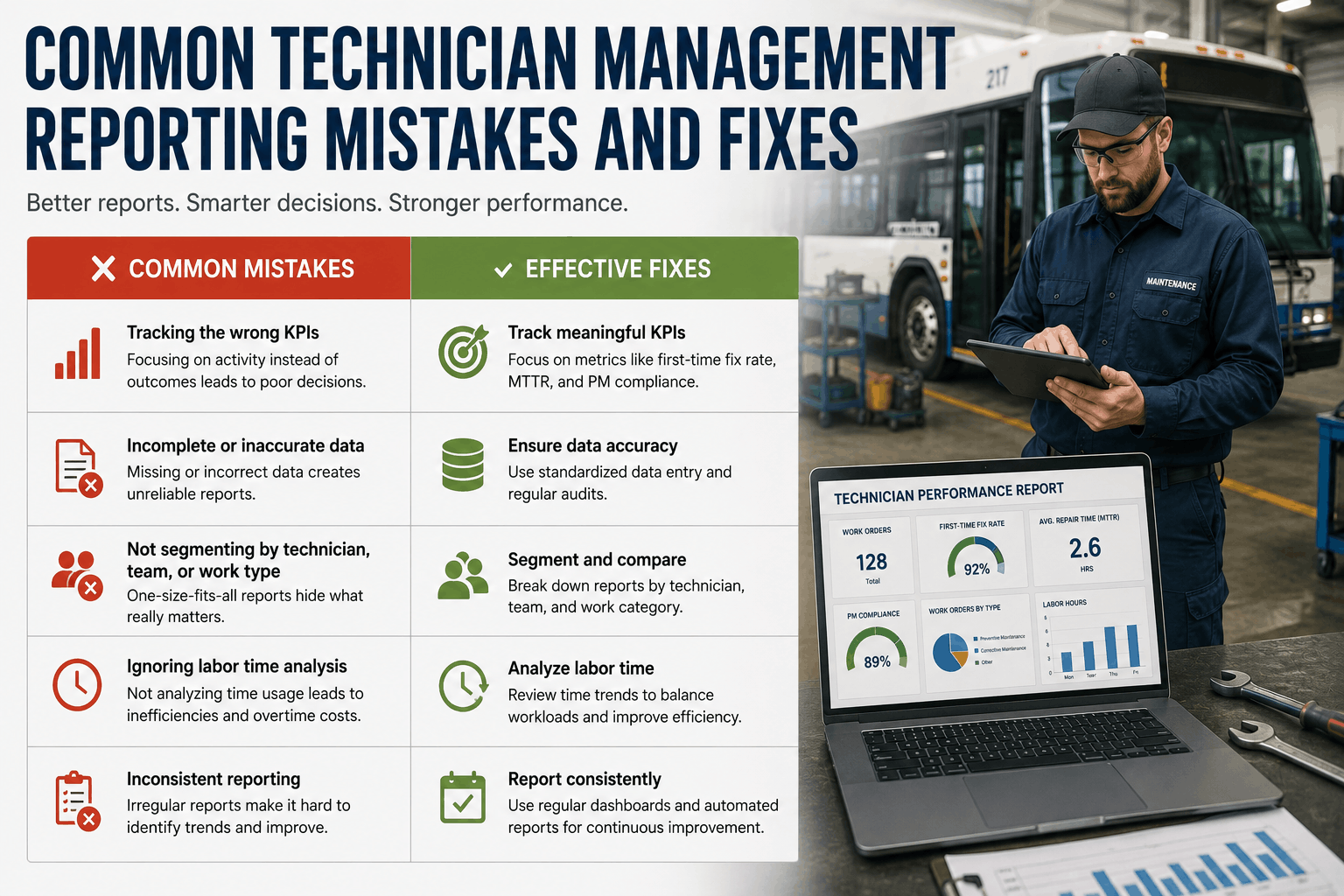
The Five Most Common Technician Reporting Mistakes and Their Fixes
| Reporting Mistake | Operational Impact | BusCMMS Fix |
|---|---|---|
| Vague defect descriptions (e.g., “brake noise”) | Misdiagnosis, repeat repairs, parts not ordered | Pre‑loaded DVIR picklists guide exact descriptions |
| Missing labor hour entries | Cost‑per‑mile calculations become useless | Mobile timer captures wrench time automatically |
| Parts used not linked to work order | Inventory shrinkage and stockouts | One‑click part scan reserves and decrements stock |
| Paper DVIRs not transferred to shop system | Defects linger 24–48 hours before action | Digital DVIR instantly creates assigned work order |
| Failure to document completed PM steps | Compliance gaps; DOT audit risks | PM checklists require sign‑off on every task |
How BusCMMS Technician Management Reporting Works on the Shop Floor
Instead of forcing a school bus shop to adapt a trucking‑oriented interface, BusCMMS mirrors the actual sequence a technician follows: receive defect → diagnose → pull parts → repair → document. Every screen on the mobile app is built for a technician wearing gloves, not a data entry clerk. The platform’s fleet operations backbone turns every completed work order into a searchable, auditable record that the transportation director can review before the next bell rings.
Every repair requires defect code, labor hours, parts used, and completion note before the WO can be closed — eliminating guesswork and partial records.
Stop arms, crossing gates, emergency exits, student mirrors — every bus‑specific check is built into the technician’s tablet screen, so nothing is ever forgotten.
A technician scanning a part barcode automatically attaches it to the open WO, decrements inventory, and flags reorder points — all before the bus leaves the shop.
The app logs when a technician starts and finishes a job, feeding actual wrench time into the cost‑per‑mile dashboard without any after‑the‑fact guessing.
A technician can snap a photo of a cracked belt or worn brake pad directly into the work order, giving the fleet manager visual proof of the repair need and the completed fix.
Each completed technician report — annual inspection, 90‑day exit check, PM sign‑off — is stored with a timestamp and linked to the asset for instant DOT audit retrieval.
Step‑by‑Step: Eliminating Reporting Errors in Your Bus Shop
Give every technician a tablet with BusCMMS’s pre‑loaded school bus inspection form. Defects are selected from a picklist, not scribbled on a damp notepad, and the data lands in the shop queue before the bus is parked.
BusCMMS’s timer function lets a technician tap “start job” and “end job” — the system calculates elapsed time and attaches it to the WO. No memory‑based timesheets, no rounding errors.
A barcode scanner (or smartphone camera) associates the exact part number with the open work order and adjusts inventory levels in real time, preventing both stockouts and phantom stock.
Configure BusCMMS so that a work order cannot be closed until defect code, labor hours, parts consumed, and repair narrative are filled in — building a bulletproof audit trail.
The fleet manager can pull a report showing average WO closure time, report completeness score, and parts accuracy by technician — celebrating top performers and coaching where needed.
BusCMMS aggregates all technician reports into the compliance dashboard, so every brake job and filter change feeds into the fleet availability and cost‑per‑mile metrics the board reviews each quarter.
Our technicians used to hate paperwork — they’d rush through it and we’d find incomplete reports days later. With BusCMMS on their tablets, the system won’t let them submit a half‑filled work order. Our parts accuracy jumped to 98% and I can finally trust the cost‑per‑mile numbers I present to the board.
Frequently Asked Questions
How does BusCMMS ensure technicians complete every required field on a work order?
BusCMMS allows administrators to mark fields as mandatory, so a technician cannot close a WO until defect type, labor hours, parts used, and repair confirmation are all entered, eliminating incomplete reports.
Can technicians use their own smartphones or does the district need to purchase tablets?
BusCMMS runs on any modern smartphone or tablet, so districts can either provide devices or allow technicians to use their own via the secure mobile app, reducing hardware costs significantly.
What happens if a technician forgets to log labor hours — can it be added later?
Yes, the work order remains editable until it is formally closed, but BusCMMS’s timer function and mandatory‑field rules are designed to prevent the “forget later” scenario from happening in the first place.
Does BusCMMS support photo attachments for technician reports?
Absolutely. Technicians can attach photos directly from their mobile device to any work order, documenting the condition before and after repair — a powerful visual record for audits and internal reviews.
How does technician reporting integrate with parts inventory?
When a technician scans a part or selects it from the catalog within a work order, BusCMMS automatically decrements inventory and triggers a reorder alert if stock falls below your minimum threshold.
Can we track individual technician productivity with BusCMMS?
Yes, the platform provides per‑technician metrics including average WO closure time, report completeness score, and parts usage accuracy, enabling fair, data‑driven performance reviews.
Does BusCMMS technician reporting meet FMCSA documentation standards?
Every technician‑completed report — DVIR defect correction, PM sign‑off, annual inspection — is timestamped, stored, and retrievable instantly, meeting the record‑keeping requirements of 49 CFR 396.
How quickly can a 40‑technician shop adopt BusCMMS without disrupting daily work?
Implementation typically takes under three weeks because the mobile workflow mimics existing shop processes. Technician adoption exceeds 85% within days because the app reduces, not adds to, their documentation burden.
Give Your Technicians a Reporting Tool They’ll Actually Use
BusCMMS replaces illegible notes with structured, complete digital records that keep buses on the road and compliance inspectors satisfied — deployed in weeks, not months.