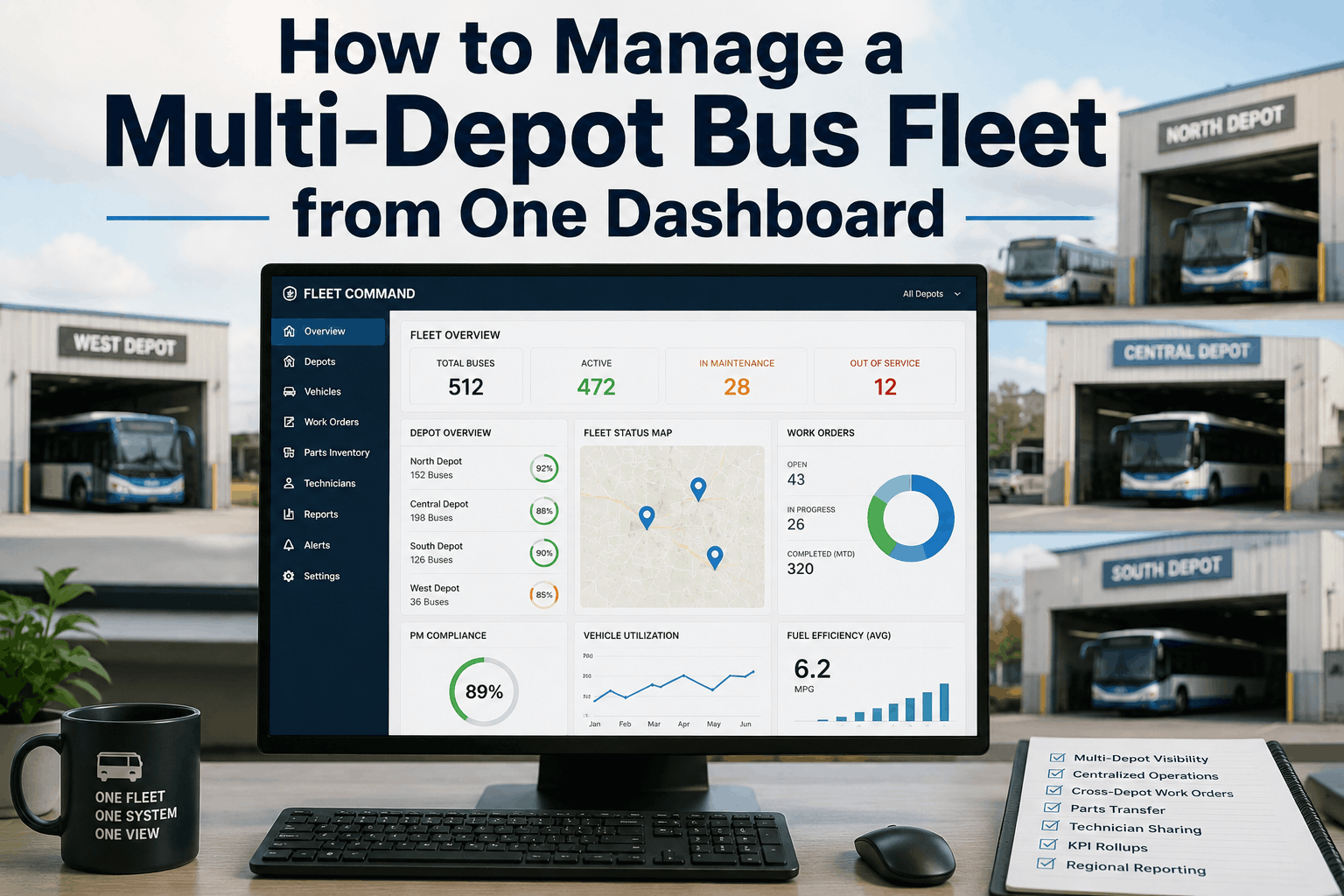
Managing buses across multiple depots creates communication silos, duplicated work, and reporting blind spots. A centralized dashboard unifies operations across yards, enabling cross-depot work orders, parts transfers, technician sharing, and regional KPI rollups — all from a single screen.
Multi-Depot Fleet Guide 2026
How to Manage a Multi-Depot Bus Fleet from One Dashboard
Run a multi-depot bus fleet on one dashboard. Depot roles, parts transfer, cross-depot WO, technician sharing, KPI rollups, regional reporting structure.
The Hidden Cost of Siloed Depots
Districts operating 3+ bus yards lose 25–35% of maintenance efficiency to duplicated admin, unshared parts, and unbalanced workloads. A single dashboard eliminates 60% of cross-depot communication time and recovers thousands of hours annually.
25–35%
Efficiency loss without consolidation
60%
Reduction in cross-depot admin time
4–8 hrs
Saved weekly per supervisor
100%
Fleet visibility target
Why Centralize Multi-Depot Fleet Management
Unified Work Order Visibility
View open, pending, and completed work orders across all yards in one queue. Assign work to any depot based on capacity, not just location.
Cross-Depot Parts Transfer
Move parts between yards without paperwork delays. Real-time inventory sync prevents duplicate orders and stockouts at any site.
Technician Sharing & Load Balancing
Schedule technicians across depots to handle peaks. The dashboard shows availability by skill set, reducing overtime and idle time.
Regional KPI Rollups
Aggregate PM compliance, downtime, and cost metrics from each depot into a single executive view. Spot underperforming yards instantly.
Consistent Processes Everywhere
Standardize DVIR, PM scheduling, and parts management across all locations. The dashboard enforces one workflow regardless of depot.
Multi-Level Reporting
Generate reports at the depot, region, or district level. Share customized views with supervisors, directors, and transportation staff.
Dashboard Consolidation Progress
Depot Role Configuration
Define each yard as a separate entity with its own team, but linked under the district dashboard. Completed for all depots.
Cross-Depot Work Order Setup
Enable work order routing to any depot. Tested assignment logic so the nearest available technician receives urgent repairs.
Parts Transfer Automation
Set up inter-depot parts request workflows with approval layers. Inventory adjusts automatically upon transfer confirmation.
Technician Sharing Rules
Configure skill-based routing and shift visibility. Supervisors can see technician availability across all sites and borrow capacity.
KPI Rollup Dashboard
Aggregate fleet-wide metrics with drill-down to depot. PM compliance, downtime, and costs are computed per yard and combined.
Regional Reporting Hierarchy
Build reporting roles: mechanic → lead → supervisor → depot manager → fleet director. All views filter appropriately by depot scope.
Fleet Distribution by Depot
Uneven fleet distribution across depots often masks workload imbalances. A centralized dashboard reveals which yards are over capacity and enables proactive technician and parts redistribution.
Common Multi-Depot Management Mistakes
Each Depot Using Its Own System
Solution: Consolidate all yards onto a single CMMS platform. Assign depot-level roles so users only see their site data while leadership gets the full picture.
No Inter-Depot Parts Transfer
Solution: Enable electronic parts requests across locations. Set minimum stock thresholds that trigger automatic transfers from overstocked depots.
Work Orders Trapped at Origin
Solution: Build cross-depot work order routing. When a bus breaks down near a different yard, the system should assign the work order to that nearest facility.
Technicians Silos by Location
Solution: Create a shared technician pool viewable by all supervisors. Allow temporary reassignments during peak periods without admin overhead.
Inconsistent PM Scheduling
Solution: Use the dashboard to enforce one PM policy across all depots. Alerts notify supervisors when a yard falls behind, not after the fact.
Reporting at the Wrong Level
Solution: Implement role-based dashboards. Mechanics see only their assigned work; directors see aggregated metrics with the ability to drill down per depot.
Multi-Depot Consolidation Checklist
Single CMMS Instance Deployed
All depots are on the same software version with identical configurations. User roles restrict visibility by location but allow cross-depot views for leadership.
Parts Inventory Shared Globally
Every depot sees real-time stock levels across the district. Parts requests route to the nearest available inventory with automatic ledger updates.
Cross-Depot Work Orders Tested
Confirmed that work orders can be reassigned mid-repair. Verified that labour and parts charges follow the asset, not the originating depot.
Technician Availability Dashboard Live
Supervisors can see all technicians by skill and current assignment. Temporary reassignments require one-click approval.
Rollup KPIs Accurate
Audited that district-level metrics match the sum of depot-level data. No double-counting or missing values in the consolidated view.
Role-Based Access Reviewed
Verified that mechanics, supervisors, and directors see appropriate data. No user has access beyond their depot unless explicitly granted.
Consolidated Dashboard KPIs
Cross-Depot Work Order Completion
Target: 90% of cross-depot WOs closed within SLA. Track monthly to ensure routing and capacity sharing are effective.
Parts Transfer Turnaround
Target: Under 4 hours from request to delivery within the district. Faster transfers reduce vehicle downtime significantly.
Technician Utilization Balance
Target: Under 15% variance in utilization between depots. Use the dashboard to rebalance workloads proactively.
PM Compliance by Depot
Target: All depots above 95% on-time PM. Drill down to identify which yard needs additional resources or process adjustments.
Dashboard Adoption Rate
Target: 100% of supervisors using the centralized view daily. Adoption correlates directly with coordination improvements.
Depot Consolidation Scoring Matrix
System Unification (Weight: 30%)
Are all depots on a single instance? Partial consolidation undercuts visibility and should be the first priority.
Cross-Depot Workflows (Weight: 25%)
Can work orders, parts, and technicians move between yards without friction? This is the true test of multi-depot success.
Reporting Accuracy (Weight: 20%)
Do rollup numbers match reality? Garbage data leads to bad decisions; validate every KPI across all depots.
User Adoption & Training (Weight: 15%)
Are supervisors actively using the single dashboard? Provide hands-on training and celebrate quick wins to drive adoption.
Access Control Precision (Weight: 5%)
Do role-based permissions protect sensitive data while enabling visibility? Audit access logs monthly to catch misconfigurations.
Scalability Readiness (Weight: 5%)
Can the system absorb a new depot without reconfiguration? The architecture should support adding yards in hours, not weeks.
Moving our four yards onto a single BusCMMS dashboard eliminated 15 hours of weekly admin per supervisor. Cross-depot parts transfers now take minutes instead of days, and our PM compliance is above 97% at every location.
Unify Your Depots Under One Dashboard
BusCMMS provides a centralized fleet management platform that connects multiple yards with cross-depot work orders, shared parts inventory, technician balancing, and regional KPI rollups. Schedule a demo to see your entire fleet in one view.
Multi-Depot Fleet Management FAQs
Can I manage multiple depots with different bus types in one dashboard?
Yes. The dashboard supports mixed fleets across all yards. Depot-level filters allow each supervisor to see their specific vehicle types while the consolidated view shows the full district picture.
How does cross-depot parts transfer work in the system?
A technician requests a part not available at their yard. The system identifies which depot has it, routes an approval to the sending supervisor, and automatically adjusts inventory at both locations upon transfer.
What if a depot has poor internet connectivity?
The CMMS should support offline mode so technicians can continue working. Data syncs automatically when connectivity returns, and the dashboard reflects the latest status without manual updates.
How do I balance technician workload across multiple yards?
The centralized dashboard displays all technician assignments and availability. Supervisors can temporarily reassign staff between depots, and the system updates labour tracking and work order ownership in real time.
Is it possible to restrict depot-level users from seeing other yards?
Yes. Role-based access controls limit each user to their assigned depot. District managers have a separate role that grants the full multi-depot view for oversight and reporting.
How quickly can a new depot be added to the dashboard?
A new depot can be configured in under an hour. You define the location, assign a depot manager, set up user accounts, and import existing asset and parts data. The dashboard automatically includes the new site in all rollup metrics.
One Dashboard, Complete Control
Managing multiple depots no longer requires separate spreadsheets, phone calls, and manual reports. A single dashboard with cross-depot work orders, shared parts inventory, technician load balancing, and regional KPI rollups gives transportation directors full visibility and control. The result is higher PM compliance, lower overtime, and faster repairs across every yard. When combined with a CMMS built for multi-site school bus operations, the district runs as one cohesive fleet rather than a collection of isolated garages.