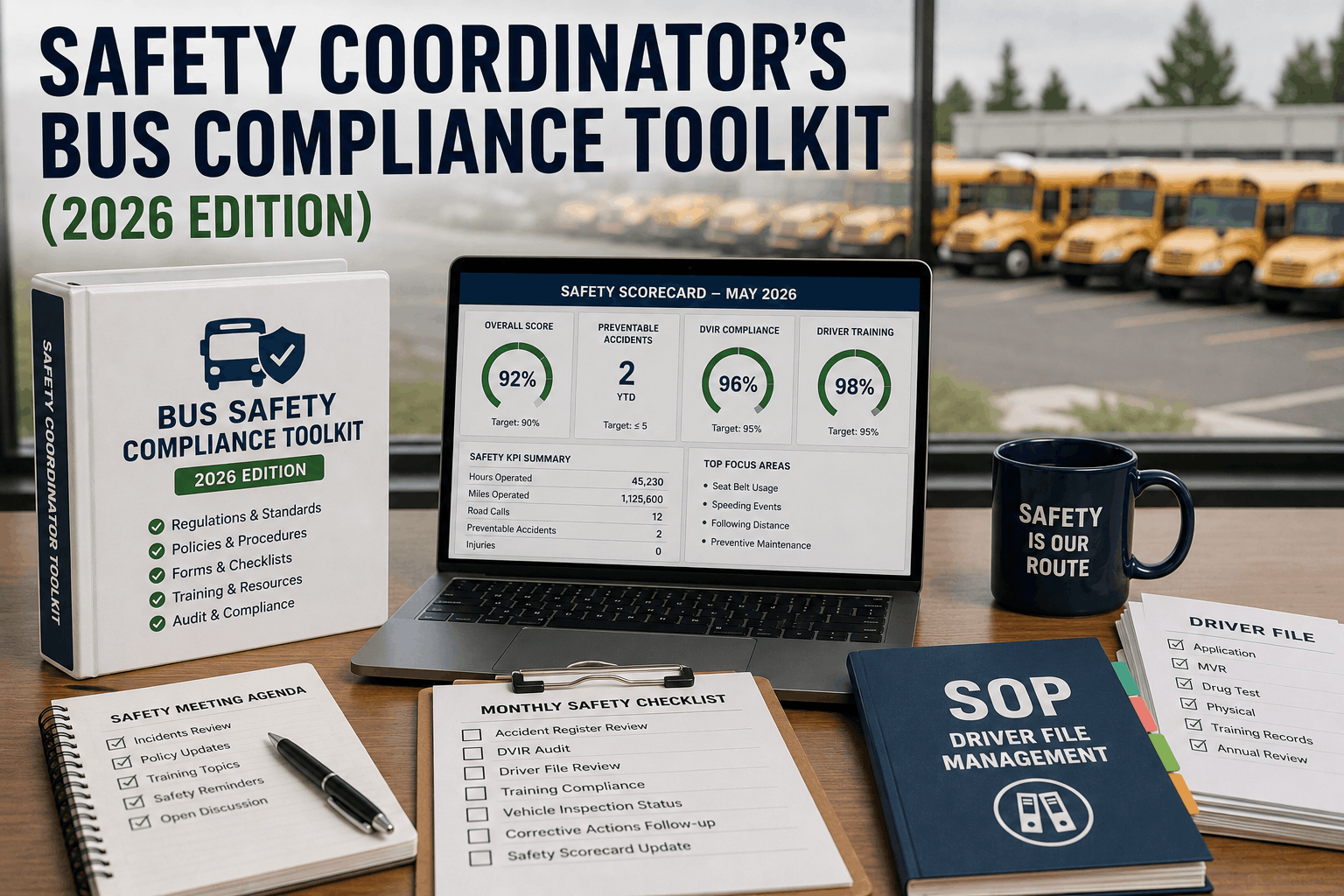
Safety coordinators at bus fleets juggle audit binders, accident logs, driver qualification files, and DVIR review queues that live in separate folders, spreadsheets, and filing cabinets. When an FMCSA or state DOT auditor asks for a document on the spot, the scramble to find it is often the first sign that the safety program is reactive instead of structured. Start Free Trial to see how BusCMMS gives safety coordinators one connected toolkit for audit prep, accident records, driver files, and DVIR review tracking.
Give Your Safety Program One Home Instead of Five Folders
BusCMMS centralizes audit documentation, accident register entries, driver qualification files, and DVIR review cadence into a single toolkit safety coordinators can open in seconds during an audit or a board review.
Why Safety Coordinators Need a Centralized Compliance Toolkit
A bus fleet safety program is only as strong as its weakest record. Missing driver file documents, a stale accident register, or an unreviewed batch of DVIRs can turn a routine FMCSA safety audit into a finding with real financial and operational consequences. Book a Demo to see how BusCMMS keeps every compliance record current, cross-referenced, and ready to present without a week of preparation.
Audit Prep Center
Keeps every document an FMCSA or state auditor typically requests organized by category and update date, so a safety coordinator can generate an audit-ready packet in minutes instead of days.
Accident Register
Logs every recordable accident with date, mileage, injury and disabling-damage status, matching the FMCSA accident register format an investigator will expect to review during a compliance review.
Driver File SOP Tracker
Tracks the standard operating checklist for every driver qualification file, flagging expired medical cards, missing MVR pulls, or incomplete road test records before they become audit findings.
DVIR Review Cadence
Confirms that every driver vehicle inspection report defect is reviewed and signed off within the required window, giving safety coordinators a defensible paper trail for every reported issue.
Monthly Safety Scorecard: KPI Progress Tracking
A safety coordinator's monthly scorecard turns scattered compliance activity into a set of trackable percentages that leadership can review at a glance. BusCMMS calculates each score directly from driver files, accident logs, and DVIR review records already stored in the system.
-
Audit Readiness Score
92%
Documents current against the audit checklist
-
Driver File Completion
96%
Qualification files with no open gaps
-
DVIR Review Compliance
89%
Defects reviewed inside required window
-
Accident Register Currency
100%
Entries logged within 24 hours
-
Training Completion Rate
84%
Annual safety training modules closed
-
Corrective Action Closure
78%
Open findings resolved within target days
Safety Coordinator Toolkit Components: Reference
Scroll for more
Toolkit Component | Update Frequency | Regulatory Basis | BusCMMS Feature | Primary Owner |
|---|---|---|---|---|
| Audit Prep Center | Continuous | FMCSA Compliance Review | Audit-ready packet export | Safety Coordinator |
| Accident Register | Within 24 hours | 49 CFR 390.15 | Structured accident log | Safety Coordinator |
| Driver Qualification File | Ongoing per driver | 49 CFR 391 Subpart C | Driver file SOP tracker | HR / Safety |
| DVIR Review Log | Daily | 49 CFR 396.13 | Defect review workflow | Maintenance / Safety |
| Training Records | Annual | State DOT requirement | Training completion tracker | Safety Coordinator |
Before BusCMMS our audit prep took a full week of pulling paper files from three different offices. Now our safety coordinator builds the entire packet from one screen and we walked through our last state review without a single missing document.
Fleet Safety Director
Regional School Bus Fleet, Ohio, USA
Building Your Safety Compliance Toolkit: Implementation Steps
-
01
Centralize Existing Records
Import current driver files, accident logs, and DVIR history into BusCMMS so every past record sits in one searchable toolkit before the next audit cycle begins.
-
02
Set the Audit Checklist
Configure the audit prep checklist against your governing agency's requirements so missing documents surface automatically rather than during the audit itself.
-
03
Assign Review Ownership
Define who reviews DVIR defects, who logs accidents, and who maintains driver files so every compliance task in the toolkit has a single accountable owner.
-
04
Automate Expiration Alerts
Turn on alerts for medical card expirations, MVR pull dates, and training renewals so the safety coordinator is warned weeks before a gap becomes a finding.
-
05
Review the Monthly Scorecard
Walk through the KPI scorecard every month with fleet leadership to confirm audit readiness, driver file completion, and DVIR review compliance stay on target.
-
06
Run a Mock Audit Quarterly
Use the audit prep export to run an internal mock audit each quarter, closing any gaps long before a real FMCSA or state DOT reviewer arrives on site.
Frequently Asked Questions
What should a bus safety coordinator's compliance toolkit include?
An audit prep center, an FMCSA-format accident register, driver qualification file tracking, and a DVIR review cadence log, all cross-referenced so any document can be produced immediately.
How does BusCMMS help with FMCSA audit preparation?
BusCMMS keeps every required document current as it is created, then exports an organized packet matching common audit checklist categories on demand.
What counts as a recordable accident on the register?
Any accident involving a fatality, injury requiring transport, or disabling damage to a vehicle towed from the scene, per the federal accident register definition.
How often should DVIR defects be reviewed?
Defects should be reviewed and either repaired or certified as not affecting safe operation before the vehicle is dispatched again, per federal inspection rules.
What documents make up a driver qualification file?
Application, MVR, road test certificate, medical certificate, and annual review records, each tracked against its own renewal or expiration date.
How is the monthly safety scorecard calculated?
BusCMMS pulls completion and currency percentages directly from driver files, accident entries, and DVIR reviews already logged in the platform.
Can multiple safety staff share the same toolkit?
Yes, role-based access lets safety coordinators, HR staff, and maintenance leads each work in their assigned section of the same compliance record.
Does the toolkit work for both school bus and transit fleets?
Yes, the same audit, accident, driver file, and DVIR structure applies to school bus, transit, and paratransit fleet safety programs alike.
Walk Into Your Next Audit Fully Prepared
BusCMMS keeps audit documentation, accident records, driver files, and DVIR reviews current automatically, so your safety coordinator is never scrambling before a compliance review.