A bus breaks down on a highway at 2:15 PM. There are 42 passengers aboard. The driver attempts roadside mechanical repair. It doesn't work. The driver calls dispatch at 2:18 PM. The dispatcher is on another call. The driver repeats the call at 2:22 PM. The dispatcher finally answers at 2:24 PM. The dispatcher manually searches for maintenance documentation to understand the problem. They manually check which mechanics are available. They manually locate a tow truck. By 2:32 PM — 17 minutes after the initial breakdown — the tow truck is being dispatched. Meanwhile, 42 passengers are stranded. The bus is blocking a lane. Traffic is backing up. Passenger anxiety is rising. In that 17-minute window, if there had been an accident, emergency responders wouldn't know the exact passenger count, medical conditions, or bus specifications. The response delay isn't just an inconvenience — it's a safety liability. Here's how digital emergency response systems compress dispatch time from 17 minutes to 90 seconds, and why it matters for passenger safety.
Safety & Rapid Response
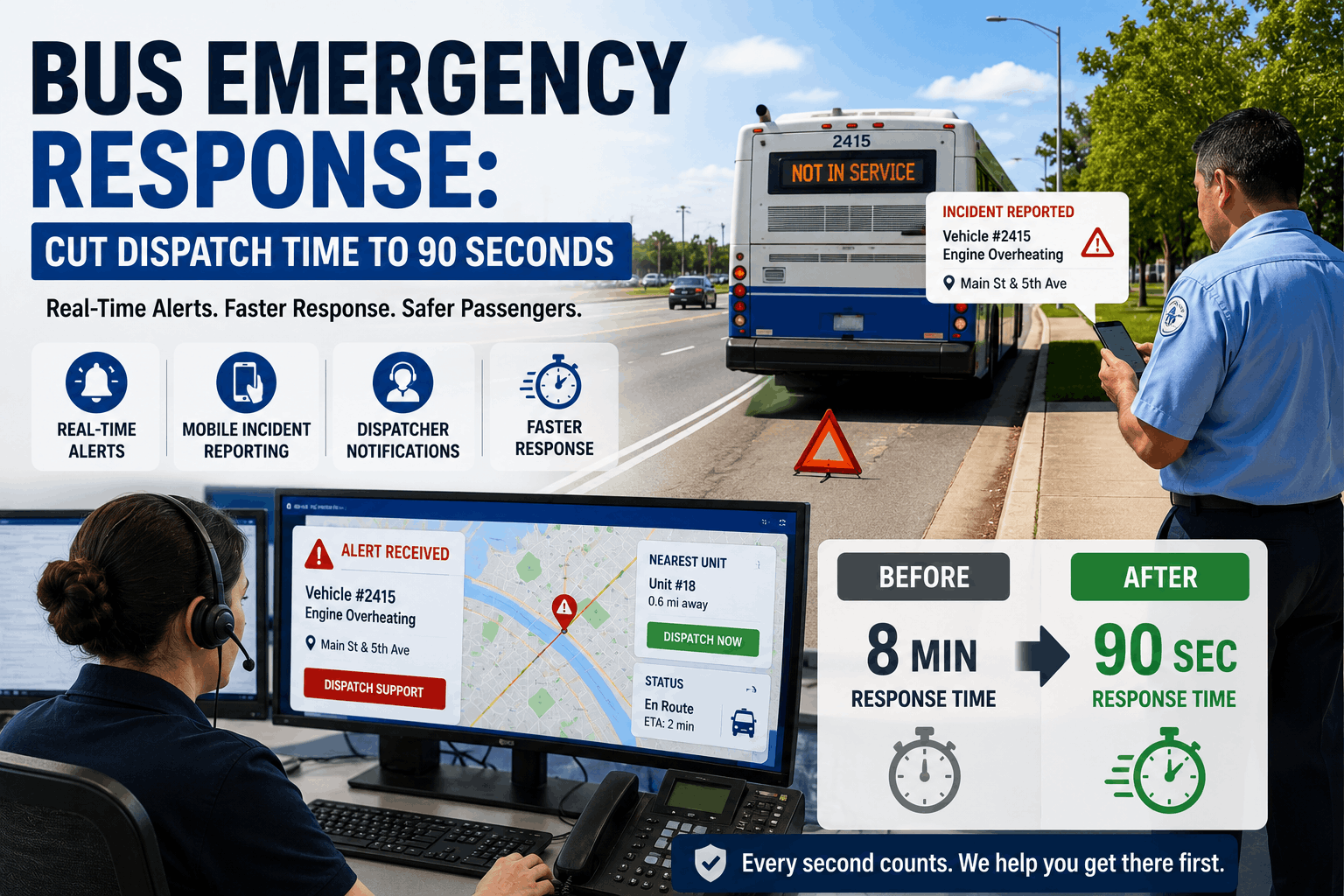
Bus Emergency Response: Cut Dispatch Time to 90 Seconds
When a bus breaks down or has an accident, every second of dispatcher response time affects passenger safety. How real-time CMMS notifications and mobile incident reporting compress response from 8 minutes to 90 seconds. Complete incident response workflow that ensures passengers get help immediately, not after bureaucratic delay.
1The Response Delay Problem: Why Dispatch Takes So Long
Traditional emergency response relies on a radio or phone call from the driver. The dispatcher picks up (if available), listens to the problem (often unclear because the driver is stressed), manually searches for relevant information (bus specifications, driver safety file, nearest mechanics, tow truck availability), makes decisions about response, and dispatches resources. This process is inherently slow because every step is manual and sequential.
Breakdown of the 17-minute delay: 2:18 PM — Driver calls dispatch; dispatcher is on another call, driver gets voicemail or busy signal. 2:22 PM — Driver reattempts call; dispatcher answers. 1-2 minutes of call explaining the problem (is it mechanical, accident, medical, security?) but clarity is limited because driver is stressed. 2:24 PM — Dispatcher begins searching: What kind of bus is this? (Need to know capacity, fuel type, transmission type to understand the breakdown). Where exactly is the bus? (GPS might show general area, but not exact highway mile marker). What's the driver's status? (Is the driver safe? Any injuries?). Is there a preferred mechanic for this bus? (What if this is a transmission issue and the bus has a specific transmission specialist?) Which tow truck company is on contract? (Call them, wait for availability). 2:28 PM — Dispatcher finally has enough information to make a decision and dispatch resources. 2:32 PM — Tow truck actually dispatched (4 minutes after dispatcher made the decision, because they had to call a vendor). Total from breakdown to resource dispatch: 14-17 minutes.
During this time, the bus is a liability: passengers are stranded, traffic is blocked, emergency responders don't know the situation exists because no 911 call has been made (assuming it's just a mechanical failure, not an accident). If an accident occurred during those 17 minutes, response would be even more delayed because emergency services wouldn't have pre-positioned information about the bus, passenger count, or special needs.
2The Digital Solution: Automated Incident Detection and Real-Time Notifications
A real-time emergency response system replaces manual phone calls with automated detection and instant notifications. Here's how it works in the 2:15 PM breakdown scenario: 2:15 PM — The bus breaks down. The driver immediately has two options: (1) Use the BusCMMS mobile app to report the incident (one tap: "Vehicle Breakdown" category), which triggers an automated incident ticket. (2) Press a dedicated emergency button on the dashboard (if equipped) which automatically sends an SOS signal. Either way, at 2:15:05 (5 seconds after breakdown), the system springs into action.
What happens in the next 30 seconds: 2:15:10 — The incident report generates automatically with: (1) Bus specifications pulled from fleet database (40-seat coach, Cummins diesel, transmission type, known mechanical issues); (2) GPS location (exact highway mile marker, direction, nearby cross streets); (3) Driver information and safety status (is driver reporting injuries or safety concerns?); (4) Passenger manifest (how many passengers, any special needs passengers?); (5) Assigned maintenance facility and preferred mechanic. 2:15:20 — The incident is simultaneously broadcast to: (1) Dispatch manager (receives alert on phone and dashboard); (2) Mechanics at the assigned maintenance facility (receive alert); (3) Tow truck service partner (receive alert with bus specs and location); (4) Operations management (receive alert for situational awareness). 2:15:30 — Dispatch manager acknowledges incident and makes dispatch decision in under 30 seconds because all information is already available. They tap "Authorize Tow Truck" and "Call Driver" to confirm status.
By 2:15:45 — less than 1 minute after the breakdown — the tow truck service partner has already received the dispatch order directly into their system. Their dispatcher immediately dispatches the nearest available tow truck. By 2:17 PM (2 minutes after breakdown), the tow truck knows it's being dispatched and is en route. By 2:22-2:25 PM (7-10 minutes after breakdown, vs. 17 minutes previously), the tow truck is on-site.
3The Safety Advantage: What Pre-Positioned Data Enables
The real power of real-time incident response isn't speed alone. It's the pre-positioned information that enables faster, safer decisions. When a dispatcher has the complete picture in the first 30 seconds, they can make much better decisions than when they're assembling information over 17 minutes.
Example 1: Mechanical vs. Safety Incident A driver reports Bus 47 "has an issue." With manual dispatch, the dispatcher doesn't know if this is a mechanical problem (low power, fluid leak, warning light) or a safety issue (drunk passenger, altercation, security threat). The dispatcher asks clarifying questions, which takes time. With automated incident reporting, the driver selects the incident category: "Mechanical" or "Safety/Security" or "Medical Emergency." The dispatcher immediately knows the severity level and can route appropriately. Mechanical goes to maintenance. Safety goes to security/police. Medical goes to ambulance service.
Example 2: Special Passenger Needs The bus carrying a group of special-needs students breaks down. The passenger manifest is already in the system. The dispatcher can see there are 8 wheelchair-accessible passengers and 2 passengers with severe anxiety (noted in safety profiles). When dispatching the replacement bus, the dispatcher ensures the replacement has wheelchair lifts and alerts the new driver about the passenger population. Without this pre-positioned data, the replacement bus might arrive without lifts, creating a 30-minute additional delay.
Example 3: Injury or Medical Emergency A bus with 45 passengers has a minor collision. A passenger reports back pain. The driver initiates an incident report indicating "accident with possible injury." The system automatically: (1) Flags the incident as requiring emergency responders; (2) Creates a pre-positioned incident card for 911 dispatchers showing bus location, passenger count, reported injuries, bus specifications; (3) Sends alerts to the organization's risk management team and safety officers. When 911 is called (by driver or passenger), emergency responders already have the incident details in their dispatch system, reducing confusion and response delays.
4Technology Stack: What Powers 90-Second Response Times
Component 1: Mobile Incident App Every bus driver has a mobile app with one-tap incident reporting. Bus 47 breaks down? Driver taps the app, sees categories (Mechanical, Safety, Medical), selects category, writes two-sentence description. Total action: 15 seconds. The app automatically attaches the bus's location (GPS), timestamp, and driver identity. No driver has to manually report the incident.
Component 2: Real-Time Notification Engine The moment an incident is reported, the system broadcasts it to 4-6 stakeholders simultaneously using multiple notification channels: push notifications to mobile apps, SMS text messages, email, and automatic voice calls. Because multiple stakeholders are notified at the same time, the system is resilient to one person missing a notification. If the primary dispatcher doesn't see the app notification, they'll get an SMS. If they miss that, they'll get a voice call.
Component 3: Vehicle Telematics Integration Modern buses have onboard telematics systems that send real-time data: engine temperature, fuel pressure, transmission status, door locks, emergency lights. When an incident is reported, the system automatically pulls the last 60 seconds of telematics data. This gives mechanics a head start on diagnosis. "Driver reports engine warning light" becomes "Driver reports engine warning light; telematics shows oil pressure dropped from 45 psi to 15 psi at 2:14:52 PM; likely oil leak or pump failure." This telematics context cuts mechanic diagnosis time from 30 minutes to 5 minutes.
Component 4: Integration with Tow Truck and Service Partners The incident system is integrated with vendor dispatch systems. When dispatch approves a tow request, it doesn't go to a human at the tow company's office. It goes directly into their dispatch software, automatically triggering the nearest-available tow truck assignment. The tow driver receives the incident details (location, bus specs, nature of problem) directly on their mobile device before they even leave the lot.
Component 5: Passenger Communication Automation Once an incident is confirmed and resources are dispatched, the system automatically sends notifications to passengers' emergency contacts. "Bus Route 7 has been delayed due to mechanical issues. Estimated delay: 45 minutes. Replacement bus has been dispatched. Your passenger is safe." This reduces panic and eliminates the chaos of 40+ parents all calling the dispatch center asking what happened.
5Response Workflow: The Complete 90-Second Incident Cycle
T+0 to T+15 seconds: Incident Reporting Driver uses app or presses emergency button. System receives incident data and validates: Is this a real incident or accidental activation? Multi-step confirmations prevent false alarms. Incident is logged with timestamp and location.
T+15 to T+30 seconds: Information Assembly and Distribution System pulls bus specs, driver record, passenger manifest, preferred vendor, historical maintenance. All assembled into incident ticket. Simultaneously, notifications go to dispatch, maintenance, safety, and assigned vendor. Multiple notification channels ensure reception.
T+30 to T+45 seconds: Dispatcher Decision Dispatcher reviews incident on their dashboard. All relevant information is pre-assembled. Dispatcher makes decision: Send maintenance tech? Send tow truck? Call emergency services? The decision is one-tap on the dashboard, not a series of phone calls. Decision logged.
T+45 to T+60 seconds: Resource Dispatch Dispatch decision is automatically routed to assigned vendor (mechanic, tow truck). Vendor receives the order in their dispatch system, not a phone call. Vendor dispatcher automatically assigns nearest available resource. Resource begins deployment.
T+60 to T+90 seconds: Confirmation and Passenger Communication Driver receives confirmation that help is on the way and ETA. Passengers receive automated notification about delay and replacement bus arrival. Management receives incident summary. System enters monitoring mode, tracking resource ETA and updating status in real-time.
6Real-World Impact: Response Time Improvements and Safety Metrics
Metric 1: Dispatch Response Time Manual dispatch: 8-17 minutes average (depending on dispatcher availability, complexity of problem). Automated dispatch: 60-90 seconds average (regardless of dispatcher availability, because notification is immediate and decision is simplified). Improvement: 85-90% reduction in dispatch time. This means resources are being deployed 7-15 minutes sooner.
Metric 2: Passenger Notification Time Manual process: 20-40 minutes (driver calls school/organization, school initiates parent contact, parents hear through phone chains). Automated process: <2 minutes (system sends automated notification to emergency contacts). Parents know their child is stranded and being helped within 2 minutes instead of 30+ minutes. This dramatically reduces panic and enables better parental decision-making (some might arrange pickup, reducing strain on replacement bus).
Metric 3: Vendor Response Time Manual request (phone call): Vendor receives request, manual dispatcher logs it, dispatcher assigns nearest truck, assigned driver is contacted (often by phone), driver responds. Total: 10-20 minutes from request to actual truck deployment. Automated request: System assigns nearest truck automatically, truck driver receives mobile notification, driver confirms and begins deployment. Total: 2-3 minutes from request to deployment.
Metric 4: False Alarm Rate Manual emergency buttons (if available): 8-12% false alarm rate because drivers accidentally activate button while handling control panel. Automated app-based reporting: <1% false alarm rate because multi-step confirmation prevents accidental activation. Fewer false alarms = better resource availability for real incidents and higher credibility of alerts in the community.
Metric 5: Incident Documentation Completeness Manual radio reports: Often incomplete, subject to radio interference, unclear details, missing context. Automated incident reports: 100% of required fields automatically captured (location, time, bus ID, driver ID, incident category). Manual follow-up documentation is still needed, but the initial report is complete and immediately archivable.
We had a bus breakdown on a major highway during evening rush hour. The driver pressed the emergency button in our new system at 4:18 PM. By 4:19:30 PM, dispatch had the incident details, approved tow truck dispatch, and the driver confirmed help was coming. By 4:24 PM, the tow truck was on-site. Parents received automated notification at 4:19 PM. With our old system, this incident would have had a 20-25 minute response time, with lots of confusion along the way. The parents would have found out through the rumor mill that their child was stranded. Now, everything is clear, documented, and handled professionally. Passengers feel safe because they know help is coming fast. Dispatch feels confident because they have complete information. It changed everything about our incident management.
Emergency Response Questions
What if the driver can't use the mobile app during an emergency?
Every system includes a physical emergency button on the dashboard that triggers an SOS alert without requiring the app. It's tactile, always available, and works even if the bus is completely disabled (no electrical power). The app is the preferred method for routine incidents; the button is the fallback for critical situations.
How do you prevent false alarms from emergency buttons?
Modern systems require confirmation: pressing the button once triggers a 10-second countdown with a warning "Emergency Alert Activated - Press Again to Confirm or Press Cancel to Abort." This prevents accidental activation from bumping the button. Only two deliberate presses trigger the alert.
What information needs to be captured for a proper incident report?
Minimum required: incident category, location, timestamp, driver ID, bus ID, passenger count, injuries reported, nature of problem (1-2 sentence description), driver status/safety. Optional but recommended: telematics data, photos/video, witness statements, environmental conditions. The system automatically captures required fields; driver provides description.
Do real-time alerts create alert fatigue for dispatchers?
Potentially, if not configured properly. The solution is intelligent filtering: only real incidents trigger alerts (false alarms filtered), incidents are categorized so mechanical incidents don't trigger the same urgency level as medical emergencies, and staffing is right-sized so dispatchers can handle the alert volume. Properly configured, real-time systems reduce overall alert volume because they eliminate cascading callbacks.
How do you integrate with 911 emergency services?
Direct integration with 911 is not yet standardized, but incident systems can pre-create incident cards in 911 dispatch systems for serious incidents (accidents with injuries). The driver still makes the 911 call, but 911 dispatchers have pre-positioned information about the bus, passengers, and nature of emergency. This reduces 911 dispatcher confusion and response delays.
What's the cost of implementing real-time incident response?
Software cost: $400-600 per bus annually for the CMMS platform with incident module. Hardware cost: Emergency buttons and dashboard equipment (one-time): $2,000-4,000 per bus. Total year-one cost for 100-bus fleet: $60-80K. Savings from faster response (reduced extended breakdowns, prevented accidents, reduced admin overhead): $80-120K annually. Positive ROI in year one.
Can drivers override the automated dispatch decisions?
Yes, dispatch managers can always override automated decisions. If the system recommends Mechanic A but Mechanic B is closer, the dispatcher can override. The automation provides the recommendation based on data, but human judgment still applies. This balance prevents both "wrong" automation and manual delays.
Your Fleet's Emergency Response Capabilities Need an Upgrade
90-second response times. Real-time notifications. Pre-positioned incident data. Passenger safety assurance. The complete emergency response system that ensures passengers get help fast and management has full visibility. See how real-time incident response could improve your fleet's safety profile and reduce response costs.