A maintenance log is the record of what work has been performed on a bus, when it was performed, and what parts were used. This historical record is essential for troubleshooting, warranty claims, compliance documentation, and making decisions about bus replacement. Without a maintenance log, you have no way to answer critical questions: What work has been done on this bus? How much have we spent maintaining it? When was the last time the transmission was serviced? Has this component been repaired or replaced before? Is this failure covered under warranty? A proper maintenance log captures every service performed, creating a permanent record for the bus's entire service life. Many fleets use paper work orders or informal spreadsheets to track maintenance. These approaches lose information—paper gets filed away and becomes impossible to search, spreadsheets become disorganized and incomplete. A systematic maintenance log ensures information is captured consistently, stored securely, and accessible when needed. A good maintenance log template includes: date of service, mileage at service, description of work performed, parts replaced, labor hours, cost, technician name, and next scheduled service. This guide provides a free template and instructions for implementing maintenance logging in your fleet.
Fleet Operations Tools
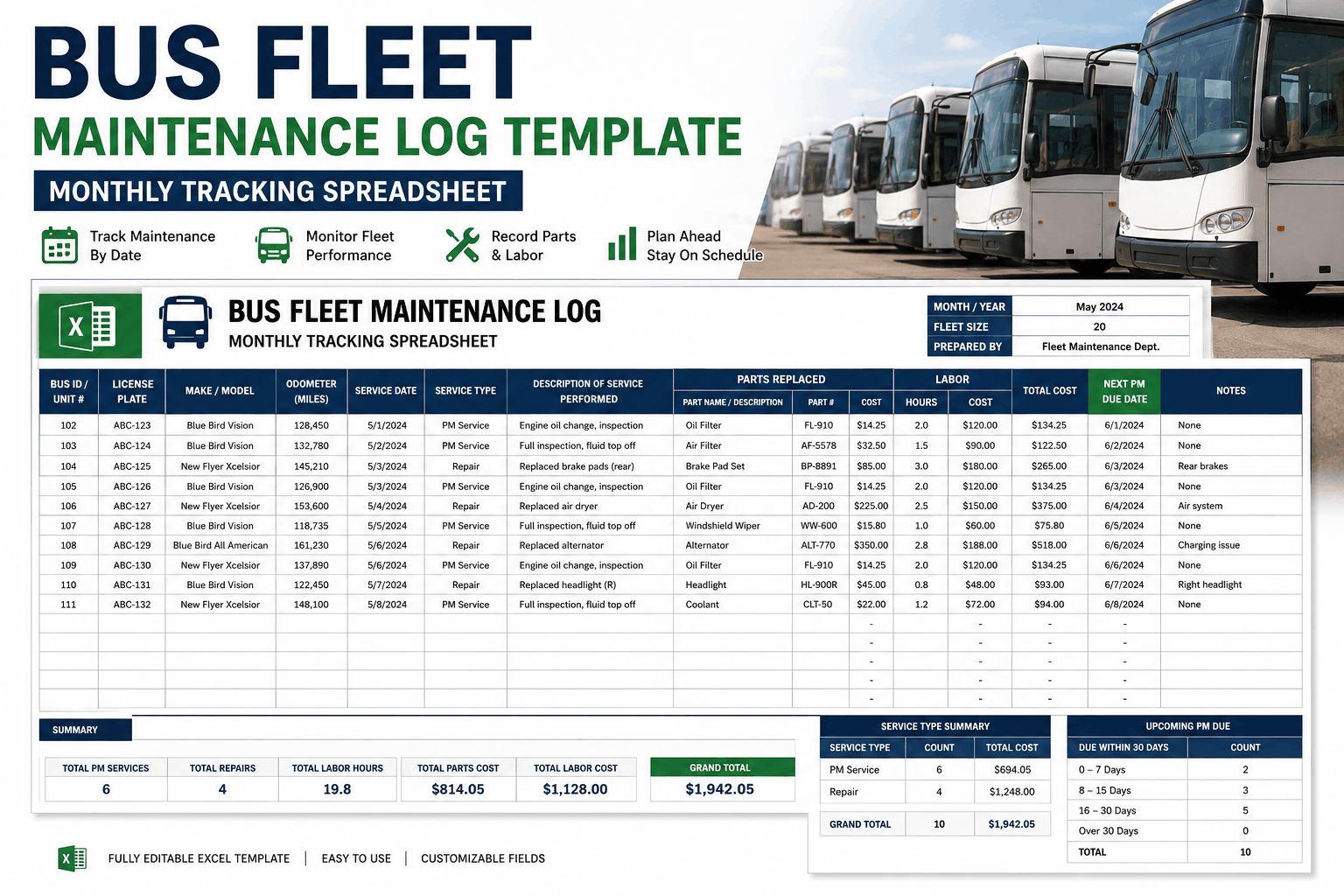
Bus Fleet Maintenance Log Template
Free monthly bus fleet maintenance log template in Excel. Track service dates, mileage, parts replaced, labor costs, and upcoming PM due dates for every vehicle in your fleet. Download now.
Why Maintenance Logging Matters: The Foundation of Fleet Management
A maintenance log is more than just documentation. It's the foundation of intelligent fleet management. Every maintenance action—from a simple fluid check to a major component replacement—should be logged. This creates a permanent record that informs decision-making for years to come. When you're evaluating whether to keep a 12-year-old bus or replace it, the maintenance log shows you the actual cost of keeping that bus operational. When a component fails and you believe it's warranty-covered, the maintenance log provides documentation proving you performed required maintenance on schedule. When a mechanic encounters an intermittent problem (a part that fails occasionally but not consistently), the maintenance log shows previous repairs, allowing the mechanic to identify patterns and potential root causes.
Warranty claim documentation: Manufacturers frequently deny warranty claims, arguing that the failure resulted from improper maintenance or missed services. With a comprehensive maintenance log, you can prove that maintenance was performed according to specifications. You have documented evidence: when services were performed, what was done, what parts were replaced, and who performed the work. This documentation transforms warranty disputes from "your word against the manufacturer's" to objective evidence. Many fleets recover thousands of dollars in warranty claims simply by producing maintenance logs that prove proper maintenance. A denied warranty claim of $5,000 or more is worth the effort to maintain detailed logs.
Troubleshooting and pattern identification: When a problem recurs on a bus, the maintenance log shows previous occurrences. If a specific component fails repeatedly, the log reveals this pattern. Maybe a water pump fails every 18 months—suggesting a quality issue, improper installation, or operational problem (overheating). With a maintenance log, you notice the pattern and can investigate root causes. Without the log, each failure seems isolated. You replace the component and move on, only to have it fail again six months later. Logs reveal patterns that drive better decisions.
Cost tracking and ROI analysis: A maintenance log documenting every service and cost allows you to calculate the true cost of ownership for each bus. After five years, you know exactly how much you've spent maintaining a particular bus. After ten years, you have comprehensive data showing whether that bus is still economical to operate or whether replacement would be smarter. This data-driven decision-making prevents the emotional attachment to old buses that "still work" from overriding economic reality. If a 12-year-old bus has cost $45,000 in maintenance over its life, and a new bus costs $120,000, the economics might still favor replacement if the old bus requires a $20,000 transmission overhaul and will likely need another major repair in two years.
Compliance and regulatory documentation: State and federal regulators require documentation of inspections and maintenance. FMCSA regulations require school buses to be inspected annually and maintain documentation of inspections. State DOT audits require evidence that buses meet safety requirements. A maintenance log documenting all inspections, safety-related repairs, and compliance work protects your fleet during audits. Without documentation, you have no proof that inspections were performed, putting your operating license at risk.
Essential Data Elements for a Complete Maintenance Log
Basic identification information: Every maintenance log entry should clearly identify which bus the work was performed on. Include: bus number (unique identifier used consistently throughout your fleet), model and year, VIN (vehicle identification number—important for warranty claims), and current mileage at time of service. This basic information links the maintenance record to the specific bus and creates accountability. When multiple buses have similar problems, the VIN and model allow you to identify if the issue is specific to one bus or affects multiple vehicles of the same model.
Service date and timing information: Log the date the service was performed. For maintenance performed over multiple days (a major overhaul taking three days to complete), log the date work started and date work was completed. Include the time in service (how many hours the bus spent in the shop), important for understanding labor cost and operational impact. This timing information helps identify seasonal patterns. If you notice all your brakes are being serviced in November and December, you might realize your routes change seasonally and create different braking demands.
Work description and detail: Describe exactly what work was performed. "Engine service" is too vague. "Oil change, oil filter replacement, air filter replacement, visual inspection of engine compartment, check all fluid levels" is specific. Specificity matters for future reference. If a mechanic encounters an intermittent electrical problem and reviews the history, vague entries like "electrical work" aren't helpful. Specific entries like "diagnosed and repaired intermittent starter solenoid connection, cleaned terminal corrosion, applied dielectric grease" help identify whether the problem was actually fixed or if the same issue is recurring.
Parts replaced and inventory tracking: Log every part replaced. Include: part name, part number (OEM part number, important for warranty claims), quantity, cost per part, and total cost. This creates a parts usage history. Over time, you see which parts are failing frequently, which suppliers you're using, and whether you can negotiate volume discounts. A transmission fluid change log shows you're using 15 quarts of transmission fluid per service. If you perform 30 transmission fluid changes per year, that's 450 quarts of fluid. Armed with this data, you can negotiate volume pricing with suppliers. Without the data, you pay whatever suppliers quote.
Labor information: Log who performed the work (technician name or ID), how many labor hours were spent, and labor cost. This creates accountability for work quality and helps identify technician performance. If one mechanic's repairs frequently require rework or warranty claims due to improper work, the maintenance log reveals this pattern. Labor cost tracking also helps budget for future maintenance. If you historically spend 0.5 hours of labor per oil change at $45/hour labor cost, you can budget $22.50 per oil change for labor.
Next scheduled service information: Note when the next required service is scheduled. If the last oil change was performed at 25,000 miles, and oil changes are every 5,000 miles, the next service is due at 30,000 miles. This future-looking information prevents missed services. When the bus reaches 30,000 miles, you should know from the maintenance log that service is due. If the bus is running but service hasn't been scheduled, the log alerts you to the gap.
Maintenance Log Template Structure and How to Use It
Single-bus log vs. fleet-wide log: There are two approaches to organizing a maintenance log. A single-bus log dedicates one spreadsheet or document to a single bus, with chronological entries from the day the bus enters service to the day it's retired. This approach creates a comprehensive history for that specific bus, easy to reference when troubleshooting or evaluating the bus's condition. The downside: managing 50+ separate documents if you have a 50-bus fleet. A fleet-wide log tracks all buses in one spreadsheet, with rows for each service event and columns for bus ID, date, description, parts, cost, etc. This approach creates visibility across the entire fleet but becomes unwieldy with hundreds or thousands of entries. Most fleets use a hybrid: one spreadsheet per month or quarter tracking all buses during that period, archived when the period ends, creating a set of documents easy to search and manage.
Monthly vs. quarterly log update cycles: How frequently should the log be updated? Daily is ideal—when a mechanic completes work, they log it immediately. Weekly is acceptable—mechanics submit work orders weekly and someone enters them into the log. Monthly is minimum—maintenance coordinator enters all completed work monthly. More frequent updates create more current logs and reduce the risk of information being lost or forgotten. Paper-based logs updated monthly are better than no log, but digital logs updated weekly or daily are superior.
Column organization in Excel spreadsheet: Organize columns logically: Bus ID, Date, Mileage, Work Description, Parts Used/Replaced, Parts Cost, Labor Hours, Labor Cost, Technician Name, Next Service Due, and Notes. This organization allows quick sorting and filtering. You can sort by Bus ID to see the complete history for a specific bus. Sort by Part Name to see every instance of a specific part being replaced, revealing patterns. Sort by Date to see all maintenance performed in a specific period.
Data entry standards and consistency: Establish standard naming conventions so data entry is consistent. Always enter bus ID the same way (Bus-01, not Bus01 or BUS1). Always enter part names the same way (Brake Pad Set, not brake pads or brake pads set). Consistent naming allows reliable sorting and filtering. Inconsistent naming creates duplicate entries and prevents pattern identification. Standardize date formatting (MM/DD/YYYY not M/D/YY). Standardize cost entries (use actual dollar amounts like 150.00, not 150 or $150).
Archiving and backup: Maintain backups of your maintenance logs. Digital files can be lost. Cloud storage (Google Drive, OneDrive, Dropbox) provides automatic backup and allows access from multiple locations. Archive old logs—don't keep active work logs for the past 10 years all in one spreadsheet. Move completed years to archive files, keeping current working logs manageable in size.
Transitioning from Manual Logs to Digital CMMS: When to Upgrade
Spreadsheet-based logging limitations: A well-maintained Excel maintenance log is better than no log at all. However, Excel has limitations. No automated alerts when maintenance is overdue. No automatic calculation of total costs—you have to sum manually. No centralized access if multiple people need to view the log. No automatic backup if the file is accidentally deleted. No user access controls—anyone with access can edit any data, potentially creating confusion or errors. As your fleet grows beyond 50 buses or maintenance volume exceeds 100+ services per month, spreadsheet management becomes cumbersome.
When to transition to CMMS: If you're asking these questions, you're ready for a CMMS: Are we missing maintenance services because there's no system reminding us when services are due? Do we struggle to access maintenance history when we need it? Do we lose information because paper work orders get filed away? Are we having trouble calculating total maintenance costs for a bus? Are warranty claims being denied because we can't prove maintenance was performed? A CMMS addresses all these issues through automation and centralized data management.
Hybrid approach during transition: Many fleets transition gradually from spreadsheets to CMMS. Start with a CMMS for core functionality (asset tracking, work order generation, compliance tracking) while maintaining a spreadsheet for cost tracking and specific reporting needs you haven't figured out how to do in the CMMS yet. As you become comfortable with CMMS capabilities, rely less on spreadsheets. Eventually, the CMMS becomes your primary system and spreadsheets become supplementary tools for specific analysis rather than primary record-keeping.
Data migration from spreadsheet to CMMS: Transitioning from spreadsheet logs to a CMMS requires moving your historical data into the system. If your spreadsheet is well-organized (consistent naming conventions, clean data), migration is straightforward. You export the data in a formatted file and the CMMS imports it. If your spreadsheet is messy (inconsistent naming, missing data, poor organization), you may need to clean it before importing. This one-time cleanup effort pays off by creating clean historical records in the CMMS.
Template Features and How to Customize for Your Fleet
Pre-built template features: The free template provided includes: monthly tracking sheet with columns for all essential information, automatic cost totaling (sum formulas calculate total parts cost and labor cost for each month), conditional formatting (cells turn yellow when parts cost exceeds budget, turn red when budget is exceeded), quick reference checklist of common services to ensure nothing is forgotten, sample data showing proper format and how to use the template. The template is ready to use immediately—just enter your fleet data and begin logging.
Customization options: The template can be customized for your specific fleet: add columns for specific information (GPS coordinates of where maintenance was performed, customer complaints addressed, parts suppliers used). Modify color coding to match your organization's preferences. Adjust budget thresholds. Add your company logo. Remove unused columns if they're not relevant to your operation. The template is a starting point—tailor it to your needs.
Multiple sheet organization: The template includes separate sheets for each month, allowing one spreadsheet to cover a full year of maintenance. At the end of each month, save the spreadsheet with a new filename (2024-January-MaintenanceLog, 2024-February-MaintenanceLog) and start fresh for the new month. This keeps each month's spreadsheet manageable in size and allows year-over-year comparison. You can summarize annual costs by reviewing monthly totals across all sheets.
Integration with other systems: The maintenance log can reference information from other systems. Link to parts inventory (when a part is logged in the maintenance log, it triggers a parts order if inventory falls below reorder point). Link to your accounting system (costs entered in the maintenance log automatically flow to budget tracking). Link to your asset management system (buses registered in one place are referenced in the maintenance log). These integrations create information flow rather than isolated silos.
The maintenance log template includes a monthly tracking sheet with the following structure:
| Bus ID | Date | Mileage | Work Description | Parts/Labor | Cost | Next Service |
|---|---|---|---|---|---|---|
| Bus-01 | 1/5/2024 | 42,500 | Oil change, air filter replacement | Oil (10qt), filter (1) | $85.00 | 47,500 mi |
| Bus-02 | 1/8/2024 | 38,200 | Brake pad replacement, inspection | Brake pads (2 sets) | $320.00 | 45,000 mi |
| Bus-03 | 1/12/2024 | 51,800 | Transmission service, fluid change | Trans fluid (15qt) | $175.00 | 56,800 mi |
This sample shows how the template organizes maintenance data. Your actual template will have all your fleet's buses and maintenance history.
Maintenance Log Template Questions
How detailed should work descriptions be in the maintenance log?
Be as specific as possible. Instead of "engine service," write "oil change, oil filter replacement, air filter replacement, check and top off all fluids, visual inspection of belts and hoses." Specific descriptions help future mechanics understand what was done and allow pattern identification when similar problems occur later.
Should we log every small repair or just major maintenance?
Log everything. Even small repairs create value by documenting what was done. Small repairs sometimes reveal patterns—if a specific bolt keeps loosening, multiple log entries over time show this pattern and allow root cause investigation. A complete maintenance history includes every service, big and small.
How long should we keep maintenance logs after a bus is retired?
Keep maintenance logs indefinitely, or at least for 7-10 years after a bus is retired. You might need to reference historical maintenance if the bus is sold and the new owner has questions, or if you later discover a systematic problem affecting that bus model. Historical data can inform decisions about similar buses still in service.
Can we use this template for warranty claim documentation?
Yes. A well-maintained maintenance log with detailed documentation of services performed serves as evidence supporting warranty claims. When a component fails and you believe it's warranty-covered, produce the maintenance log showing you performed required maintenance on schedule. This documentation supports your claim.
How do we ensure data accuracy in the maintenance log?
Establish a data entry process: mechanics complete work orders, supervisors review and sign off on completion, someone enters the information into the maintenance log within one week. Having a review step catches errors before they're logged. Entering data promptly prevents information being lost or forgotten.
Should maintenance logs be accessible to all staff or restricted?
Maintenance logs should be accessible to: mechanics (to understand bus history), supervisors (to manage maintenance and budgets), and management (for analysis). Restrict edit access to prevent accidental data corruption. Most staff can view but only authorized people can add new entries.
How does the template handle multiple maintenance facilities?
Add a column to identify which facility performed the maintenance. If you have Facility A, Facility B, and Facility C, note which facility performed each service. This allows you to compare maintenance practices and costs across facilities and identify if certain facilities are underperforming.
Start Logging Maintenance Today
A maintenance log is the foundation of intelligent fleet management. Use our free template to begin tracking maintenance, building a historical record that informs decisions for years. Download the template now and start documenting your fleet's maintenance story.