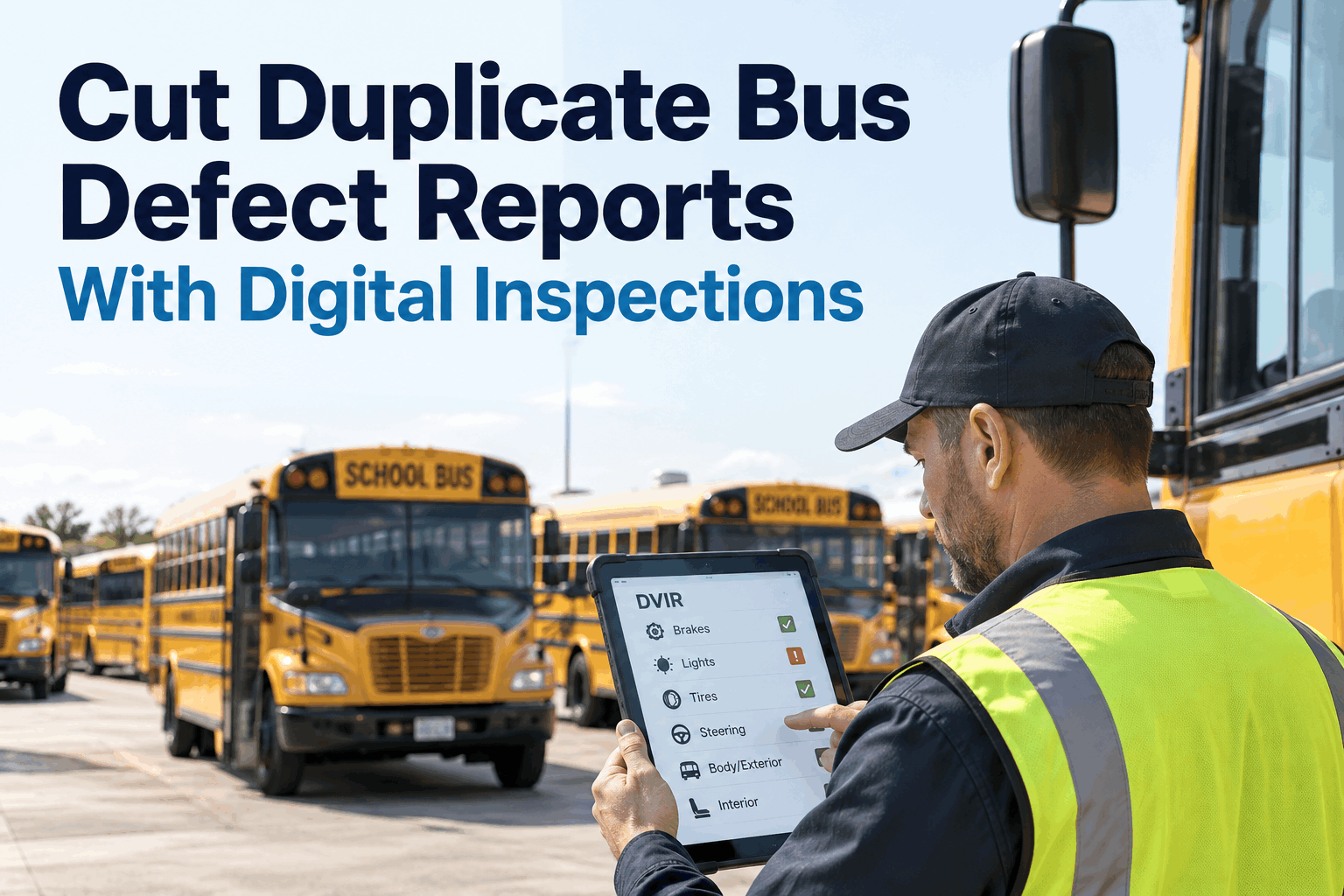
A shop foreman opens the DVIR queue at 6:15 AM and sees 47 new defect reports from overnight and morning pre-trips. Roughly 30 of them are duplicates — three drivers writing up the same broken interior light, five reporting the AC that has been on order for a week, four flagging the same rough idle nobody has cleared. The technicians will spend an hour just sorting duplicates from real defects before they touch a wrench. This guide covers duplicate bus defect reports — why they happen, and how digital DVIRs surface open issues to drivers so the queue actually reflects what needs work.
Cutting Duplicate Bus Defect Reports With Digital Inspections
Why drivers keep writing up known issues, and how digital DVIRs make the shop queue reflect real defects instead of daily noise.
- 4Root causes
- 5Defect states
- 90 dayHistory visible
The Duplicate Problem Nobody Measures
Duplicate bus defect reports are what happens when a driver writing a pre-trip inspection has no way to see what has already been reported on the bus they are inspecting. So they write down what they observe — a rough idle, a warm AC, a dim interior light — because that is the honest thing to do. The problem is not the driver. The problem is that same observation is now the eighth version of the same defect in the shop's queue this week, and the shop has to open, read, and dismiss each one before finding the two real new issues buried underneath.
On a mixed-shift fleet, the same defect on a single bus is frequently reported by three or more different drivers before any repair happens. Every duplicate is a work-order line the shop opens, reads, cross-references, and closes as a repeat — time that never touched an actual repair. Multiply by 60 buses and three shifts and duplicate triage becomes a full-time task somebody is doing without a job title for it.
There is a compliance angle too. A defect reported, closed, and reported again days later reads to a DOT auditor like a repair that was signed off without being verified. That is a much bigger conversation than duplicate noise — and the fix for both problems is the same: visibility. When the second driver can see the first driver's report and its current repair status, the second report either turns into a related observation or does not get written at all. Book a walkthrough to see open-defect visibility inside the driver DVIR flow.
The 4 Reasons Duplicate Reports Happen
Almost every duplicate DVIR report traces back to one of four causes. Naming them is the first step, because each has a different fix — and only one requires better driver behavior.
01 · No Visibility Into Open Defects
The driver has no way to see what was reported yesterday on this bus. They report what they observe. This is the single biggest cause — and the only one drivers cannot solve without a tool.
02 · No Repair Status Communicated Back
Even when a driver reports a defect, they never learn what happened with it. So they report again, half checking, half nudging. A "parts on order" status visible to the driver ends most of these.
03 · Repair Signed Without Verification
The work order was closed but the defect was not actually fixed. The next driver reports it again — correctly. This is the compliance-flag pattern DOT auditors look for.
04 · Related Symptoms Logged as New Defects
"AC warm," "AC blowing hot," "AC compressor loud" — three tickets, one underlying defect. Solved by letting drivers add an observation to an existing open ticket instead of forcing every entry into a new one.
Three of the four are workflow and tooling problems. Only cause 03 — unverified repair sign-off — is a human-accountability issue, and even that one is often a symptom of a shop rushing to close tickets because the queue is inflated with duplicates in the first place. Fix the visibility and the queue shrinks; a smaller queue lets the shop do actual verification.
The Before / After: What Changes When the DVIR Starts With Open Defects Visible
The single most important digital-DVIR feature for duplicate reduction is startling in how simple it is: when the driver opens the pre-trip on their assigned bus, the open defects for that bus load at the top of the checklist. That is it. Everything downstream depends on this one behavior.
Blank Form Every Shift
Open Defects Load First
The subtle detail is the "add new observation" affordance. It gives the driver a legitimate way to note something related without either being forced to invent a new ticket or feeling like their concern was ignored. A driver who taps "add observation" attaches their note to the existing work order — the shop sees additional context on the same defect, not a duplicate. Everybody wins: driver feels heard, shop keeps the queue clean, compliance record shows a coherent single defect history instead of six overlapping tickets. Sign up free and see the open-defect-first DVIR running on your fleet.
The Defect State Machine: Where a Report Should Live at Every Moment
A digital DVIR needs a shared vocabulary between the driver, the shop, and the compliance record. Five states cover every real defect. Both drivers and shop staff see the same state names — and drivers see enough of the state to know a report is being handled without needing a phone call.
Reported
Driver writes the defect on the DVIR. Timestamp captured.
Triaged
Shop reviews report. Confirms defect, upgrades to work order, or dismisses as duplicate of existing WO.
In Progress
Assigned technician + status: awaiting parts, in bay, road-testing. Driver sees ETA when known.
Repaired
Technician certifies fix complete. Work order closed on shop side. Defect awaits driver verification on next pre-trip.
Verified & Closed
Driver confirms repair holds on next pre-trip DVIR. Defect drops off the open list. Compliance record permanent.
The state that eliminates the most compliance risk is 05 — driver verification. A shop-closed defect that no driver has verified is exactly the pattern that raises audit flags. Digital DVIRs surface the "awaiting verification" state on the next driver's pre-trip; the driver confirms or re-reports. Either outcome is documented. That is what a defensible defect history looks like.
Duplicate Detection Rules: What the System Actually Matches
Beyond driver visibility, the system can flag likely duplicates before they reach the shop queue. Four matching rules cover most real cases. None is perfect on its own; combined, they catch almost every duplicate without suppressing genuine new defects.
Same Bus + Same Component
New report references the same bus and same component (HVAC, brakes, lights) as an existing open work order. Flagged for triage as probable duplicate.
STRONGEST SIGNALReported Within 72 Hours
Same-component reports on the same bus within a rolling three-day window auto-link to a candidate parent report unless clearly independent.
HIGH SIGNALParent WO Still Open
If the referenced defect's work order is still in Reported / Triaged / In Progress state, the new report is likely a duplicate observation, not a new defect.
HIGH SIGNALKeyword Similarity
"AC warm," "AC not cold," "AC blowing hot" flagged as related through common-term matching. Confidence weighted; borderline cases sent to shop review, not auto-merged.
SUPPORTING SIGNALThe important guardrail: auto-merging aggressive rules risks suppressing a real defect that happens to share vocabulary with an old one. Bus-fleet duplicate handling should always route borderline matches to a human triage step (usually the shop foreman) rather than silently combine them. A missed real defect costs more than a triaged duplicate. Book a demo to see the duplicate-detection rules against your real DVIR history.
What Changes for the Shop Queue When Duplicates Get Handled
Three metrics move immediately when digital DVIR visibility and duplicate detection are in place. All three are usually visible within the first month of proper rollout.
The secondary benefit is subtle but consistent: driver trust in the DVIR process improves. Drivers who see their reports being handled and status coming back stop treating pre-trip inspection as paperwork theater and start treating it as a real signal channel. When the tool respects the driver's time, drivers respect the tool.
How BusCMMS Runs Digital DVIR With Duplicate Handling Built In
The features below all serve one goal: the DVIR queue the shop opens in the morning reflects the actual state of the fleet — not the accumulated noise of an unfocused reporting process.
-
Bus-Specific Digital DVIR
Pre-loaded checklists for stop arms, crossing gates, wheelchair lifts, student mirrors, 8-light systems. Not a truck DVIR retrofitted for buses.
-
Open Defects Visible at Pre-Trip
Every open work order on the assigned bus surfaces at the top of the driver's DVIR — with status, ETA, and technician if assigned.
-
Add Observation to Existing WO
Driver taps "add observation" instead of starting a new report. Additional context attaches to the existing work order — not a duplicate ticket.
-
Duplicate Auto-Flag
Same-bus + same-component + 72-hour window rules flag likely duplicates for shop triage. Borderline cases route to human review, never auto-merge silently.
-
Driver Verification Prompt
On the pre-trip after a repair, the driver is asked to verify the fix. Confirm and close, or re-report with fresh context — both outcomes documented.
-
Defect History Per Bus
Every bus record shows repeat-defect patterns over 90 days — the audit-visible signal that either a repair is not holding or a driver interpretation issue exists.
The whole workflow costs the driver about the same time as before — usually less, because most of their DVIR items auto-populate on a bus with no active defects — and dramatically less time for the shop foreman opening the queue in the morning.
The Practitioner View: What Visibility Actually Changed
That is the quiet payoff. Nobody wrote fewer defects; nobody worked harder. The visibility layer just did what it was supposed to do — and the shop got its morning back. Sign up free and see the open-defect DVIR flow on your fleet within a week.
The Bottom Line on Duplicate Bus Defect Reports
Duplicate DVIR reports are not a driver problem. They are a visibility problem, and the fix is a digital DVIR that shows the driver what is already known on the bus they are about to inspect. Once open defects are visible, related observations get attached instead of duplicated. Once the shop queue is clean, real new defects get triaged in hours instead of days. Once verification is built into the next pre-trip, closed defects have an audit trail nobody can question. The whole thing runs on one small change to what happens when a driver opens the DVIR. Book a walkthrough to see the full digital DVIR workflow on a bus fleet like yours.
Why do drivers keep reporting the same defect over and over?
Almost always because the driver has no way to see what has already been reported on the bus they are inspecting. With paper DVIRs or basic mobile forms, every pre-trip starts as a blank form. The driver observes the AC blowing warm and honestly writes it down — not knowing that four other drivers reported the same thing this week and the compressor is already on order. The problem is not the driver's diligence; it is the tool's silence. Digital DVIRs that surface open defects and repair status at the top of the pre-trip eliminate most of this by giving the driver the context they need to either add a related observation or move on.
Are duplicate DVIR reports a compliance risk?
They can be. Under 49 CFR 396.11, DVIR records must be retained for three months and made available during audits. A defect that appears in Monday's report, gets closed Tuesday, and reappears Wednesday reads to an auditor like a repair certified without being verified — which is one of the specific patterns DOT compliance reviews flag. Digital DVIRs help two ways: they reduce the accumulated noise so real duplicate-recurrence patterns stand out, and they build driver verification into the next pre-trip so a closed defect has an explicit re-check documented before it drops off the open list.
How does a digital DVIR actually stop duplicate reports?
Three mechanisms together. First, open work orders for the assigned bus load at the top of the pre-trip checklist with status and ETA, so the driver sees what is already being handled. Second, an "add observation" option lets the driver attach related notes to the existing work order instead of creating a new one — the shop gets more context on one ticket rather than a duplicate ticket. Third, duplicate-detection rules (same bus, same component, within a 72-hour window, parent work order still open) flag likely duplicates for shop triage. Together these mechanisms typically cut duplicate work orders by 50-65% in the first month.
Will duplicate detection suppress a real new defect?
Not if the rules are built properly. Good duplicate detection surfaces likely duplicates for a human triage step — usually the shop foreman — rather than silently auto-merging. Borderline cases where vocabulary matches but circumstances differ (e.g., a new brake noise on a bus with a closed brake work order from three weeks ago) go to review, not to the merge pile. A missed real defect always costs more than a triaged duplicate, so the guardrail defaults to human judgment on ambiguous matches.
How does BusCMMS handle duplicate defect reports?
BusCMMS uses bus-specific digital DVIRs with open defects visible at the top of the driver pre-trip, showing status and repair ETA. Drivers can add observations to an existing work order rather than spawning a new ticket. Duplicate auto-flag rules match on same bus, same component, and rolling time window, routing likely duplicates to shop triage. On the closure side, drivers are prompted to verify repairs on the next pre-trip after a fix — either confirming closure or re-reporting with fresh context, both outcomes documented. 90-day defect history per bus makes repeat-defect patterns visible to the shop and to auditors, and every step lives in the same platform as work orders, PM, and compliance records.