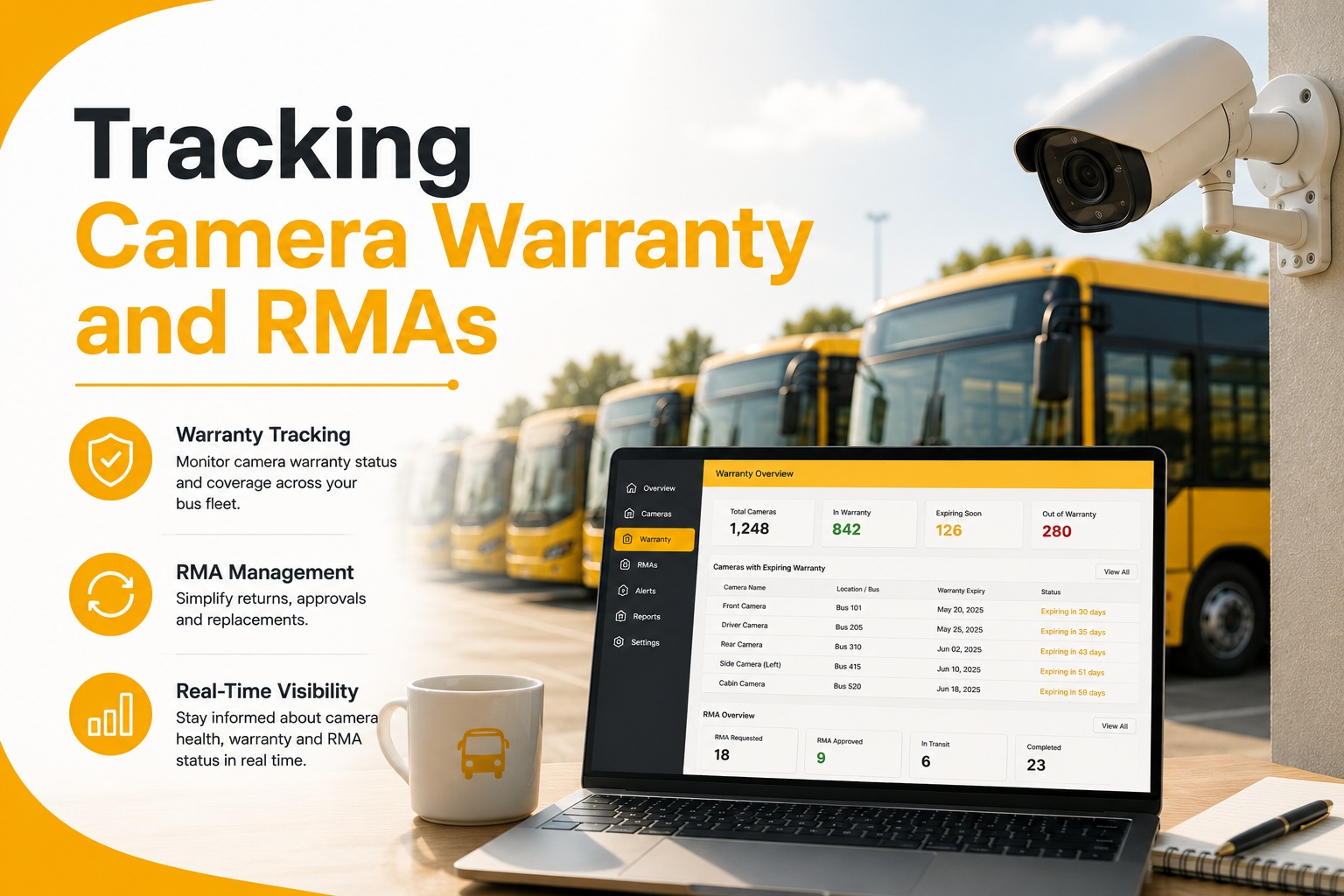
Camera failures don't announce themselves — a unit just stops recording, and by the time someone notices, nobody can say if it's still under warranty or which vendor to call. Dash cam warranty tracking means logging every device serial against its bus, its install date, and its warranty clock the day it goes in, so an RMA takes a phone call instead of a week of digging through invoices. See how a failed unit becomes a tracked RMA in BusCMMS.
Tracking Camera Warranty and RMAs
Why device serials need to live on the bus record, how a warranty clock and RMA turnaround actually work, and what to report back to the vendor at renewal.
Failure logged
Loaner installed
Replacement returned
Why Serial Logging Has to Happen at Install, Not Later
A warranty clock that starts on paper, not from memory.
Every camera has a serial number, a warranty period, and an install date — and all three need to be logged against the specific bus the unit went into, on the day it's installed. Wait even a few weeks and that information lives only in a technician's memory or a paper work order that may or may not get filed correctly. When a unit fails eighteen months later, the shop needs to answer one question fast: is this still under warranty, and with which vendor? Without a per-device log, that question turns into a search through old purchase orders instead of a lookup that takes ten seconds.
Loaner Management: Don't Let a Bus Go Dark While Waiting on RMA
A bus shouldn't run uncovered for two weeks because a claim is in process.
An RMA turnaround commonly runs one to two weeks depending on the vendor, and a bus shouldn't sit without camera coverage that entire time. A small loaner pool — a handful of spare units held specifically for this — keeps a bus in service with working coverage while the original unit is in transit for repair or replacement. Track which loaner went to which bus and when, the same way you'd track the original unit, so a loaner doesn't quietly become permanent inventory nobody remembers to reclaim.
Where the Federal Rule Applies — and Where It Doesn't
FMVSS 111 covers fewer bus types than most people assume.
No single federal mandate governs warranty tracking itself; 49 CFR 396 maintenance records and district policy set that bar. But the underlying camera requirement is worth naming precisely: FMVSS 111 was retitled from "Rearview Mirrors" to "Rear Visibility" and requires a rear camera on vehicles at or under 10,000 lb GVWR from May 1, 2018 (NHTSA, via School Transportation News, retrieved Aug 2026). That captures some Type A-1 buses, but leaves most Type C and D buses — the large, familiar yellow bus body styles — on the mirror requirement instead. Knowing which of your buses actually fall under the camera mandate versus which are running cameras purely as an added safety layer changes how you prioritize warranty coverage and replacement urgency.
A Scenario From a Real Bus Operation
A missing serial log turned a five-minute call into a two-week delay.
A school district running 65 buses had a camera fail on a route bus, and the shop foreman went looking for the purchase record to confirm warranty status. The install had happened fourteen months earlier during a batch rollout, and the paperwork was filed under the rollout project, not under the individual bus. It took four days of searching before the serial number and install date were confirmed, by which point the RMA window had shrunk and the bus had run nearly a week with a loaner nobody had formally logged either. After that, the district began logging every camera serial against the specific bus asset record at install, cutting the same lookup down to under a minute the next time a unit failed.
We used to have a drawer full of camera invoices and no idea which serial went on which bus. Now when a unit dies, I pull up the bus and the warranty status is right there — filed, expired, or still covered. RMA calls that used to take half a day take five minutes now.
Not sure how many of your cameras are still under warranty right now? That's worth checking before the next failure. Talk to the team about a warranty audit →
AI Detection First, So You're Not Waiting on a Complaint
The wedge BusCMMS solves that a spreadsheet can't.
BusCMMS is an AI-native bus fleet operations platform, and the wedge here is sequencing: AI defect and event detection runs first, so the platform surfaces the worst-performing bus and the riskiest route before anyone opens a manual report. A camera failing intermittently, or a device sitting near end-of-warranty with a rising fault rate, shows up on the fleet dashboard instead of waiting for a driver complaint.
Quick Spec Reference
Scannable on a phone during a vendor call.
| Item | What to actually check |
|---|---|
| Serial logging | Recorded against the specific bus at install, not a batch project file |
| Warranty clock | Start date, duration, and vendor logged per device |
| RMA turnaround | Typically 1–2 weeks depending on vendor; track actual vs stated |
| Loaner tracking | Logged like a real asset so it doesn't become permanent inventory |
| Install position | Chosen for field-of-view coverage, not wiring convenience |
| Federal coverage | FMVSS 111 rear camera rule applies to some Type A-1 buses only; most Type C/D remain on mirrors |
Frequently Asked Questions
What information do I need to log to track camera warranties?
Device serial number, install date, warranty duration, and vendor, all logged against the specific bus the camera went into. Logging this at install time, rather than relying on paperwork filed under a broader rollout project, is what makes a warranty claim fast later.
How long does a typical dash cam RMA take?
RMA turnaround commonly runs one to two weeks depending on the vendor. A loaner unit, tracked the same way as the original camera, keeps the bus covered while the replacement or repair is in transit.
Does federal law require cameras on school buses?
FMVSS 111, retitled from "Rearview Mirrors" to "Rear Visibility," requires a rear camera on vehicles at or under 10,000 lb GVWR starting May 1, 2018. This captures some Type A-1 buses but leaves most Type C and D buses on the mirror requirement instead.
What's the most common camera installation mistake fleets make?
Choosing a mount position based on wiring convenience rather than field of view, which frequently leaves the loading door or entry steps uncovered. That gap usually isn't discovered until an incident review, rather than during install.
Is there a federal mandate for warranty or RMA recordkeeping?
No single federal mandate governs warranty tracking specifically. 49 CFR 396 sets the general maintenance recordkeeping bar, leaving warranty and RMA tracking to each fleet's own purchasing and maintenance processes.