Dispatch needs a bus for a mid-day field trip, so they radio the shop: "Is 214 ready?" No answer — the foreman's under a bus. Ten minutes later the callback comes: 214's been down since yesterday. Now they're scrambling. That lag is the whole problem bus fleet readiness visibility solves: when dispatch can see live vehicle status — ready, in maintenance, or unavailable — without calling anyone, the scramble disappears and the guesswork goes with it.
Bus Fleet Readiness: Give Dispatch Live Vehicle Status
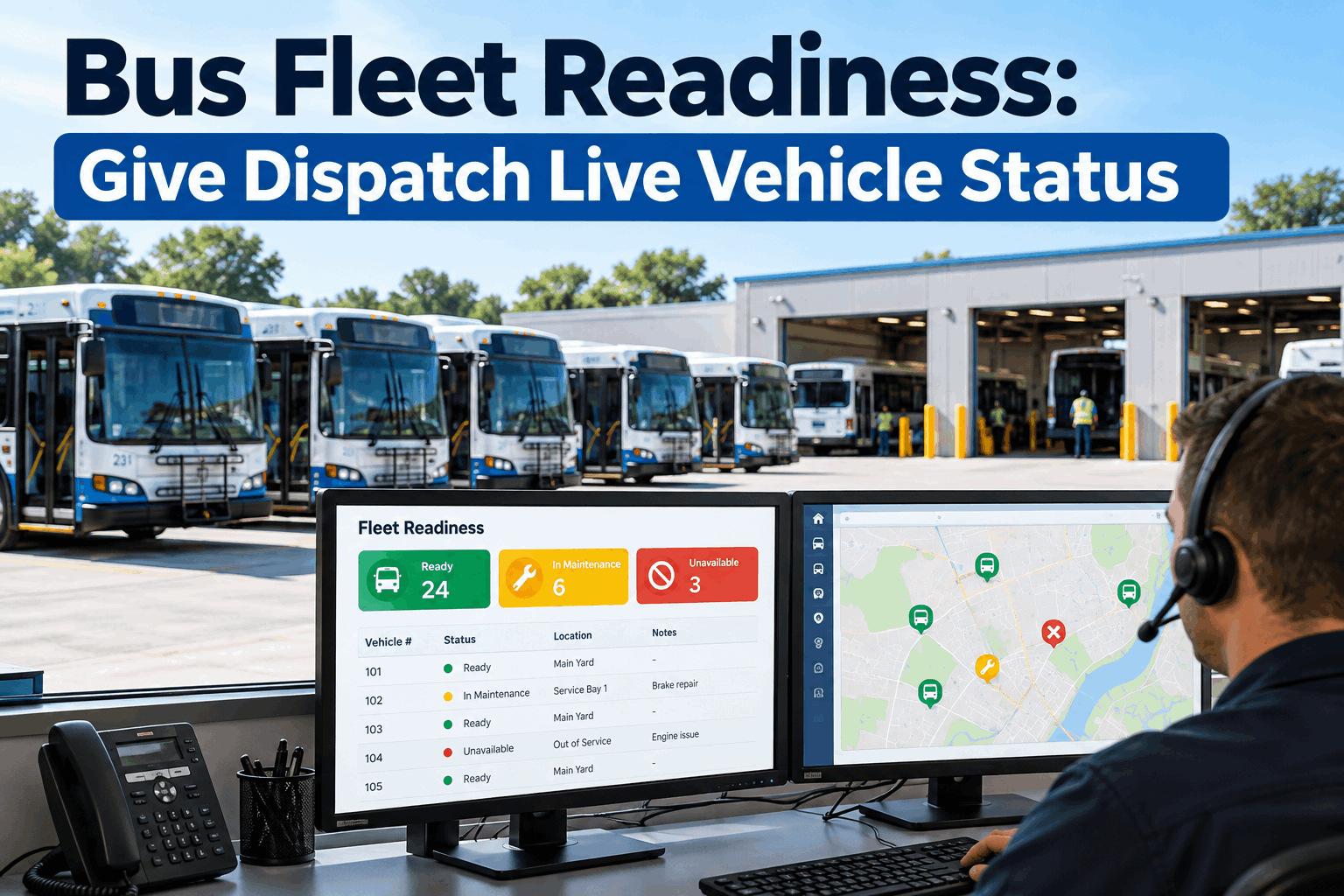
Stop calling the shop to ask what's available. One live readiness view shows dispatch which buses are ready, which are in maintenance, and which are down — updated by the shop's own work.
Why Dispatch Is Flying Blind
In most fleets, dispatch and the shop live in two different information worlds. Maintenance knows exactly what's down and why; dispatch knows what routes need covering. The two only connect through a phone call, a radio crackle, or a whiteboard that someone updates when they remember. That gap is where the delays, the double-bookings, and the surprise breakdowns live — not because anyone's careless, but because the status simply isn't shared.
The Call-and-Wait
Dispatch radios the shop to ask if a bus is ready, and waits — while the foreman's mid-repair and can't answer. The answer arrives after the decision needed to be made.
The Stale Whiteboard
The status board on the wall was accurate this morning. By afternoon, three buses have changed state and nobody's wiped the marker. Dispatch trusts a number that's already wrong.
The Surprise Down Bus
Dispatch assigns a bus to a route only to find out it's been in the shop since yesterday. Now a driver's standing at an empty bay and a route is late.
The cost isn't just the wasted minutes on hold. It's the compounding effect: a bus assigned that can't run means a driver reassigned, a route delayed, and sometimes a call to a school or a rider that could have been avoided. Multiply a handful of those a week and dispatch is spending real time managing information gaps instead of managing the fleet. The fix isn't more phone calls — it's making the status visible to both sides at once. For the broader operations picture these gaps sit inside, our bus fleet KPI dashboard guide covers the metrics view. Book a demo to see dispatch and maintenance reading one live status.
The Readiness States Dispatch Actually Needs
A useful readiness view isn't just "up or down." Dispatch needs enough states to make the right call without a follow-up question — and no more than that, so the board stays scannable at a glance. These four cover almost every dispatch decision.
Ready
Inspected, fueled or charged, no open defects — assignable right now. This is the pool dispatch pulls from with confidence, no phone call needed.
In Maintenance
In the shop on an open work order — not assignable, but coming back. Ideally with an expected-return estimate so dispatch can plan around it, not just avoid it.
Unavailable / Out of Service
Down for a safety defect, awaiting parts, or otherwise off the road. Dispatch knows not to count on it, and knows why, without asking.
Needs Check
Due or overdue for a pre-trip or PM before it can be trusted on a route — a spare that's been sitting, say. Assignable only after the check clears.
The state that earns its keep most is "in maintenance" with an expected-return time. "Down" tells dispatch to look elsewhere; "back by 2 p.m." tells them whether to cover a 3 p.m. route with a spare or just wait for the bus. That difference — between knowing a bus is unavailable and knowing when it returns — is what turns a readiness board from a status list into a planning tool. And the "needs check" state is what keeps a sitting spare from being assigned before someone confirms it's actually road-ready. Sign up free and set up your fleet's readiness states.
How Live Status Changes the Dispatch Decision
The point of a readiness view isn't the screen — it's the decision it changes. Here's the same mid-day assignment, made the old way and the live way.
- Dispatch needs a bus, radios the shop
- Foreman's under a bus, can't answer
- Ten minutes pass; decision stalls
- Callback: that bus is down
- Start over, now behind schedule
- Route covered late, or not at all
- Dispatch opens the readiness view
- Sees 42 ready, 6 in shop, 3 down — instantly
- Picks a ready bus and assigns it
- No call, no wait, no callback
- Decision made in seconds
- Route covered on time
The live path isn't just faster — it's calmer. Dispatch stops interrupting the shop with status questions, which frees the foreman to actually turn wrenches instead of fielding the radio. And it removes the worst outcome entirely: assigning a bus that can't run. When the readiness view is the source of truth, dispatch never picks from the down pool by accident, because the down buses aren't in the ready column to pick from. That single guardrail — you can only assign what's actually ready — prevents most of the day's fire drills. This ties directly into how a failed inspection or a completed repair flows through, which our work on bus dispatch and fleet software touches on. Book a walkthrough to see a live readiness assignment in seconds.
One Shared Truth: The Shop's Work Updates the Status
A readiness board is only worth trusting if it's always current — and the only way it stays current is if maintenance work updates it automatically, not by someone remembering to change a marker. That's the real mechanism: the status is a byproduct of the work the shop is already doing.
A Defect Marks It Down
A failed inspection or a new work order flips the bus to in-maintenance or unavailable the instant it's logged — so dispatch sees it down the moment the shop knows.
Work Progress Shows
As the work order moves — parts on order, in progress, expected-return set — that context surfaces on the readiness view, so dispatch can plan around the return.
Completion Returns It to Ready
When the repair closes and re-inspection clears, the bus flips back to ready automatically — back in the assignable pool the second it's actually roadworthy.
Both Teams See the Same Thing
Dispatch and the shop read one status, updated by the same events. No reconciling two boards, no "I thought it was ready" — one source of truth for the whole fleet.
This is what separates a real readiness system from a shared spreadsheet someone has to maintain. A spreadsheet is only as current as the last person who updated it; a status driven by the work orders and inspections themselves is current by default, because changing the bus's real state is what changes the display. Nobody has a separate "update the board" task to forget. That's the difference between a board dispatch double-checks with a phone call and one they simply trust. Sign up free and let maintenance work keep the readiness view current.
How BusCMMS Gives Dispatch Live Readiness
Because BusCMMS runs the inspections, work orders, and fleet status in one system, the readiness view is fed by the maintenance work itself — so dispatch and the shop always see the same current picture. The features below make live readiness real.
-
Live Fleet-Status Board
Every bus sorted into ready, in maintenance, or unavailable at a glance — the current answer to "what can I run," no phone call required.
-
Auto-Updated by Work Orders
A new or closed work order flips the bus's status automatically — the board is current because the work keeps it current, not a person.
-
Inspection-Driven Status
A failed DVIR marks a bus down and a cleared re-inspection returns it to ready — so the status always reflects roadworthiness, not guesswork.
-
Expected-Return Estimates
See not just that a bus is in the shop but when it's due back, so dispatch plans around the return instead of just writing it off for the day.
-
Shared Across Teams
Dispatch, the shop, and operations all read the same status from the same system — one truth, no reconciling two boards or two stories.
-
Availability Counts & Trends
See how many buses are ready right now and how availability trends over time — the number operations and the board both care about.
The reason it works is integration, not a prettier whiteboard. A standalone status board still needs a human to keep it true; a readiness view wired to the same system that logs the inspections and runs the work orders is true automatically, because the events that change a bus's real state are the events that update the display. Dispatch gets an answer they can trust without a call, the shop gets left alone to work, and operations gets a real availability number instead of an optimistic guess. Book a demo to see the live readiness board fed by real maintenance work.
The Dispatcher's View
That's the win: the status conversation stops existing, because the status is just there. Dispatch trusts the ready column, the shop works uninterrupted, and the buses that can't run were never in the pool to assign. Sign up free and give your dispatch a readiness view they can trust.
The Bottom Line on Bus Fleet Readiness
Bus fleet readiness comes down to closing the gap between the shop, which knows what's down, and dispatch, which needs to know what's up. When that only travels by phone call and stale whiteboard, dispatch flies blind — waiting on callbacks, trusting outdated numbers, and occasionally assigning a bus that can't run. A live readiness view fixes it by giving both teams one shared status — ready, in maintenance, unavailable, needs check — that the shop's own work keeps current automatically. Dispatch makes the call in seconds without interrupting the shop, the down buses are never in the ready pool to pick by mistake, and operations gets a real availability number. The phone-tag conversation about "is 214 ready?" simply stops happening, because the answer is already on the screen. Book a walkthrough to see live fleet readiness on a fleet like yours.