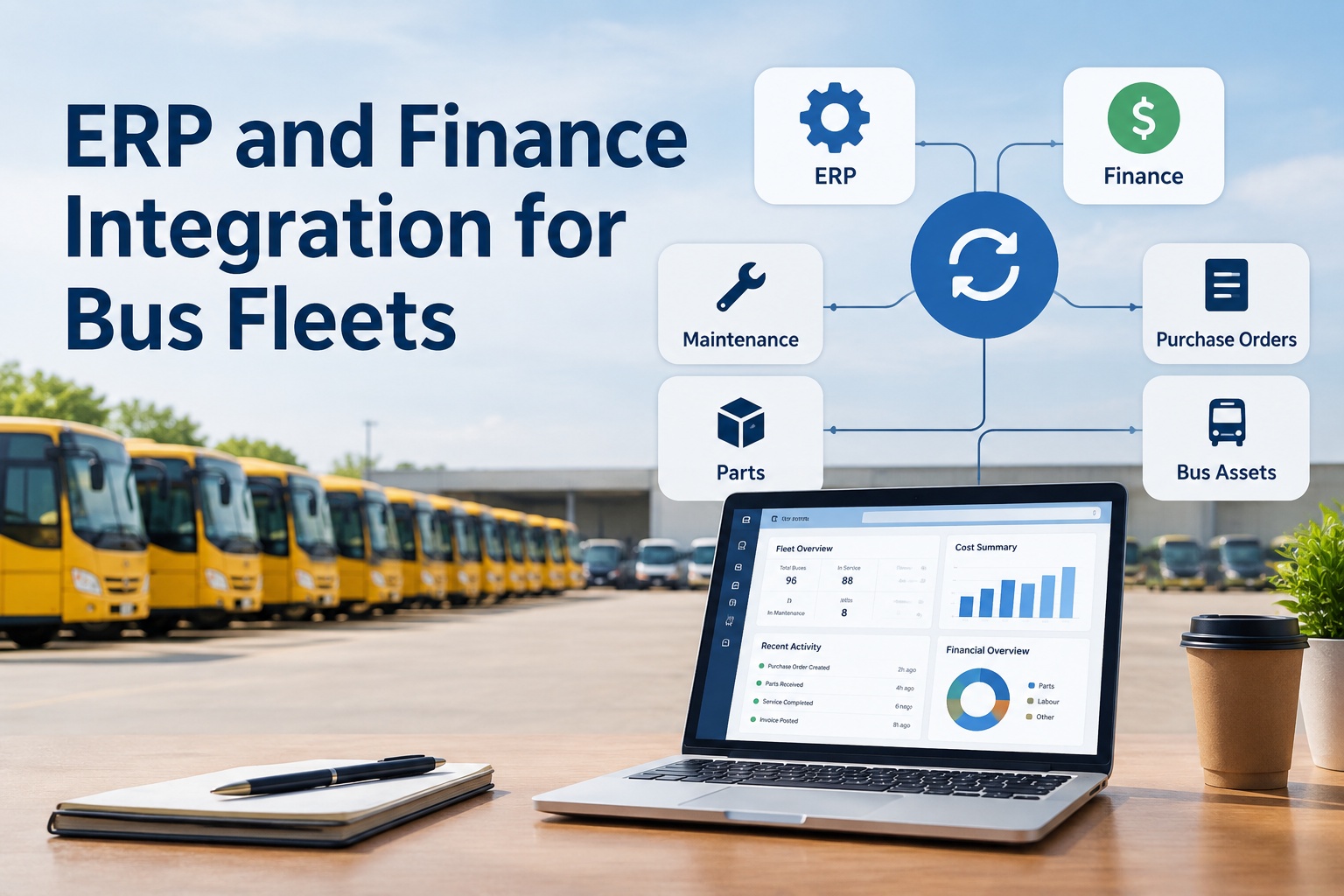
Bus fleet ERP integration connects your maintenance system to the ERP, accounting, and procurement software your district runs its money through — so a bus, a work order, its parts, and its labour cost carry the same identity on both sides. Done right, a repair logged in maintenance shows up as a reconciled cost in finance without anyone re-keying a purchase order or inventing a second asset record for the same bus.
ERP and Finance Integration for Bus Fleets
Sync purchase orders, parts, labour costs, and bus asset records between maintenance and finance — one identity per bus, no duplicate entry
- 1 busOne record, both systems
- No re-keyPOs & parts flow through
- Month-endReconcile, don't scramble
What Is ERP Integration for a Bus Fleet?
ERP integration for a bus fleet is the connection between your maintenance operation — work orders, inspections, parts, defects — and the back-office systems that handle money and assets: your ERP, accounting, and procurement software. Its whole job is to make sure both sides agree on what a bus is and what a repair cost, without a person copying data from one screen into another.
The problem it solves is a familiar one for any district IT director. Maintenance calls a bus "Unit 214." Finance calls the same bus "Asset 30081." Procurement issues a purchase order that never links back to the work order that needed the part. So parts get received but not reconciled, labour hours never reach the repair's cost history, and somewhere a duplicate asset record quietly appears for a bus you already own. Integration exists to close those gaps — so cost, purchasing, and asset data line up across maintenance, procurement, and finance instead of drifting apart. If you want to see how that connection looks in practice, you can book a walkthrough of the unified maintenance and finance record.
How Bus Fleet ERP and Finance Integration Works
Follow a single repair and the whole flow makes sense. Each step hands clean data to the next, so the cost that lands in finance is traceable all the way back to the bus and the defect that started it.
- 1
Vehicle & work order
A defect on a specific bus becomes a work order in maintenance, tied to that bus's unique record — the anchor everything else attaches to.
- 2
Requisition & purchase order
Parts needed for the repair generate a requisition and a purchase order — linked to the work order, so the spend has a documented reason.
- 3
Parts receipt & inventory
Parts are received against the PO and drawn from inventory, so stock levels and the repair's parts cost both stay accurate.
- 4
Labour cost
Technician hours are captured against the work order, so labour joins parts on the repair's total cost — not lost in a separate timesheet.
- 5
Invoice & finance reporting
The invoice reconciles against the PO and receipt, and the fully-costed repair rolls up to the right cost centre for finance reporting.
The point of the chain is traceability: finance sees a reconciled cost, and can follow it straight back to the bus, the defect, the parts, and the hours behind it. Nothing is re-keyed between systems, and nothing arrives in finance as an unexplained number. That end-to-end line — work order to reconciled cost — is exactly what breaks when maintenance and finance run on disconnected tools. You can talk to BusCMMS about your ERP and finance workflow to see where your current gaps are.
What Data Should Move Between BusCMMS and ERP?
Not everything needs to sync — but the fields that tie a bus, a repair, and its cost together absolutely do. Here's the data that should flow so both systems tell the same story.
Bus asset records
VIN, fleet number, unit ID, make, model, year, status — plus electric-bus identifiers where relevant. The master identity for each vehicle.
Work orders & defects
The repair record and the defect behind it — the reason a cost exists, carried through to finance for full traceability.
Parts & inventory
Part numbers, quantities, and stock levels — so a part used on a repair and a part drawn from inventory are the same event.
POs & invoices
Purchase orders, receipts, and invoices — linked to the work order so spend is reconciled, not floating on its own.
Labour costs
Technician hours against each work order, so labour is part of the repair's true cost rather than a disconnected line item.
Cost centres
Mapping by district, depot, garage, route, vehicle, or department where supported — so costs land in the right budget line.
Cost-centre mapping deserves a special mention, because it's what makes fleet spend actually answerable. When a repair can be attributed to a specific garage, route, or vehicle, a transportation director can finally answer "what is this depot costing us?" or "which buses are the money pits?" with data instead of a guess. That's the reporting payoff of getting the sync right.
Prevent Duplicate Bus Asset Records Across Systems
This is the failure that quietly corrupts fleet cost data more than any other: the same bus existing as two different records because maintenance and the ERP identify it differently. One system keys on VIN, another on fleet number, a third on a unit ID someone typed slightly wrong — and now a single bus has costs split across two "assets," and no report is trustworthy. Preventing it takes a deliberate master-data approach.
Decide who owns the master record
Pick one system as the source of truth for bus asset data — the record everything else maps to. Ambiguity here is the root of most duplicates.
Choose a unique identifier
Agree on one stable key — VIN is the natural candidate — that both systems match on, rather than each keying on its own local number.
Map the fields explicitly
Field mapping ties "Unit 214" to "Asset 30081" once and for all, so the two systems recognise them as the same bus on every sync.
Validate and handle exceptions
A record that doesn't match is held for review, not auto-created. An unmatched VIN is a flag to resolve, never a licence to spawn a duplicate.
The discipline is simple to state and easy to skip: one master record, one unique key, explicit mapping, and validation that quarantines mismatches instead of duplicating them. Get that right and every cost for a bus accrues to one record you can trust. Skip it and you spend month-end untangling why the same bus shows up twice. This is exactly the kind of thing worth pinning down before you buy any integration — and worth starting free to see how one bus record is maintained cleanly.
School District Example: Closing the Month Without Re-Keying
Here's an illustrative walkthrough — the numbers are made up for clarity, not real figures — showing how one bus repair moves from work order to finance without anyone typing it twice.
At a district running disconnected systems, that same $600 arrives in finance as a parts invoice and a separate labour line that nobody connects back to Bus #14, posted to the wrong cost centre because someone guessed. Multiply that by every repair across every bus and garage, and month-end becomes a reconciliation marathon. With the flow connected, the repair is already fully costed and correctly attributed the moment it's closed — month-end is a review, not a rebuild. You can book a walkthrough to see this run on your own cost centres.
Month-End, Reconciliation, and the Audit Trail
Connected data changes what month-end feels like — and what an auditor sees. When purchase orders link to work orders, receipts reconcile to POs, and labour sits on the repair it belongs to, the close is mostly confirmation rather than reconstruction.
Reconciliation
POs, receipts, and invoices already match by design, so reconciliation is checking exceptions, not rebuilding the whole ledger by hand.
Audit trail
Every cost traces back to a work order, a defect, and a bus — a documented chain, not a number someone has to explain from memory.
Exception handling
Mismatches — an unreceived PO, an unmatched invoice — surface as exceptions to resolve, instead of hiding until they cause a variance.
Compliance records
Maintenance history and inspection records accumulate as a by-product of daily work — supporting recordkeeping under the rules below.
A note on regulation, kept precise: 49 CFR 396.3 requires motor carriers to systematically inspect, repair, and maintain their vehicles and to keep maintenance records, and 49 CFR 396.17 requires a periodic (typically annual) inspection with records retained. Connected maintenance data can support that recordkeeping and cost traceability — but it doesn't replace the required maintenance records themselves or your district's own maintenance, procurement, and financial policies. There's no single federal mandate that requires any specific ERP integration; the value here is operational, not a compliance checkbox. Always confirm current rule text and effective dates with the source before relying on them.
Real District Complexity: Garages, Spares, and Electric Buses
A real school transportation operation is messier than a spreadsheet, and integration has to hold up against that mess. The scenarios below are exactly where disconnected systems produce duplicate assets and misattributed costs.
District-owned across multiple garages
A bus maintained at more than one garage still needs one asset record and correct cost-centre attribution per repair — not a duplicate per location.
Spare buses
Spares that swap in and out of routes must keep a single identity and cost history, so their costs don't get lost or double-counted.
Electric school buses
Electric buses carry their own identifiers and a different maintenance and cost profile — battery and charging work that finance still needs attributed correctly.
Mixed fleets
Diesel and electric on one roster means different cost patterns per bus — one system has to attribute both cleanly to the right vehicle and budget.
The common requirement across all four is a single, trustworthy identity per bus that survives garages, route swaps, and fuel type. When that holds, complexity is just detail on a clean record; when it doesn't, every one of these becomes a source of duplicate assets and cost data nobody trusts. This is why the master-data discipline earlier isn't bureaucratic — it's what keeps a real, messy fleet reportable.
What District IT Should Check Before Buying an ERP Integration
Before committing to any integration, run through this. It's the list to take to both your fleet-software vendor and your ERP vendor — the answers decide whether the integration is clean, limited, or a maintenance headache of its own.
Supported systems & APIs
Which ERP and accounting systems can it exchange data with, and does it offer APIs, scheduled imports, and exports — or only manual files?
Authentication & security
How is access secured and authenticated, and how is data protected in transit — especially important with district systems and student-adjacent data.
Sync frequency & error handling
How often does data sync, and what happens when an import fails — are errors surfaced, retried, and recoverable, or silent?
Field mapping
Can you map identifiers, cost centres, and part numbers between systems — the mechanism that prevents duplicates and misposting?
Data ownership
Who owns the data, where does it live, and can you export it if you change vendors? Confirm this in writing before you commit.
Implementation, testing & support
How is it implemented and tested before go-live, and what support exists when an ERP update changes something downstream?
Two answers matter most. Data ownership is the one districts skip and later regret — confirm you can take your data with you. And error handling separates a reliable integration from one that silently drops records until a variance shows up at month-end. Get straight answers on both, and the rest of the evaluation is manageable.
How BusCMMS Supports Connected Bus Fleet Operations
The reason to connect these systems is straightforward: you want cost, purchasing, and asset data to line up across maintenance and finance without an army of re-keyers — and you want your maintenance history to be there when you need it, not assembled from a binder the week before an audit.
That's the role BusCMMS plays. BusCMMS is the AI-native bus fleet operations platform that keeps bus inspections, maintenance, defects, work orders, parts, and operational records in one place — and connects them to back-office workflows so a repair's cost is traceable end to end. Where supported, it exchanges data with ERP, accounting, and procurement systems through APIs, scheduled imports, and exports with configurable field mapping, so one bus keeps one identity across systems and compliance-relevant maintenance history builds up as a by-product of daily work. Explore the bus fleet integrations hub to see how maintenance and finance data connects to the rest of your stack. To scope your own setup, book a walkthrough of the unified camera and maintenance record and bring your ERP and finance workflow to the conversation.
What is bus fleet ERP integration?
Bus fleet ERP integration is the connection between your maintenance system — work orders, inspections, parts, and defects — and the back-office ERP, accounting, and procurement software your district runs its money and assets through. Its purpose is to make sure both sides agree on what a bus is and what a repair cost, so purchase orders, parts receipts, labour costs, and asset records line up across systems without staff re-keying data or creating duplicate records for the same bus.
How does integration prevent duplicate bus asset records?
By using a master-data approach: one system is designated the source of truth for bus asset data, both systems match on a single stable identifier such as VIN, and fields are mapped explicitly so a maintenance "unit ID" and a finance "asset number" are recognised as the same bus. Records that don't match are held for review as exceptions rather than auto-created, so an unmatched identifier becomes a flag to resolve instead of a duplicate. This keeps every cost for a bus accruing to one trustworthy record.
What data moves between BusCMMS and an ERP?
Typically the data that ties a bus, a repair, and its cost together: bus asset records (VIN, fleet number, unit ID, make, model, year, status, and electric-bus identifiers where relevant), work orders and defects, parts and inventory, purchase orders and invoices, labour costs, and cost-centre mappings by district, depot, garage, route, vehicle, or department where supported. The goal is that a repair logged in maintenance becomes a reconciled, correctly attributed cost in finance, traceable back to the bus and defect behind it.
Does an ERP integration satisfy DOT maintenance record requirements?
No integration by itself satisfies a regulation. 49 CFR 396.3 requires motor carriers to systematically inspect, repair, and maintain vehicles and keep maintenance records, and 49 CFR 396.17 requires a periodic inspection with records retained. Connected maintenance data can support that recordkeeping and make cost and repair history easier to produce, but it does not replace the required maintenance records themselves or your district's own policies. There is no single federal mandate requiring any specific ERP integration, so treat the value as operational and confirm current rule text and dates with the source.
What should district IT check before buying integration software?
Confirm which ERP and accounting systems it exchanges data with and whether it offers APIs, scheduled imports, and exports; how access is authenticated and data secured; how often data syncs and what happens when an import fails; whether you can map identifiers, cost centres, and part numbers between systems; who owns the data and whether you can export it if you switch vendors; and how implementation, testing, and ongoing support work. Data ownership and error handling are the two answers districts most often skip and later regret.