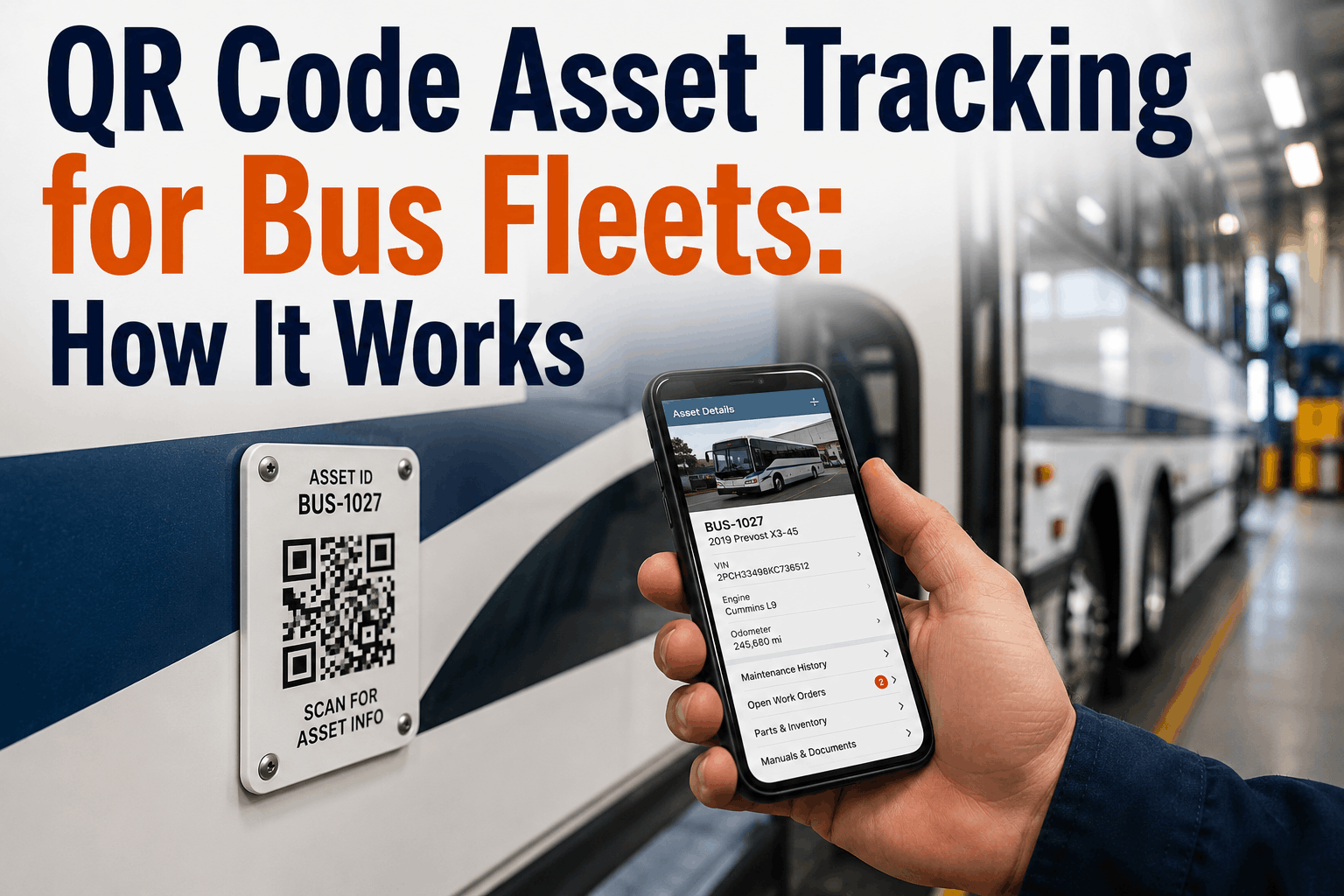
A technician approaches a bus to perform maintenance and needs the vehicle's service history. With traditional systems, they search a computer database, navigate multiple screens, and retrieve records from files. With QR code asset tracking, the technician scans a QR code attached to the bus, and instantly sees: complete maintenance history, known issues and recurring problems, manufacturer specifications and manuals, upcoming scheduled maintenance, parts inventory, and safety bulletins. The entire vehicle profile appears on their phone or tablet in seconds. QR codes are simple—scannable digital tags linking physical assets to digital records. For bus fleets, QR code asset tracking transforms how technicians access information, improving efficiency and reducing errors. A technician with instant access to accurate maintenance history makes better repair decisions. A technician who can instantly check parts inventory prevents unnecessary trips to the stockroom. A technician who sees manufacturer specifications works more accurately. Here's how QR code asset tracking works and how to implement it in your fleet.
Scan to see history instantly. Learn how QR-code asset tagging gives technicians instant access to each bus's maintenance records and manuals.
QR code basics: A QR (Quick Response) code is a two-dimensional barcode consisting of black and white squares arranged in a grid. QR codes encode data (typically a URL or identifier) that can be scanned by any smartphone or QR code reader. When scanned, the device opens the encoded URL or retrieves the associated data. For asset tracking, QR codes are attached to each vehicle and encode a unique identifier linking to that vehicle's digital record.
Asset tracking workflow: A bus has a QR code attached (typically on the driver's door or inside the cab). The technician scans the QR code with their smartphone or tablet. The scan opens a mobile app or web portal showing that specific bus's information: maintenance history, known issues, upcoming service, parts inventory, manuals, and other relevant data. The technician can update records, log work completed, or access information needed for the job. All data flows through the CMMS.
Data linkage and integration: QR codes are linked to records in the CMMS. When a technician scans a code, the CMMS displays information for that vehicle. As work is completed and documented in the CMMS, the QR code automatically links to updated information. The next technician scanning sees the latest data. There's no delay or manual updating needed.
QR code placement and durability: QR codes should be placed where technicians will naturally see them: on the driver's door, inside the cab on the dashboard, or on the engine compartment. Codes should be protected from damage (laminated or under clear protective stickers). Durable QR codes remain readable for years. If a code is damaged, it can be replaced with a new code linking to the same vehicle record.
Maintenance history and records: Technicians can instantly see all maintenance performed on a vehicle: service dates, work completed, parts replaced, costs, and hours spent. This history shows patterns: which components fail frequently, which have been recently serviced, and which are approaching next scheduled maintenance. A technician seeing that brakes were serviced 6 months ago doesn't need to inspect them as thoroughly as a bus with no brake service history.
Known issues and recurring problems: The CMMS should document persistent issues: a bus that repeatedly develops transmission problems, a bus with chronic cooling system issues, or a bus with recurring electrical failures. A technician approaching a bus sees these known issues immediately and can be alert for symptoms. Knowing a bus has a history of transmission problems helps the technician diagnose new issues faster.
Manufacturer specifications and manuals: QR codes can link to digital manuals, service bulletins, and manufacturer specifications. A technician needing to know the correct torque specification for a bolt, the proper fluid type for a system, or the diagnostic procedure for a fault code can access this information immediately without searching multiple sources. Instant access to correct specs reduces errors and improves consistency.
Scheduled maintenance and alerts: The CMMS tracks scheduled maintenance: next oil change due at 50,000 miles, next brake inspection due in 6 months, next DOT inspection due in 3 months. QR code scans show which services are due or overdue, prompting technicians to schedule them. This visibility prevents maintenance from being forgotten.
Parts inventory and availability: If the CMMS tracks parts inventory, scanning a QR code can show what parts are in stock for that vehicle model, current inventory levels, and reorder status. A technician needing a replacement alternator sees immediately that one is in stock (avoiding a trip to the parts area) or orders one if out of stock.
Safety bulletins and recalls: Manufacturer safety bulletins and recalls applicable to that vehicle model can be linked via QR code. A technician sees critical safety information immediately when working on the vehicle, ensuring they're aware of known hazards or required repairs.
Select a CMMS with QR code support: Ensure your CMMS platform supports QR code generation and scanning. The system should allow generating unique QR codes for each vehicle, automatically linking codes to vehicle records. The mobile app should allow scanning and displaying information. Some CMMS platforms include QR code functionality built-in; others require third-party integrations.
Generate and print QR codes: Using the CMMS, generate a unique QR code for each vehicle in your fleet. Codes should be printed on durable labels (laminated or weatherproof stickers). Ensure codes are large enough to scan reliably (minimum 1-2 inches square). Include vehicle identification number or name on the label below the code for visual reference.
Attach codes to vehicles: Place QR codes in locations where technicians will find them: driver's side door, inside cab on dashboard, inside engine compartment, or on the maintenance access panel. Consider placing codes in multiple locations on larger fleets so technicians can easily access codes regardless of which part of the vehicle they're servicing. Ensure codes are secure and won't be damaged by weather or vehicle operation.
Test and validate: Before fleet-wide deployment, test the QR code system thoroughly. Scan codes from various distances and angles to ensure they're readable. Test the mobile app with different phones and operating systems. Verify that scanning codes opens the correct vehicle information. Fix any technical issues before training staff.
Train mechanics and staff: Conduct hands-on training showing how to scan QR codes and use the mobile interface to access information. Demonstrate finding maintenance history, checking known issues, accessing manuals, and logging work. Training should be practical—show technicians how the system helps them do their job better, not just how to use technology.
Promote adoption and gather feedback: After deployment, encourage technicians to use the system and provide feedback on improvements. Some mechanics might initially prefer old methods; consistent promotion and highlighting benefits drives adoption. Collect feedback and make improvements based on actual usage experience.