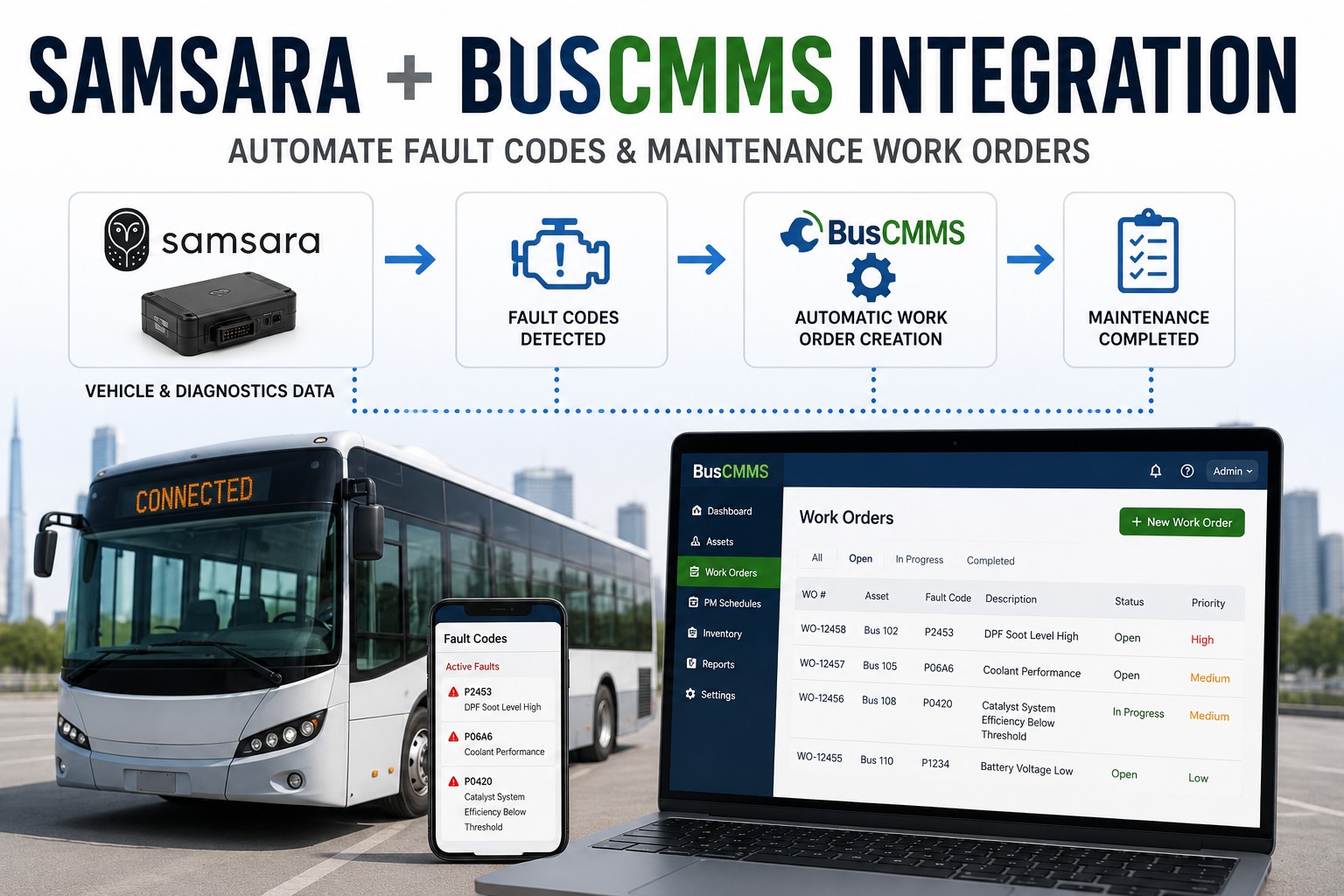
Your Samsara dashboard is showing 23 active fault codes across your fleet right now. Nobody has looked at it since yesterday. Bus #14 has been logging SPN 3251 for four days -- a DPF warning that becomes a forced regen in about a week, then a $3,200 turbo repair after that. The data was there. The work order was not. Closing that gap between telematics and maintenance is exactly what the Samsara-to-BusCMMS integration does.
Samsara + BusCMMS: Fault Codes to Work Orders, Automatically
Every fault code, DVIR defect, and mileage trigger from Samsara flows into BusCMMS in real time -- becoming a prioritized, tech-routed work order in seconds.
- J1939 + J1708 decoded
- DVIR-to-WO auto-link
- Real-time sync
Why Telematics Alone Is Not Enough
Samsara does one thing very well: it captures data from every bus in the fleet, in real time, all the time. What it does not do on its own is turn that data into a repair. A fault code sitting in the Samsara dashboard is just a number. A fault code that auto-creates a prioritized work order, routes to a qualified tech, and closes the linked DVIR when done -- that is the beginning of predictive maintenance.
- 08:00Engine fault appears in Samsara
- 14:00Someone remembers to check dashboard
- 15:00Data exported to spreadsheet
- 16:00Work order finally created
- 16:47Bus fails on route
- 08:00Engine fault appears in Samsara
- 08:00BusCMMS auto-decodes + creates WO
- 08:01Tech receives assigned work order
- 10:30Repair complete, DVIR closed
- 14:00Bus on afternoon route
That is not a hypothetical. Fleets running Samsara without a connected CMMS report an average 4-6 hour gap between fault appearance and work order creation. Fleets on the BusCMMS integration close that gap to seconds. Book a demo to see the real-time sync running on live fault data.
What Actually Flows Between Samsara and BusCMMS
Six data streams sync automatically once the integration is live. Each one triggers a different part of the maintenance workflow, and every one of them was historically manual copy-paste work.
-
J1939 & J1708 Fault Codes
Live engine, transmission, brake, and emissions codes. Decoded to plain English on arrival.
-
Driver DVIRs
Failed inspection items from the Samsara Driver App auto-create prioritized work orders.
-
Odometer + Engine Hours
Daily sync fires mileage-based and hour-based PM triggers without manual entry.
-
GPS + Geofences
Bus enters the depot: PM check gets scheduled. Leaves the yard: pre-trip is logged.
-
Vehicle Telemetry
Coolant, fuel, DPF load, battery voltage -- trending signals for predictive alerts.
-
WO Completion Sync
Closed WO in BusCMMS auto-closes the originating Samsara DVIR. No double entry.
Every one of these streams was historically manual work. Book a demo to see all six data streams flowing on a live dashboard.
Fault Code to Work Order in 5 Steps
Here is what happens the moment a Samsara device reads a fault code from a bus's ECU. Total elapsed time from step 1 to step 4: usually under a minute.
-
01Samsara
Detect
Samsara device reads a raw J1939 or J1708 fault code from the bus ECU and pushes it to the cloud instantly.
-
02BusCMMS
Translate
SPN + FMI code decoded to plain English. "SPN 110 FMI 0" becomes "Coolant temp dangerously high -- stop engine."
-
03BusCMMS
Prioritize
Severity assigned based on FMI: red for critical, amber for watch, yellow for informational.
-
04BusCMMS
Route
Work order auto-created with description, likely cause, parts, and estimated hours -- sent to a qualified tech.
-
05Both
Close
Repair logged in BusCMMS, linked DVIR auto-closes in Samsara, records retained per FMCSA 396.3.
The mechanic sees plain-English repair guidance -- not "SPN 3251 FMI 16." Your foreman sees a prioritized queue by severity, not a wall of raw codes. Sign up free and connect Samsara in under 10 minutes.
What the Integration Actually Solves
Every one of these was a manual problem before automation. Now they solve themselves.
-
01
Zero Manual Data Entry
Odometer, engine hours, fault codes, DVIRs -- no re-typing anywhere in the workflow.
-
02
No Missed Fault Codes
Every code becomes a work order. Nothing sits stored in the dashboard for weeks.
-
03
Faster Repair Starts
WO created in under a minute with parts and hours pre-populated. Tech starts wrenching sooner.
-
04
Consolidated Shop Visits
Related fault codes and DVIRs group into one WO. Bus in and out on one visit, not three.
-
05
Auto-Fired PM Triggers
Live mileage and hour sync means PM-A, PM-B, PM-C fire on real numbers, not last-Friday's guess.
-
06
Audit-Ready Records
Every work order timestamped, tech-signed, and retained per 49 CFR 396 requirements.
The compound effect: less admin work per WO, faster starts, fewer repeat visits, and audit-ready records that build themselves. Book a demo to see how the integration reshapes your maintenance workflow.
The Real-Fleet Impact
These are the numbers fleets on the integration typically see within the first quarter of go-live.
- 4-6 hr Time gap eliminated between fault code and work order creation
- under 60s From fault detection to a tech-assigned, priced work order
- 10,000+ J1939 and J1708 fault codes decoded automatically
- 10 min Typical time to authorize the integration end-to-end
The setup is one OAuth handshake. You authorize BusCMMS to read from your Samsara account, map your buses once, and the data starts flowing. No hardware to change, no telematics contract to renegotiate. Book a demo and we will walk through the connection process live.
What Fleet Managers Actually Say
Before BusCMMS, fault codes went into a Samsara dashboard that nobody checked until a bus broke down. We had 47 stored codes sitting there for weeks. First month after connecting, every code auto-created a work order with plain-English description and severity. We caught three DPF regen warnings before they became turbo failures -- $9,600 saved from data we already had.
The real win was PM triggers. Our odometers used to lag by three or four days because someone was retyping them. Now PM-A fires the day the mileage hits, not the following Monday. Compliance rate jumped from 74% to 96% in one quarter -- no new staff, no new processes.
How does the Samsara + BusCMMS integration work?
The integration is an OAuth-authorized API connection between your Samsara account and BusCMMS. Once connected, six data streams sync automatically: J1939 and J1708 fault codes, driver DVIRs, odometer readings, engine hours, GPS and geofence events, and vehicle telemetry. Fault codes are decoded from SPN and FMI numbers into plain English, prioritized by severity, and auto-created as work orders routed to qualified technicians. When a work order closes in BusCMMS, the originating Samsara DVIR closes automatically. Setup takes about 10 minutes.
What Samsara data can trigger a work order in BusCMMS?
Five triggers automatically create work orders. First, engine and system fault codes (J1939 and J1708 protocols covering diesel, CNG, and EV bus systems). Second, driver DVIR defects from the Samsara Driver App. Third, mileage thresholds crossing scheduled PM-A, PM-B, or PM-C intervals. Fourth, engine hour thresholds for hour-based service. Fifth, geofence entry or exit events (for example, a bus entering the depot can trigger a scheduled PM check). All five can be configured to auto-create work orders or send alerts based on your fleet's preference.
Do I need to replace my Samsara hardware or change my contract?
No. The integration uses Samsara's standard API and works with any Samsara telematics device you already have installed. No hardware to swap, no contract to renegotiate, no separate installation project. You authorize BusCMMS to read from your Samsara account via a one-click OAuth flow, map your buses to their BusCMMS records once, and data starts flowing. If you later switch telematics providers, BusCMMS also supports Geotab and other major platforms.
How fast is the fault-code-to-work-order flow?
Under 60 seconds from ECU fault detection to a tech-assigned, priced work order. Samsara pushes fault codes to the cloud in real time, BusCMMS ingests them immediately, decodes SPN and FMI values against a database of 10,000+ codes, assigns severity (red, amber, or yellow), matches parts and estimated labor, and routes the work order to a qualified technician. Fleets without integration typically see 4-6 hour gaps between fault appearance and work order creation, which is enough time for a small fault to become a road failure.
What happens to fault code and DVIR history after integration?
Everything is retained per FMCSA 49 CFR 396.3 requirements. Every fault code, work order, and DVIR is timestamped, technician-signed, and archived in BusCMMS. Closed Samsara DVIRs and their linked BusCMMS work orders remain fully searchable for audit purposes. Retention periods automatically enforce federal minimums: 1 year for maintenance records, 3 months for DVIRs, and 14 months for annual inspection records. FTA Triennial Review and DOT audit exports are available on demand from a single dashboard.