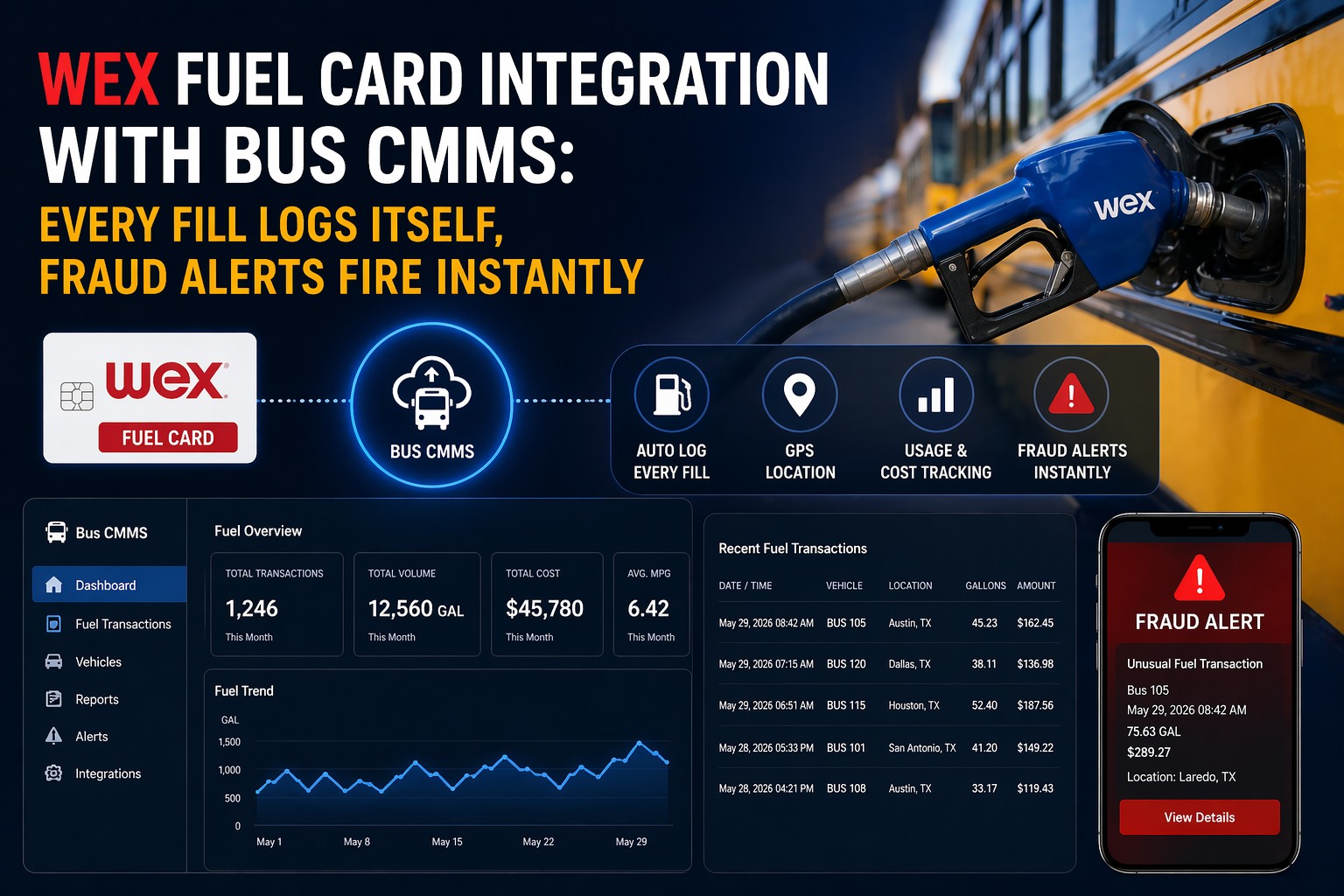
Right now, somewhere in your fleet, a WEX card just got swiped at a fuel pump. In the next thirty seconds, several things happen — or don't happen — depending on whether your WEX account is connected to Bus CMMS. Without integration: a transaction record sits in WEXOnline until someone downloads it, manually matches it to a vehicle, and enters it into a spreadsheet — or doesn't. With integration: Bus CMMS receives the complete Level III transaction data in real time, matches it to the vehicle, cross-checks the GPS location, flags any anomaly, and logs the fill against that vehicle's fuel history — automatically, while the driver is still at the pump. This is not a future capability. This is how the WEX + Bus CMMS integration works today. Here's exactly what happens, step by step.
$70
lost per vehicle per month to fuel fraud without GPS-matched transaction data
Source: NACS industry data
19–22%
of fleet fuel spend lost annually to fraud and misuse without transaction verification
Source: FleetRabbit / WEX industry data
600K
businesses trust WEX — 19 million vehicles served. 95%+ US fueling station acceptance
Source: WEX Inc. 2024
What Happens the Moment a WEX Card Is Swiped — With Bus CMMS Connected
The integration works through WEX's Level III data API — the same data layer that captures driver ID, fuel grade, cost per gallon, quantity, station location, and transaction timestamp. When your WEX account is linked to Bus CMMS, that data stream flows directly into your fleet management system in real time. Here is the complete transaction lifecycle.
Step 1
Driver Swipes WEX Card
Driver uses WEX card at any of 180,000+ US fuel locations. WEX captures Level III transaction data: driver ID, fuel grade, cost per gallon, gallons purchased, station location, timestamp.
Zero change to driver workflow
Step 2
WEX API Sends Data to Bus CMMS
The moment WEX processes the transaction, Bus CMMS receives it via real-time API sync. No manual CSV uploads, no scheduled batch pulls. The full Level III record arrives automatically.
Real-time — not next-day
Step 3
GPS Location Cross-Check
Bus CMMS cross-references the station's location against the bus's GPS position at the time of the transaction. Vehicle was at the pump? Transaction auto-clears. Vehicle was somewhere else? Anomaly flag raised instantly.
Cross-checked against live GPS
Step 4
Fraud Rule Checks Run Automatically
Six additional fraud checks fire in parallel: over-tank volume, off-hours purchase, velocity check (multiple fills in short window), fuel type mismatch, route deviation, and duplicate transaction detection.
6 fraud rules — every transaction
Step 5
Transaction Logged Against Vehicle Profile
The fill is automatically recorded in that bus's fuel history: liters/gallons, cost, station, odometer-matched consumption rate, and driver. No data entry. No reconciliation spreadsheet.
Permanent per-vehicle fuel record
Step 6
Manager Alert (If Anomaly) or Silent Log (If Clear)
Clean transaction: silently logged, zero manager effort required. Flagged transaction: manager receives immediate alert with full context — driver, vehicle, station, GPS position, amount, and which rule triggered. One-click review.
Alert fires while driver is still at pump
The entire sequence — from card swipe to logged record (or fraud alert) — completes in real time. The driver's workflow doesn't change. The manager's workload drops from hours of monthly reconciliation to reviewing flagged exceptions only. Start your free Bus CMMS trial and connect your WEX account today.
The 6 Fraud Checks That Fire on Every Single Transaction
WEX alone tells you what was purchased and where. Bus CMMS tells you whether that purchase makes sense given everything the system knows about that vehicle and driver. These six checks run automatically on every transaction — catching anomalies that manual review would never find in time.
01
GPS Location Mismatch
Station location vs. vehicle GPS position at transaction time. If the bus was 40 km away when the card was swiped — instant flag.
Catches: card theft, card sharing, unauthorized use by non-driver
02
Over-Tank Volume
Gallons purchased vs. the vehicle's tank capacity. If a bus with a 200L tank "buys" 310L in one transaction — flags immediately.
Catches: inflated fill reports, siphoning cover-ups
03
Off-Hours Purchase
Transaction time vs. vehicle's approved operating schedule. A fill at 2:47 AM on a bus that's supposed to be parked — flagged.
Catches: personal vehicle fills, overnight misuse
04
Velocity Check
Multiple transactions on the same card within a short window. Two fills within 2 hours at different stations — impossible for one bus — flagged.
Catches: cloned cards, card sharing between drivers
05
Fuel Type Mismatch
Diesel card used at a petrol-only pump. Bus fleet card used to purchase premium unleaded. System flags any purchase outside the approved fuel type.
Catches: personal vehicle fills, fuel type misuse
06
Consumption Anomaly
Fill amount vs. distance driven since last fill. A bus that drove 80 km since its last fill buying 180L — far above its consumption baseline — flagged.
WEX Alone vs. WEX + Bus CMMS: What You Actually See
WEX's own WEXOnline portal is a strong tool. The question is whether the transaction data it provides is sufficient for a bus fleet operator who needs to connect fuel spend to vehicle performance, maintenance history, route data, and driver behaviour simultaneously.
WEXOnline Portal Only
WEX + Bus CMMS
Transaction capture
Manual download or scheduled export
Real-time API sync — automatic
GPS verification
Not available — location only
Vehicle position vs. station at transaction time
Fraud alerts
WEX spend controls and basic alerts
6-rule anomaly engine fires on every transaction
Per-vehicle fuel history
Filtered from full account data manually
Automatically linked to vehicle profile
Consumption vs. distance analysis
Not possible without separate systems
Auto-calculated per fill per vehicle
Link to maintenance records
Separate process — not connected
Rising consumption triggers maintenance alert
Driver fuel behaviour ranking
Card-level only — not per km driven
Cost per km by driver, by route, by vehicle
Monthly reconciliation time
3–8 hours manual work
Near-zero — exceptions only
Already Using WEX? Connect It to Bus CMMS in Under 10 Minutes
No hardware. No IT team. Link your WEX account and Bus CMMS starts pulling real-time Level III transaction data, matching GPS, running fraud checks, and logging every fill automatically — from the first swipe after connection.
What Gets Automatically Logged — Every Field, Every Fill
When a WEX transaction arrives in Bus CMMS, it doesn't just create a line item. It populates a structured fuel record that becomes part of that vehicle's permanent operational history. Here is every data field that Bus CMMS receives from WEX Level III data and logs automatically.
Fuel Transaction Record — Auto-Populated from WEX Level III Data
Transaction Details
Transaction ID
WEX-generated unique reference
Date & Time
Exact timestamp from WEX
Station Name & Location
Merchant name + address
Fuel Grade / Type
Diesel, unleaded, DEF, etc.
Quantity (gallons/litres)
Exact fill amount
Cost per gallon/litre
Price at point of purchase
Total Transaction Amount
Pre-tax and post-tax amounts
Vehicle & Driver Match
Driver ID
Matched to driver profile in Bus CMMS
Vehicle / Unit Number
Matched to vehicle fleet register
GPS Position at Fill
Vehicle coordinates at transaction time
GPS-Station Match Result
Verified / Anomaly flagged
Calculated Fields (Bus CMMS)
km Since Last Fill
From odometer / GPS data
Litres per 100 km (this fill)
Vs. vehicle baseline
Fraud Risk Status
Clear / Review / Escalate
Expert Review: What Changes When Every Fill Logs Itself
The practical impact of WEX + Bus CMMS integration is not just fraud prevention. It changes the entire economics of fuel management for a bus fleet — removing administrative labour, surfacing performance intelligence that was previously invisible, and converting a reactive expense category into a managed cost line.
Monthly reconciliation: from 3–8 hours to near-zero
Manual WEX reconciliation means downloading transaction exports, matching them to your vehicle list, checking for anomalies manually, and entering data into your maintenance system. With integration, every fill logs itself against the right vehicle. Your accountant reviews exceptions — not every line.
~8 hrs
monthly admin recovered
Fraud caught at the pump — not in next month's budget review
The average fleet without GPS-matched transaction verification discovers fuel fraud during monthly reconciliation — weeks after the money is gone. With Bus CMMS, the alert fires while the driver is still at the pump. You can act in real time: call the driver, flag the card, or escalate to management. Time-to-detection collapses from weeks to seconds.
Seconds
vs. weeks to detect fraud
Rising consumption flags a maintenance issue before it becomes a breakdown
When Bus 17's fuel consumption increases 22% above its baseline over 3 consecutive fills, Bus CMMS flags the anomaly and creates a maintenance alert. Poor injectors, incorrect tyre pressure, a clogged air filter — all of these generate elevated fuel consumption before they produce a fault code or breakdown. The fuel data becomes an early warning system.
20%+ rise
triggers automatic maintenance flag
Driver fuel efficiency ranking — by cost per km, not just total spend
Two drivers on the same route, same vehicle type, same distance. Driver A averages 28L/100km. Driver B averages 34L/100km. Without per-vehicle, per-driver fuel data matched to distance driven, this difference is invisible. With integration, Bus CMMS produces a monthly driver fuel efficiency ranking that gives fleet managers a coaching conversation backed by data.
15%
avg fuel saving from driver coaching
Running WEX without GPS-matched transaction verification? You're likely losing $70+ per vehicle per month to fraud that never gets detected. For a 50-bus fleet, that's $3,500 per month — $42,000 per year — in losses that look like normal fuel spend because there's no system to compare against.
How to Connect WEX to Bus CMMS — 3 Steps, Under 10 Minutes
The integration requires no hardware installation, no IT team, and no changes to your drivers' fueling workflow. Here is what the setup process looks like.
1
Link Your WEX Account
In Bus CMMS Settings → Integrations, select WEX. Enter your WEX account credentials or API key. Bus CMMS establishes the API connection to WEX's Level III data feed. One-time setup — takes under 3 minutes.
2
Match WEX Cards to Your Vehicle Register
Bus CMMS auto-imports your WEX card list and prompts you to match each card to a vehicle in your fleet register. If cards are already assigned to vehicles in WEXOnline, this step is often automatic. Takes 2–5 minutes for most fleets.
3
Set Your Fraud Alert Rules
Review the default fraud detection thresholds — over-tank volume, off-hours window, velocity check parameters — and adjust any that don't fit your fleet's operating patterns. Set alert destinations: email, SMS, or in-app notification. Done. Every subsequent fill logs automatically.
Your WEX Data Is Already There. Bus CMMS Makes It Work.
Every fill your fleet makes is generating Level III data in WEX right now. Connect Bus CMMS and that data starts working for you — logging itself, verifying GPS, running fraud checks, and building the per-vehicle fuel history your fleet management decisions need.
Does connecting WEX to Bus CMMS require any hardware installation?
No hardware is required. The integration works through WEX's API, pulling Level III transaction data directly to Bus CMMS in real time. There is no hardware to install in buses, no devices to configure at fuel stations, and no changes to the driver's fueling process. Setup requires only your WEX account credentials or API key, and typically takes under 10 minutes to complete in Bus CMMS Settings.
What is WEX Level III data and why does it matter for bus fleet management?
WEX Level III data is the detailed transaction record captured at the point of purchase — going beyond basic card and amount information to include driver ID, fuel grade, cost per gallon, exact quantity, tax amounts, and station details. Standard payment processing captures Level I or II data. Level III data is what enables Bus CMMS to match each transaction to the correct vehicle and driver, verify GPS proximity, calculate consumption rates, and run fraud rule checks. Without Level III data, GPS verification and consumption anomaly detection are not possible.
How quickly does Bus CMMS receive WEX transaction data after a fuel purchase?
Transaction data is received in real time through the WEX API — within seconds of WEX processing the transaction. This is not a scheduled import or daily batch sync. The practical significance is that fraud alerts can fire while the driver is still at the pump, giving fleet managers the opportunity to act before the transaction results in a confirmed loss. Compare this to manual reconciliation approaches where fraud is typically detected during monthly reviews, weeks after the purchase.
Which WEX products and card types work with the Bus CMMS integration?
The Bus CMMS integration connects to WEX fleet card accounts through the WEX API, which covers WEX Fleet Cards, WEX FlexCards, and WEX over-the-road (OTR) fleet cards — applicable for small fleets through large multi-vehicle operations. The integration pulls the same Level III data available through WEXOnline, making it compatible with WEX's standard fleet card programs. If you have questions about whether your specific WEX account type is supported, the Bus CMMS team can confirm during the demo.
Can Bus CMMS connect to other fuel cards, or only WEX?
Bus CMMS is designed to integrate with major fleet fuel card providers. WEX is one of the most widely used fuel cards in commercial bus fleet operations, which is why the WEX integration is a primary focus. If your fleet uses a different fuel card provider, contact the Bus CMMS team during your demo to discuss integration options and data capture capabilities for your specific card provider.